Examples of AI Workflows in Project Management (With a Person in the Loop)
"AI workflow" is often used loosely. Here it means something precise: a trigger, an AI step that does the heavy lifting, a human step that decides, and a recorded result. These are six that work today, with what the AI does and where the person sits.
An AI workflow in project management chains a trigger, an AI step and a human decision into a repeatable result. Examples: a SOW becomes a reviewed plan, customer feedback becomes a task, a milestone conflict becomes an approved change request, and an overloaded week becomes a rebalanced assignment. CoMng.AI builds these in, with approval gates.
- The pattern: trigger, AI step, human step, result: AI drafts and detects; a person approves.
- Six examples: SOW to plan, feedback to task, risk to approved fix, status report, capacity rebalance, agent work order.
- Built in, not wired up: these run on the project's own data, with change requests and audit logs.
- Not a no-code builder: CoMng.AI is not a general workflow engine with conditional logic; it automates project delivery workflows.
The Pattern: Trigger, AI Step, Human Step, Result
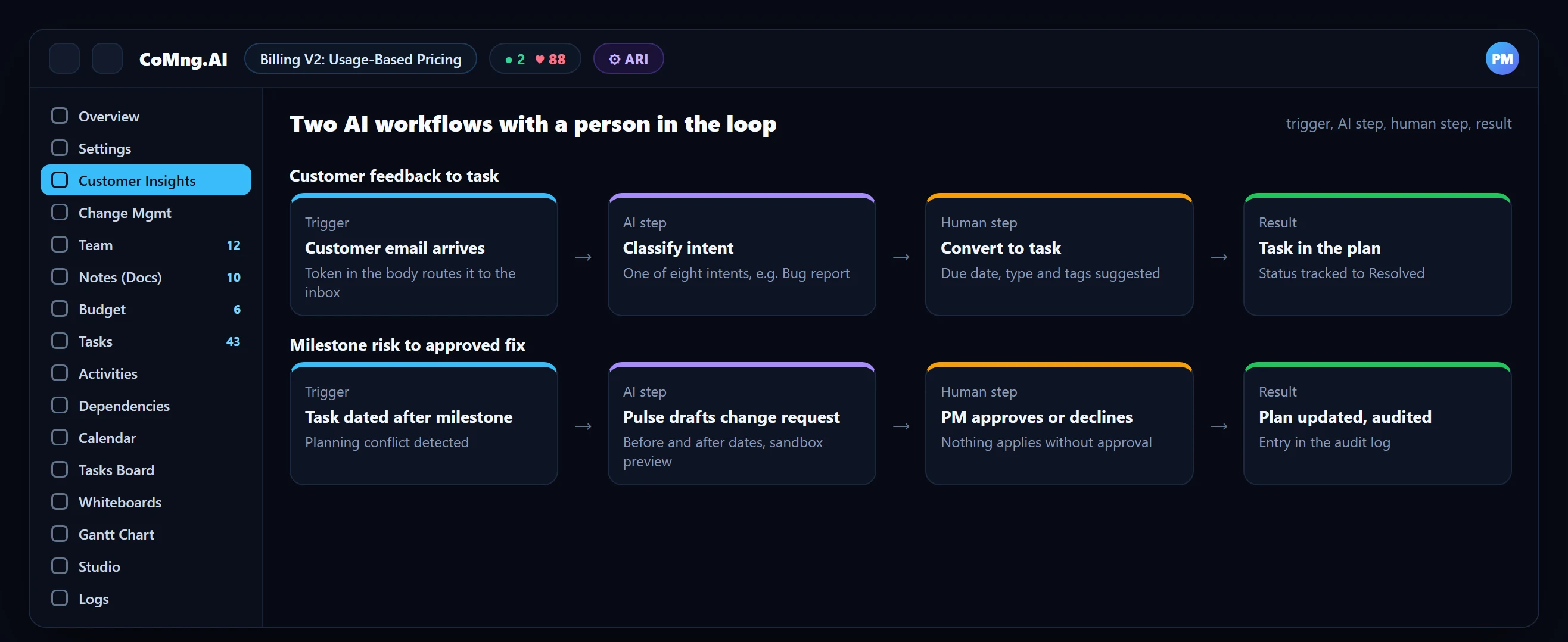
Every example below follows the same shape. The AI is good at reading text, comparing dates and drafting; the person is good at deciding. Putting the decision in the middle, and recording it, is what makes the workflow trustworthy.
Six AI Workflow Examples
1. Document to reviewed plan
Trigger: a signed SOW. AI: extracts goals, scope, milestones, risks and tasks. Human: reviews and edits. Result: a plan, audited for coverage. See Create a Project Plan From a Document.
2. Customer feedback to task
Trigger: a customer email with the token. AI: classifies the intent. Human: converts it to a task, note or change request. Result: a tracked item. See Email to Backlog.
3. Milestone risk to approved fix
Trigger: a task dated after its milestone. AI: Pulse drafts a change request with before and after dates. Human: approves or declines. Result: the plan changes with an audit trail. See Early Blocker Identification.
4. Status report in minutes
Trigger: the weekly cadence. AI: the Pulse briefing and a generated report from live data. Human: adds judgment. Result: a report shared to the reader's channel. See Automated Project Reports.
5. Overload to rebalanced week
Trigger: a dark-red week on the heatmap. AI: Smart Assign or a Pulse-drafted rebalancing request. Human: reviews the assignment summary. Result: a cooler heatmap. See Resource Capacity Planning.
6. Task to agent work order
Trigger: a well-specified task with acceptance criteria. AI: a generated work order and an agent working over MCP. Human: reviews the final summary. Result: finished work with activity logged. See Claude Code Project Management.
A Seventh Example: Brief to Reviewed Task Plan
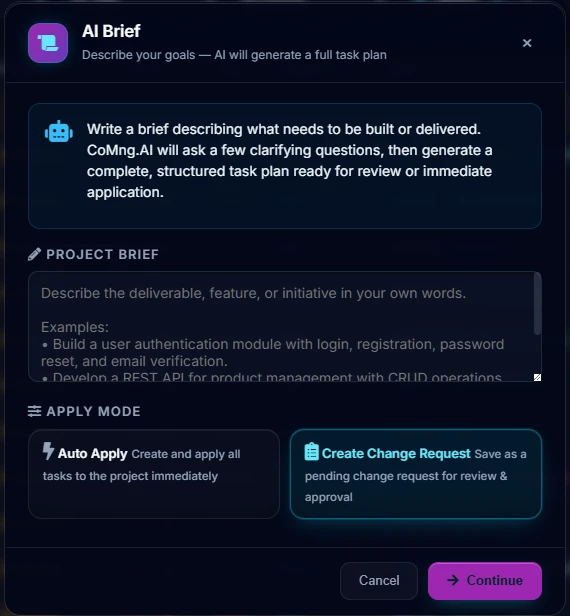
Trigger: a new deliverable, such as "build user authentication with login, registration and password reset". AI: AI Brief asks a few clarifying questions, then generates a structured task plan. Human: you choose Create Change Request, review the tasks and approve. Result: tasks in the plan, with the decision recorded. The AI Task Builder follows the same shape when it generates from project data such as goals, milestones or risks.
What This Is Not
These are project delivery workflows built on CoMng.AI's own data. It is not a general no-code workflow platform with arbitrary conditional logic across other business systems. If you need to orchestrate invoicing, HR and CRM, use a dedicated workflow tool; if you need the delivery of projects to run itself under supervision, these workflows are the point.
How to Design Your Own
- Pick a repeated manual step (copying, chasing, comparing).
- Decide what the AI may do alone (detect, draft) and what needs a person (apply, approve).
- Make the human step explicit and recorded (a change request, an approval).
- Measure the time saved against your baseline.
The levels of autonomy are covered in Project Automation and Plan Automation.
- AI that acts silently
- Steps copied between tools by hand
- No record of why something changed
- AI proposes, a person decides
- Steps run on one project's data
- Every decision recorded and auditable
About CoMng.AI
CoMng.AI is an AI-native project management platform that generates a project's plan, tasks, risks and budget from a description or document, monitors project health in real time, and gives both human teams and AI coding agents live access to the same project data, with a person approving every AI-generated change.
Try it on one real project, free
Create a free project, import or generate a plan, and see Pulse, milestone flags and capacity in the first hour.
Frequently Asked Questions
What are examples of AI workflows in project management?
Document to reviewed plan, customer feedback to task, milestone risk to approved change request, live data to status report, overloaded week to rebalanced assignments, and a task to an AI agent work order.
What is an AI workflow?
A repeatable sequence in which a trigger starts an AI step (detect, classify, draft) and a human step (review, approve) produces a recorded result.
Is CoMng.AI a workflow automation platform?
It automates project delivery workflows on its own data. It is not a general no-code workflow builder with conditional logic across other business systems.
Where does the human stay in control?
At approval: AI-drafted changes are change requests that need approval, bulk changes are flagged in code, and actions are recorded in audit logs.
How do I start?
Pick one repeated manual step, such as the weekly status report, and replace the copying with the generated version, adding your judgment.
Can AI generate a task plan from a short brief?
Yes. AI Brief takes a brief you write, asks a few clarifying questions and generates a structured task plan, which you can apply immediately or save as a change request for review.
Related reading
See the full guide: AI Project Management Strategy & Buying Guide