Resource Capacity Planning: Spot Burnout Early
A cross-project capacity heat map flags overload and burnout risk weeks ahead, and Smart Assign matches unassigned tasks to the best-fit person.
- Invisible Multi-Project Overload: Overload is invisible inside a single project board; a developer double-booked across three projects looks fine in each one.
- Organization-Wide Heat Map: Combines each person's load across every portfolio project in a week-by-week heatmap spanning 8, 12, 16, or 24 weeks.
- Burnout Risk Defined: Automatically flags anyone scheduled above 100% of standard capacity for two or more consecutive weeks with an organization-wide alert.
- Algorithmic Smart Assign: Evaluates role requirements, skills, and current allocations to match unassigned tasks to the best-fit specialist in one click.
The Blind Spot in Multi-Project Resource Management
Nobody told you she was at 150 percent. She is on three projects, and you manage one.
In matrixed organizations, lead engineers and designers are routinely overallocated. Each project manager assigns 'just 15 hours' of work, believing the team member has plenty of time. In reality, the specialist is working 55 hours a week. By the time leadership discovers the problem, critical milestones are missed or key employees resign. CoMng.AI replaces reactive guessing with **Predictive Resource Capacity Planning**.
How do you plan resource capacity across projects?
Combine every person's assigned work from all projects into one weekly view measured against a standard capacity, such as 40 hours. Highlight anyone above 100 percent, flag repeated overload as burnout risk, and rebalance by moving or rescheduling tasks before deadlines slip.
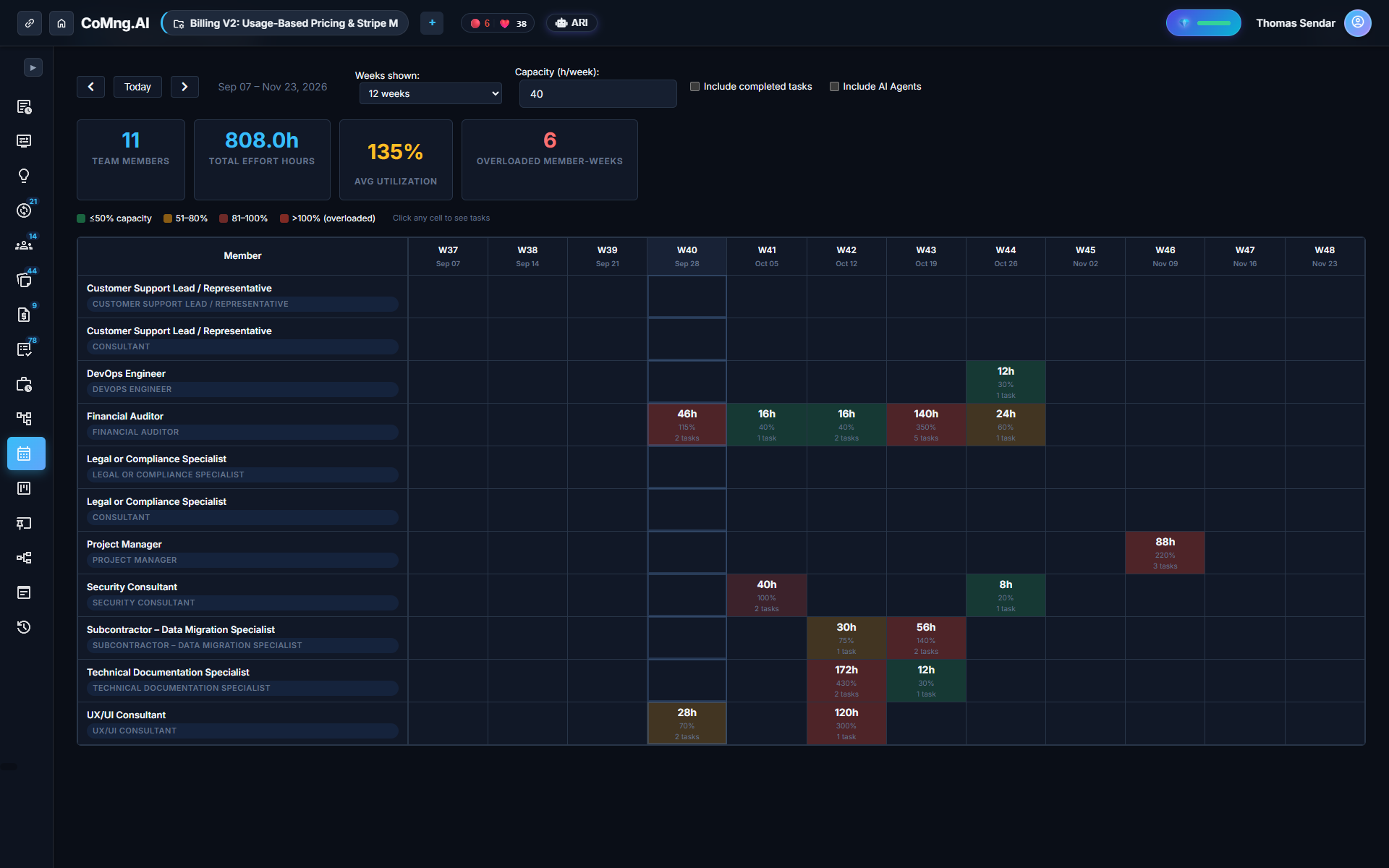
Reading the Capacity Heat Map
The heat map organizes your entire workforce: weeks across the top, team members down the left. Cells transition from neutral for manageable loads to bold red for allocations exceeding 100%.
Key metrics displayed on the dashboard include: - Total people staffed across the organization - Total committed effort hours versus available capacity - Average organization utilization percentage - Overloaded person-weeks and headcount at active burnout risk
Burnout Risk: Why Consecutive Weeks Matter
A single week spike above 100% is common during major releases and rarely causes attrition. However, **two or more consecutive weeks** of overallocation triggers an immediate Burnout Risk banner across the organization. This distinction allows PMO leaders to intervene before fatigue leads to team departures.
Fixing Overload: Three Strategic Moves
| Remediation Strategy | How It Works | Best Use Case |
|---|---|---|
| Reschedule with Optimize Timeline | Shifts non-critical tasks to weeks with open capacity | Tasks with generous float and flexible deadlines |
| Reassign with Smart Assign | Algorithmic match based on skills, role, and open hours | Unassigned backlog tasks or sudden staff shortages |
| Cross-Project Team Suggestions | Identifies available specialists across other departments | High-priority milestones requiring immediate reinforcement |
Clicking Through to the Exact Root Cause
Clicking any cell on the heat map opens the exact task list driving that week's load across all active projects. You can filter by open versus completed work, making it simple to reassign specific deliverables without disrupting other managers' schedules.
Ready to Experience True Project Intelligence?
Try CoMng.AI today with zero setup drag. Ingest contracts, manage hybrid teams, and simulate change impacts with 5-Dimension Telemetry.
Frequently Asked Questions
How far ahead can I see planned workload?
The planner provides forward-looking views across 8, 12, 16, or 24 weeks with convenient previous, next, and Today navigation.
What specifically triggers a burnout risk flag?
Anyone scheduled above 100% of weekly capacity for two or more consecutive weeks triggers a burnout risk indicator.
Can I configure the standard work week hours?
Yes. While the standard work week defaults to 40 hours, baseline capacity can be customized per employee (e.g. 20 hours for part-time contractors).
Does Smart Assign reassign tasks without permission?
No. Smart Assign presents recommendations for your review, which you can approve directly or route through a Sandboxed Change Request.