Manage AI Coding Agents and Humans in One Team Roster
Register Claude Code, Gemini CLI or Cursor as team members, assign them WBS branches and track their progress next to your human developers.
- The Side-Chat Problem: Most engineering teams run AI coding agents in disconnected chats with zero record of assigned work.
- Roster as Source of Truth: CoMng.AI registers agents as official team members of type 'AI Agent', giving them assigned tasks, workloads, and WBS branches.
- Structured AI Work Orders: Automatically generates work orders complete with WBS breakdown, dependencies, acceptance criteria, and connection instructions.
- Unified Telemetry: Kanban, Gantt, and Project Pulse display human and agent progress together, with mandatory human review before task completion.
The Disconnected Agent Problem in Engineering
Your best developer this week might not be a person. Does your project plan know that?
Engineering teams are heavily adopting autonomous coding tools like Anthropic's Claude Code, Gemini CLI, Cursor AI, and Devin. Yet these tools live in side chats and developer terminals, completely invisible to project schedules and PMO dashboards. CoMng.AI bridges this divide by putting AI agents on the official team roster.
How do you manage AI coding agents alongside people?
Treat each agent as a team member: put it on the roster, assign it defined tasks, give it a work order with context and acceptance criteria, let it report status through an API, and have a person review what it delivers. One board then shows human and agent work together.
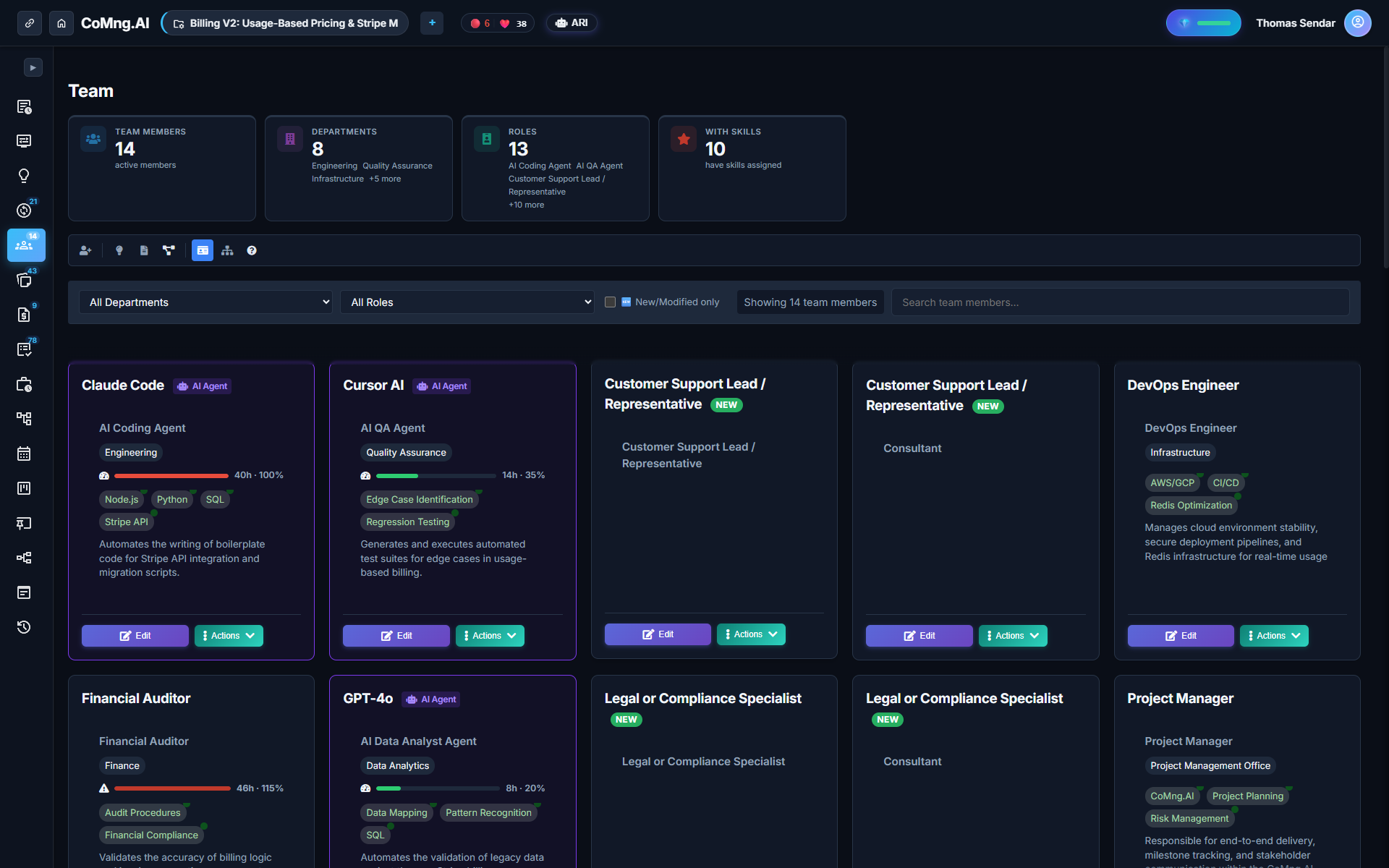
Putting an Agent on the Roster
Adding an agent takes seconds. Create a new team member with the type **AI Agent**. The system supports common models and CLI tools including Claude Code, Claude 3.5 Sonnet, Claude Opus, GPT-4o, Gemini CLI, GitHub Copilot, Cursor AI, and Devin.
Assign the agent specific skills (e.g., Python, TypeScript, Unit Testing) and responsibilities. The agent now appears across task assignment dropdowns and workload views.
Generating Structured AI Workplans
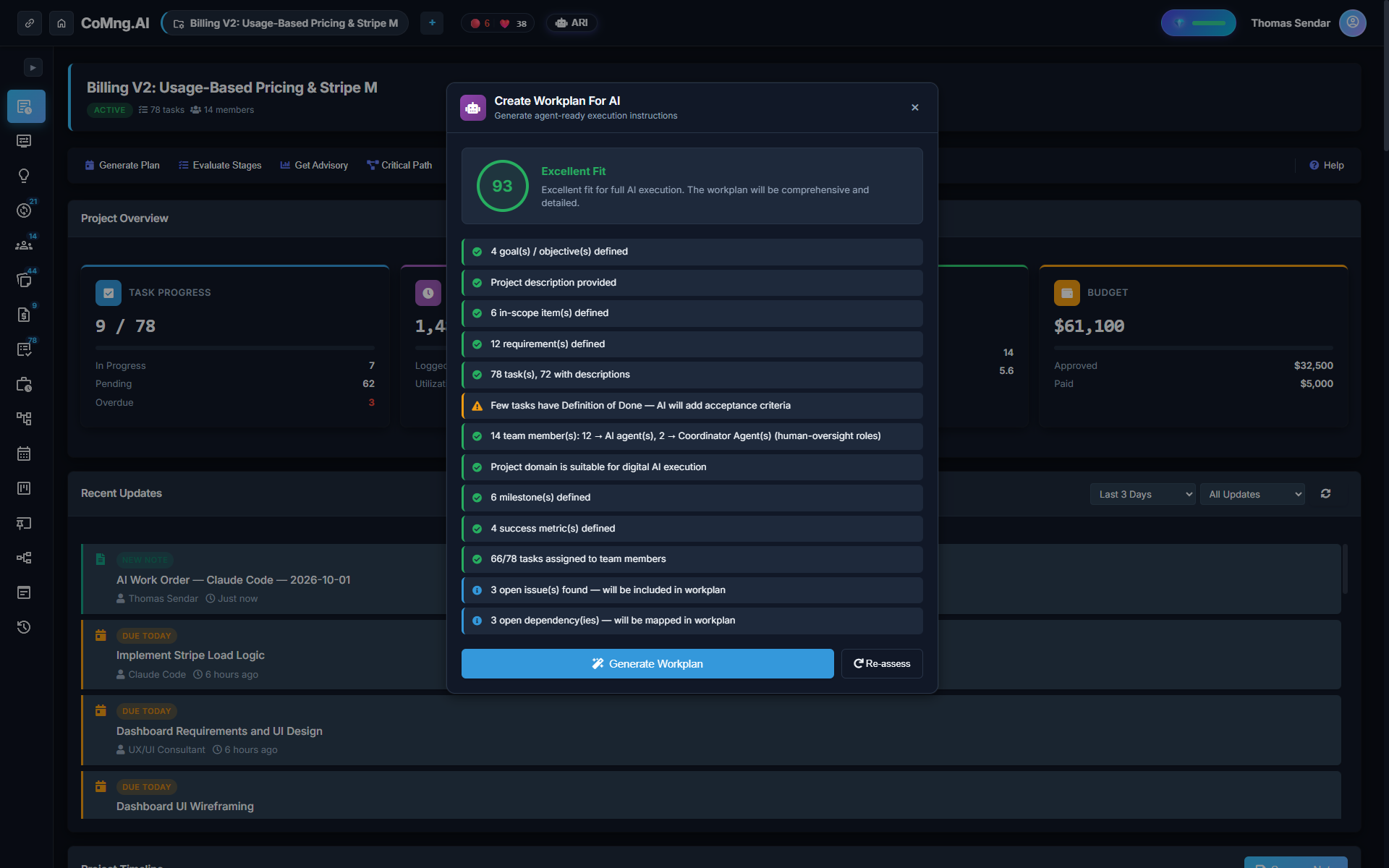
Instead of handing an agent a vague sentence, clicking **Create Workplan for AI** evaluates your task readiness, flags ambiguities, and generates a structured work order with exact file paths, constraints, and test commands.
Which Work Belongs to an Agent, Which to a Person?
| Work Characteristics | Best Assigned To | Governance & Review Requirement |
|---|---|---|
| Well-specified, testable boilerplate code | AI Coding Agent (Claude / Gemini) | Human code review & PR approval |
| Unit test authoring & regression suites | AI Coding Agent | Automated CI verification + Lead sign-off |
| System architecture & schema design | Human Senior Architect | Human design review with ARI consultation |
| Client negotiation & contractual trade-offs | Human Delivery Lead | Strictly human (agents cannot negotiate) |
| Bug triaging & initial patch proposals | AI Coding Agent | Human verification before merging |
Live Telemetry: Unified Gantt and Project Pulse
When agents update their tasks via API or MCP server, progress streams directly into your Gantt chart and 5-Dimension Pulse score. Every change is logged in the project audit history, ensuring complete visibility across the hybrid workforce.
Ready to Experience True Project Intelligence?
Try CoMng.AI today with zero setup drag. Ingest contracts, manage hybrid teams, and simulate change impacts with 5-Dimension Telemetry.
Frequently Asked Questions
Can I assign tasks directly to Claude Code or Gemini CLI?
Yes. Register the agent on the roster, assign it tasks or a full WBS branch, and generate an AI Workplan for it.
Does the agent need a separate tool to report progress?
No. It connects through CoMng.AI's native API or MCP server to stream progress back to your live project board.
What does an AI work order contain?
It contains the task hierarchy, dependency links, acceptance criteria, definition of done, and API connection credentials.
Do humans still review the agent's work?
Yes. A human sign-off step is mandatory before any agent-assigned task can be marked complete.