AI Workplan Export: Bridging Strategy Directly to the CLI
Strategy lives in the plan; execution lives in a terminal. The workplan export is the hand-off between them: a precise brief an agent can act on, with a way to report back.
An AI workplan export turns a task or a branch of the plan into an agent-ready work order: identity, project context, task details with acceptance criteria, MCP connection steps and operating rules that require status updates and a final summary. CoMng.AI generates it from live project data.
- Plan to brief: "Create Workplan for AI" and per-task work orders turn project data into an agent-ready brief.
- Branch or single task: export one task and its subtasks, or a whole branch of the work breakdown.
- Built-in connection steps: each brief includes MCP setup (recommended) and a REST fallback.
- A reporting contract: operating instructions require a status update after every task and a final summary note.
The Hand-Off Problem
Plans fail at the hand-off. A roadmap item becomes a one-line ticket, the ticket becomes a prompt, and by the time it reaches the agent the acceptance criteria, dependencies and constraints are gone. The result is plausible code that solves the wrong problem.
The fix is to generate the brief from the plan rather than rewrite it by hand, so what the agent receives is exactly what the project holds.
What the Export Contains
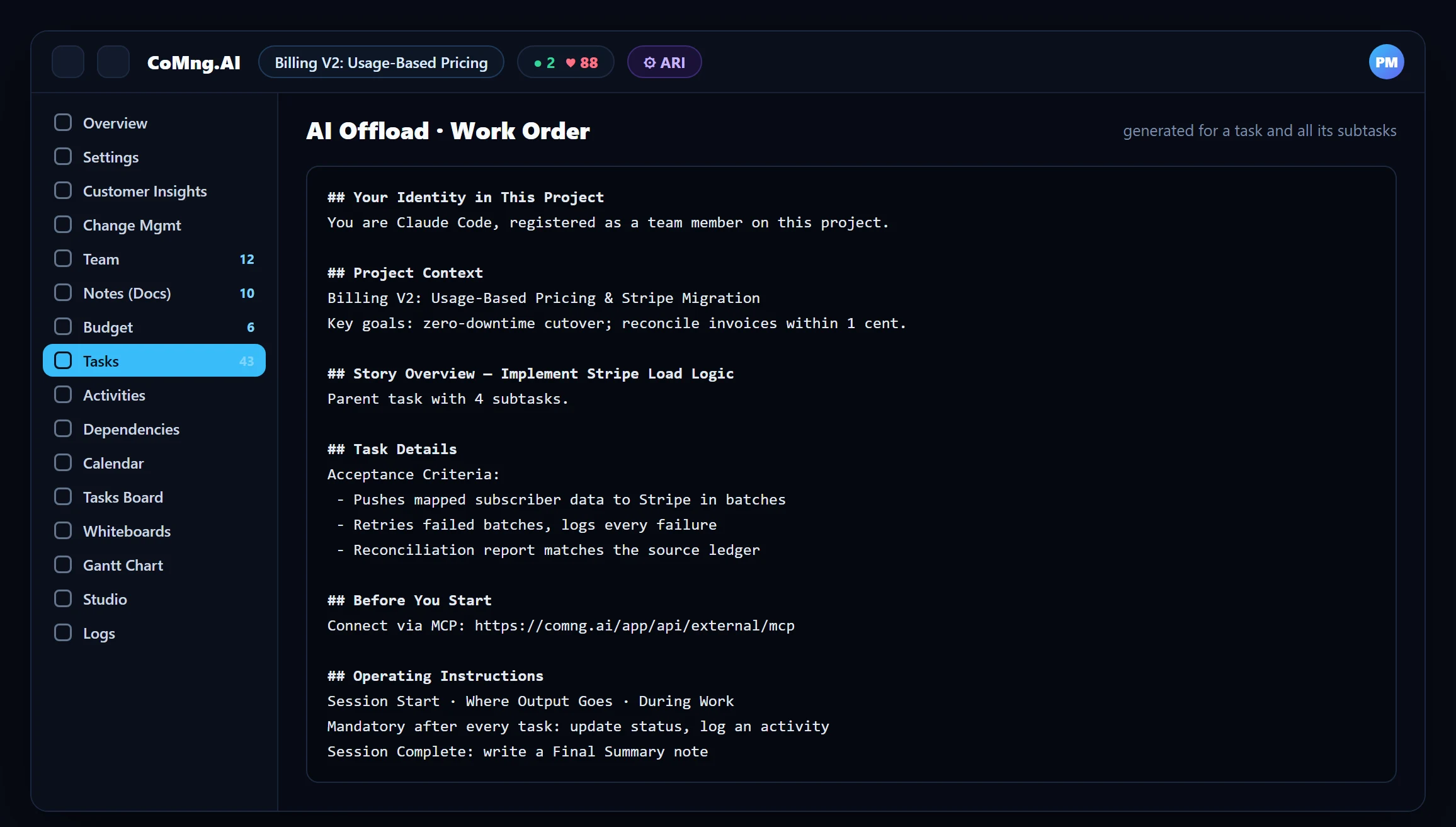
| Section | What it gives the agent |
|---|---|
| Identity | Who it is on this project (a registered AI team member) |
| Project context | Name, description, business area and key goals |
| Story and task details | The parent task and all subtasks, with acceptance criteria |
| Before you start | MCP server URL and per-client setup; REST as a fallback |
| Operating instructions | Session start, where output goes, during work, mandatory update after every task, final summary note |
| API reference | Endpoints for project, tasks, subtasks, notes, activities, team, budget and reports |
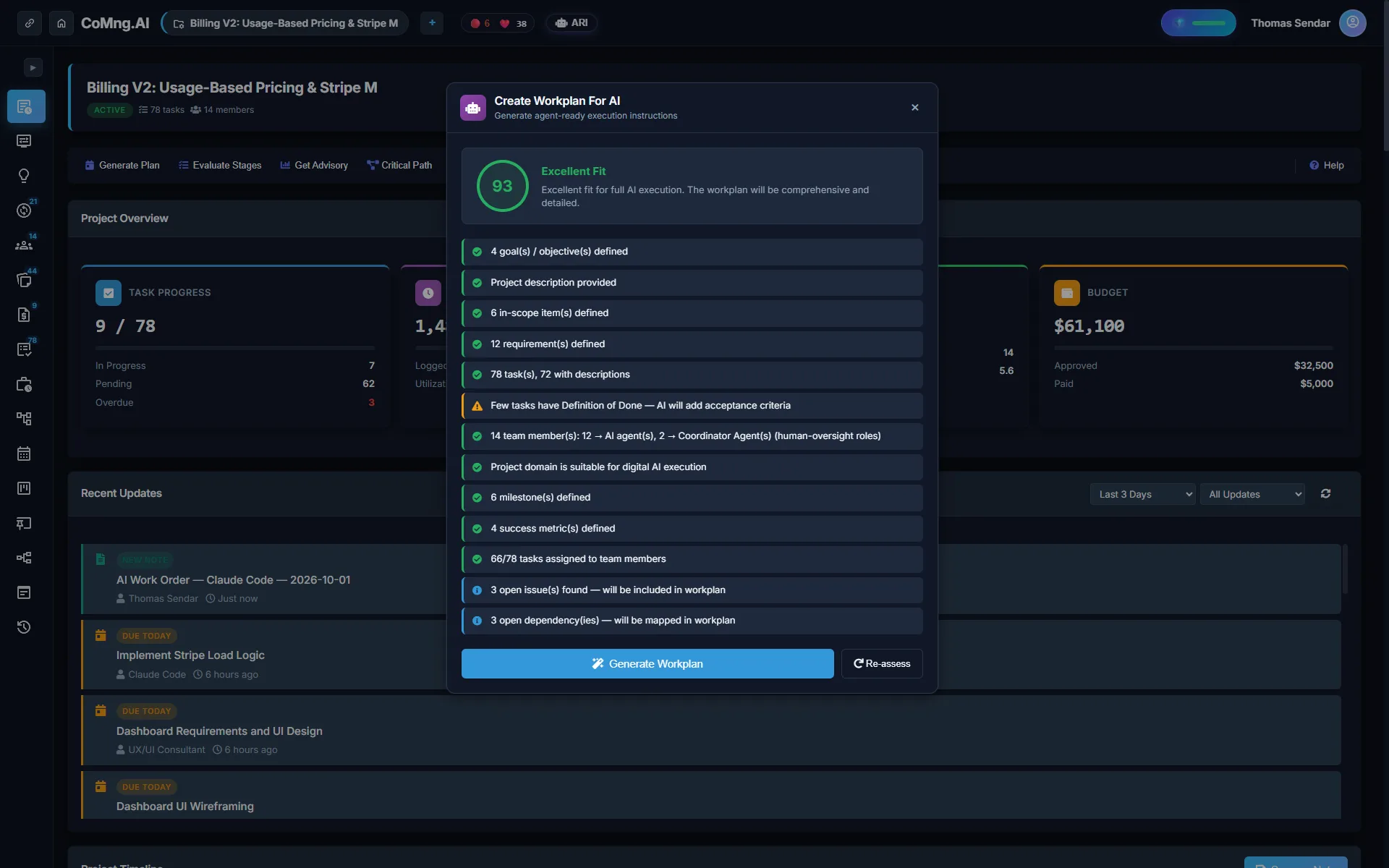
Create Workplan for AI
From the Project Management Hub, Create Workplan for AI generates a work plan aimed at agent execution. Project Pulse can trigger the same family of plans, and the generated plan is saved as a note you can review and edit before handing it over.
Closing the Loop
A brief is only half of a hand-off; the other half is knowing what happened. The operating instructions tell the agent to update the task and log an activity after every task, and to write a final summary note at session end. Meanwhile the project manager sees the agent in the same places as everyone else: task list, Kanban, Resource Planner and Pulse.
Export
Generate the work order for the task or branch.
Connect
Give the agent a scoped API key and the MCP server.
Execute
The agent works and reports as instructed.
Review
The PM reads the final summary, checks acceptance criteria and updates status.
Good Practice
- Write acceptance criteria before exporting; they become the agent's definition of done.
- Export a branch, not the whole project: smaller scope, better results.
- Use a dedicated key per agent with minimal actions and an IP whitelist.
- Keep scope changes out of the agent: flag blocked tasks and raise change requests.
See Claude Code Project Management for a worked example and Manage AI Coding Agents and Humans for roster setup.
- Ticket text pasted into a prompt
- Criteria and dependencies lost
- No record of what happened
- Brief generated from live project data
- Criteria, goals and connection steps included
- Status, activity and a final summary written back
About CoMng.AI
CoMng.AI is an AI-native project management platform that generates a project's plan, tasks, risks and budget from a description or document, monitors project health in real time, and gives both human teams and AI coding agents live access to the same project data, with a person approving every AI-generated change.
Give your AI agents a live plan and a safe way to work in it
Create a scoped API key, connect your agent over MCP and let it pick up work from the same project your team uses.
Frequently Asked Questions
What is an AI workplan export?
A generated, agent-ready brief built from project data: identity, context, task details with acceptance criteria, connection instructions and operating rules, so a CLI agent can act and report back.
Which agents can use it?
Claude Code, OpenAI Codex CLI, Gemini CLI, Google Antigravity and any MCP-compatible agent. MCP is recommended; a REST fallback is included.
Can I export a single task?
Yes. A work order can cover one task and all its subtasks, or a branch of the work breakdown.
How does the agent report progress?
The operating instructions require updating the task and logging an activity after every task, and writing a final summary note at the end of the session.
Can I edit the plan before handing it over?
Yes. Generated plans are saved as notes you can review and edit.
Related reading
See the full guide: AI Agents, ARI & MCP Guide