Early Blocker Identification: See Which Task Will Break Which Milestone
A blocker found on the due date is a crisis. A blocker found three weeks earlier is a calendar edit. Here is how CoMng.AI puts the warning on the exact task and the exact milestone, and what the project manager can do about it in a couple of clicks.
A Milestone Blocker is a task scheduled to finish after the milestone it supports, and a Blocked milestone has such tasks feeding it. CoMng.AI flags both on the rows, lists the tasks and days late on click, and Project Pulse raises the same conflict proactively with a drafted change request.
- Two badges, one story: a Milestone Blocker badge on the task and a Blocked badge on the milestone, both appearing the moment the plan cannot meet a milestone date.
- Cause is one click away: click either badge to see every task or milestone involved, with the exact number of days the task lands after the milestone.
- Project Pulse alerts proactively: without anyone opening the plan, Pulse raises a HIGH alert that a milestone cannot be met as scheduled and drafts a change request to move the date, for the PM to approve or decline.
- Dependencies stay in view: every task row shows how many tasks it is blocked by and how many it is blocking, next to its priority score.
- Fixing is assisted: for tasks marked blocked, AI produces 3 to 5 concrete unblock suggestions from the project context and the recorded reason.
Why Blockers Hide Until It Is Too Late
Most blockers are not dramatic. A data-mapping task is due on November 11. The integration task that depends on it is due November 14. The milestone that both feed is due November 12. Every row looks reasonable on its own. Only when you line the dates up does it become clear that the milestone cannot be reached.
In a long task list that comparison is rarely made until someone is already late. The fix is not more discipline from the project manager. It is to have the platform do the date comparison continuously and put the result where the PM is already looking: on the task row and on the milestone row.
The "Milestone Blocker" Badge: Detection at the Task Level
When a task is scheduled to finish after the due date of a milestone it supports, CoMng.AI marks the task with a red Milestone Blocker badge. The badge sits in the same row as the task's priority score and its dependency counters, so the warning arrives together with the context needed to judge it.

Read the row left to right and the story is already told. The task has a high priority score. Three tasks must finish before it can. Twelve tasks are waiting on it. And it will land after the milestone it feeds. That is a task worth looking at today.
Clicking the badge opens a short panel: the task name, its due date, and every milestone it threatens, each with a line such as "Milestone due Nov 12, this task finishes 2 days later." Click a milestone in that list and its details open directly.
The "Blocked" Badge: Detection at the Milestone Level
The same finding is shown from the other direction. On the milestone row, a red Blocked badge appears next to the milestone name when one or more tasks that feed it are due after the milestone's own date. A project manager scanning the milestone list sees which commitments are in danger without opening a single task.

This is the important detail in Figure 2. The milestone is In Progress, so a status-only report would call it healthy. The Blocked badge exposes what a status column cannot: the dates of the work feeding it do not add up. Clicking it lists the offending tasks and how many days after the milestone each one finishes.
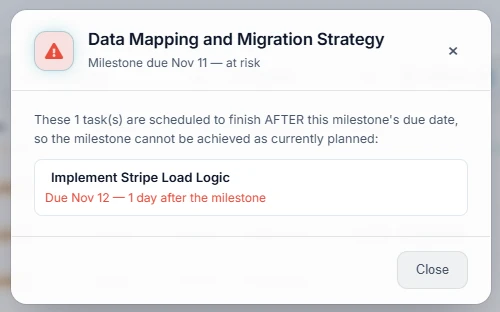
The dialog states the problem in plain language and names the culprit with its exact gap. No dependency-graph reading is needed: the PM knows the fix is either to pull that task in by a day or move the milestone. Click the task in the list and its dependency panel opens for the next step.
How CoMng.AI Decides Something Is a Blocker
Only open work counts
Completed, achieved and cancelled milestones and tasks are ignored, so the badges only appear on things that can still be changed.
Explicit links come first
When a milestone has confirmed task links, only the work under those tasks is checked. A shared parent epic does not drag unrelated sub-branches in, which keeps false alarms low.
A fallback when links are missing
If a milestone has no explicit links yet, the platform falls back to a due-date heuristic across the related branch of the work breakdown structure. Confirming the links turns that estimate into a precise answer, and the milestone view can scan for suggested dependencies for you.
Proactive Detection: Project Pulse Raises the Alert for You
The badges are what the PM sees when browsing the plan. But a project manager should not have to browse to find out. Project Pulse runs the same schedule-conflict analysis on its own and surfaces the result as a ranked alert, alongside a project health score and a daily briefing.
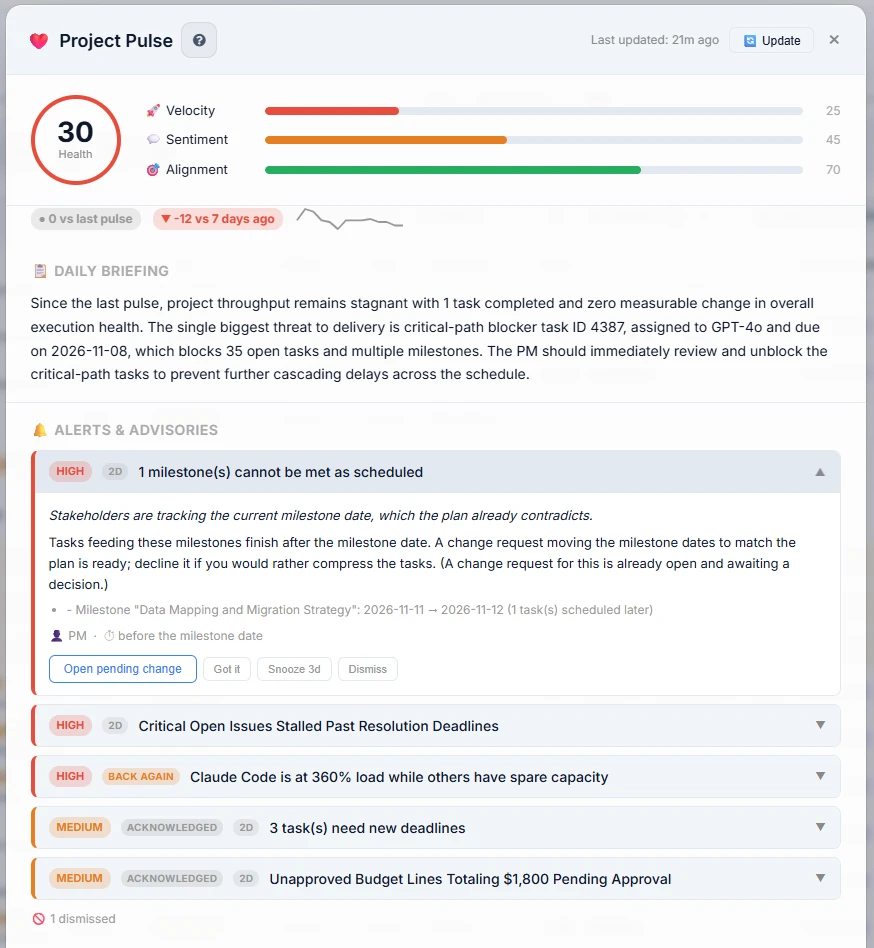
Three things in Figure 4 shorten the path from detection to decision:
- It says it unprompted. The HIGH alert reads "Tasks feeding these milestones finish after the milestone date" and names the milestone with the shift: Data Mapping and Migration Strategy, 2026-11-11 → 2026-11-12 (1 task(s) scheduled later). It is the same conflict as in Figures 2 and 3, found without anyone opening the milestone.
- The briefing names the biggest threat. The Daily Briefing calls out a critical-path blocker task that blocks 35 open tasks and multiple milestones, and tells the PM to unblock it first.
- A decision is already drafted. Pulse prepares a change request that moves the milestone date to match the plan. The PM can open it with Open pending change and approve it, or decline it and compress the tasks instead. Nothing changes until a person decides.
Each alert can also be acknowledged (Got it), snoozed for three days or dismissed, and alerts that persist show how many days they have been open. The list stays a short, ranked to-do list instead of a wall of warnings.
From Detection to Fix: What the PM Does Next
Finding a blocker is half the job. The other half is deciding what to do, and the platform keeps each decision a short step away from the badge.
| If the cause is... | The PM can... |
|---|---|
| A task is simply scheduled too late | Open it from the badge panel, move its due date or reassign it, and watch the badge clear. |
| An upstream task is holding it up | Use the "Blocked by" counter to open the dependency panel, then fix or expedite the predecessor. |
| The task is truly stuck | Mark it Blocked with a reason, then use the AI unblock button for 3 to 5 specific suggestions. |
| The milestone date itself is unrealistic | Open the milestone from the panel and renegotiate the date with the evidence of exactly how many days late each task is. |
Marking a task Blocked, with a reason
A task can be marked Blocked from its toolbar with a written reason. The task then shows a banner recording the reason, who blocked it and when, and the list can be filtered to Blocked only so the project manager can review every stuck task in one pass. The same action is available to ARI, the AI project assistant, which can block or unblock a task and record the reason as a reviewable change.
AI unblock suggestions
On a blocked task, an AI button asks for help resolving it. The request carries the project's name, description and goals, along with the task's title, type, description and recorded blocked reason. The response is a numbered list of three to five concrete suggestions covering who needs to act, what alternatives exist and what workarounds are available, written in the project's own language. Treat them as a well-informed starting point for the conversation with the team, not as a decision.
A Five-Minute Weekly Blocker Routine
- Scan the milestone list for red Blocked badges. Each one is a commitment at risk.
- Click a badge to see the tasks involved and how many days late each is.
- For each task, decide: re-date it, unblock its predecessor, reassign it, or move the milestone.
- Filter to Blocked only and clear anything with a stale reason, using the AI suggestions where the path is unclear.
- Check the high-priority tasks with large "Blocking" counters. They are the ones that hurt most if they slip.
For the capacity and critical-path side of early warning, see How AI Software Detects Project Blockers Before Deadlines and AI Project Delay Prediction for Milestones.
About CoMng.AI
CoMng.AI is an AI-native project management platform that generates a project's plan, tasks, risks and budget from a description or document, monitors project health in real time, and gives both human teams and AI coding agents live access to the same project data, with a person approving every AI-generated change.
See Which Task Is Putting Your Next Milestone at Risk
Import or generate a plan and let CoMng.AI show you the Milestone Blockers before your stakeholders do.
Frequently Asked Questions
What is a Milestone Blocker in CoMng.AI?
A Milestone Blocker is a badge shown on a task that is scheduled to finish after the due date of a milestone it supports. Because the task lands late, the milestone cannot be achieved as currently planned. Clicking the badge lists every milestone the task threatens and how many days later the task finishes.
How does Project Pulse detect milestones at risk?
Project Pulse runs the same schedule-conflict analysis automatically and raises a ranked alert such as "1 milestone(s) cannot be met as scheduled", naming the milestone and how far its date would have to move. It also prepares a change request that moves the milestone date to match the plan, which the project manager can open and approve or decline. Nothing changes until a person decides.
What does a Blocked milestone mean?
A Blocked badge on a milestone means one or more tasks that feed it are due after the milestone's own due date. Clicking the badge lists those tasks and how many days after the milestone each one finishes, so the project manager sees the cause without hunting through the plan.
How does CoMng.AI help fix a blocker?
From the badge, the project manager opens the offending task and its dependency panel to see what it is blocked by and what it is blocking. For tasks explicitly marked as blocked, an AI unblock button generates three to five specific suggestions based on the project, the task and the recorded blocked reason.
Is the blocker detection based on guesses?
Detection prefers explicit, confirmed task-to-milestone links. When a milestone has no explicit links yet, CoMng.AI falls back to a due-date heuristic across the related branch of the work breakdown structure. Linking tasks to milestones makes the warnings more precise.