How AI Software Detects Project Blockers Before Deadlines
Most blockers are not discovered; they are announced, usually the day before a deadline. Here are the four places blockers hide, and how CoMng.AI surfaces each one early.
AI project management software detects blockers before deadlines by watching the relationships behind the task list: dependency chains, tasks scheduled after the milestones they feed, overloaded people and in-progress work that has gone quiet. CoMng.AI shows these as counters and badges on each task and ranks them in Project Pulse, so the top blocker is named before the deadline.
- Four hiding places: dependency chains, milestone date conflicts, overloaded people, and in-progress work that has gone quiet.
- Counters on every task: each task shows how many tasks it is blocked by and how many it is blocking, next to its priority score.
- Pulse ranks the threats: the Daily Briefing names the task that blocks the most downstream work and what to do first.
- Rebalance in a click: Smart Assign moves work from overloaded people or AI agents to those with capacity.
The Blocker Surprise
Every project manager knows the 4 p.m. Thursday message: Task 42 is blocked by an unapproved API specification, and tomorrow's release just moved. The painful part is that the blocker existed two weeks earlier. The specification had not moved, but nothing in a plain task list said so.
A blocker is not a status; it is a relationship. It only becomes visible when the platform understands which task waits on which, who is available to do the work, and what has not moved lately.
Four Places Blockers Hide, and How CoMng.AI Finds Them
1. Dependency chains
CoMng.AI maintains task dependencies (and AI can scan and suggest them rather than you adding them by hand). Every task row shows how many tasks it is Blocked by and how many it is Blocking. A task with a dozen waiting successors is a blocker candidate even if nobody has complained.
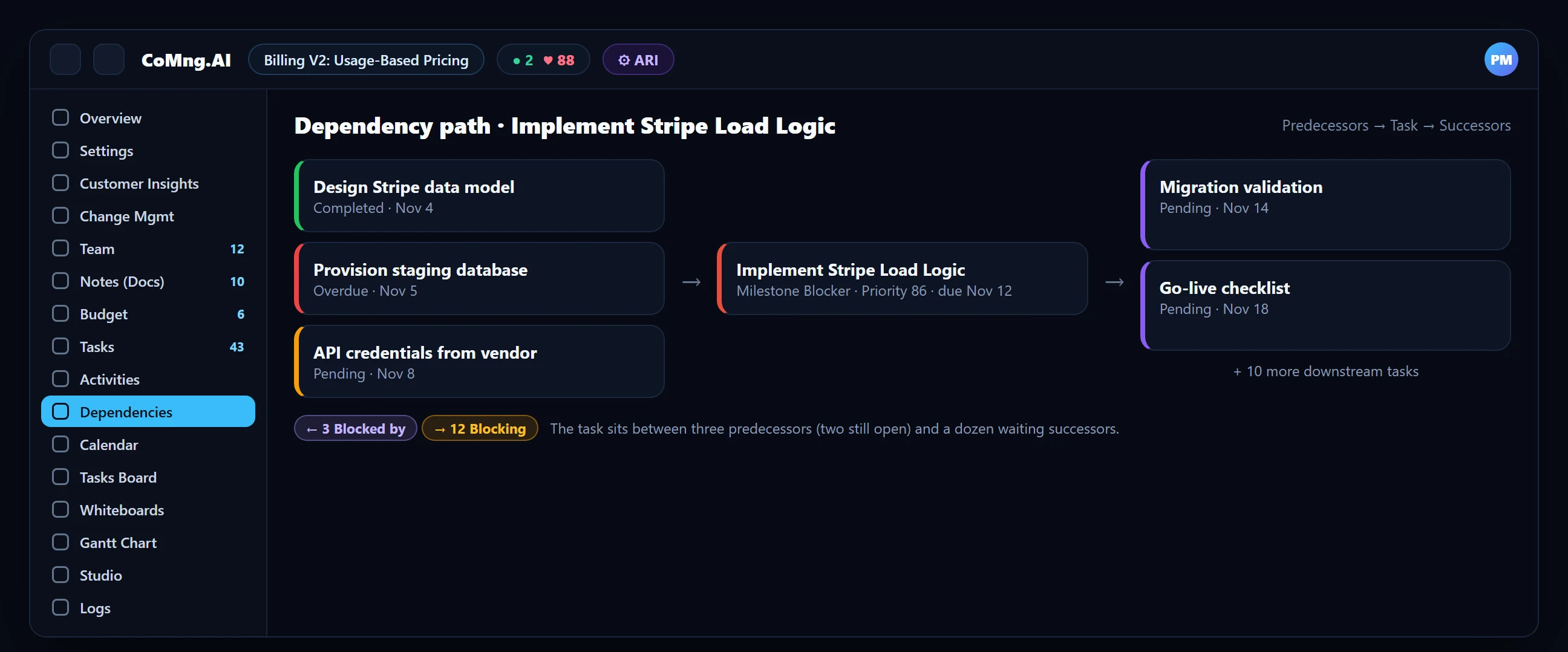
2. Milestone date conflicts
When a task required for a milestone is dated after that milestone, the task gets a Milestone Blocker badge and the milestone a Blocked badge. Pulse raises the same finding as a ranked alert. The detail view lists the offending tasks and how many days late each is.

3. Overloaded people (and AI agents)
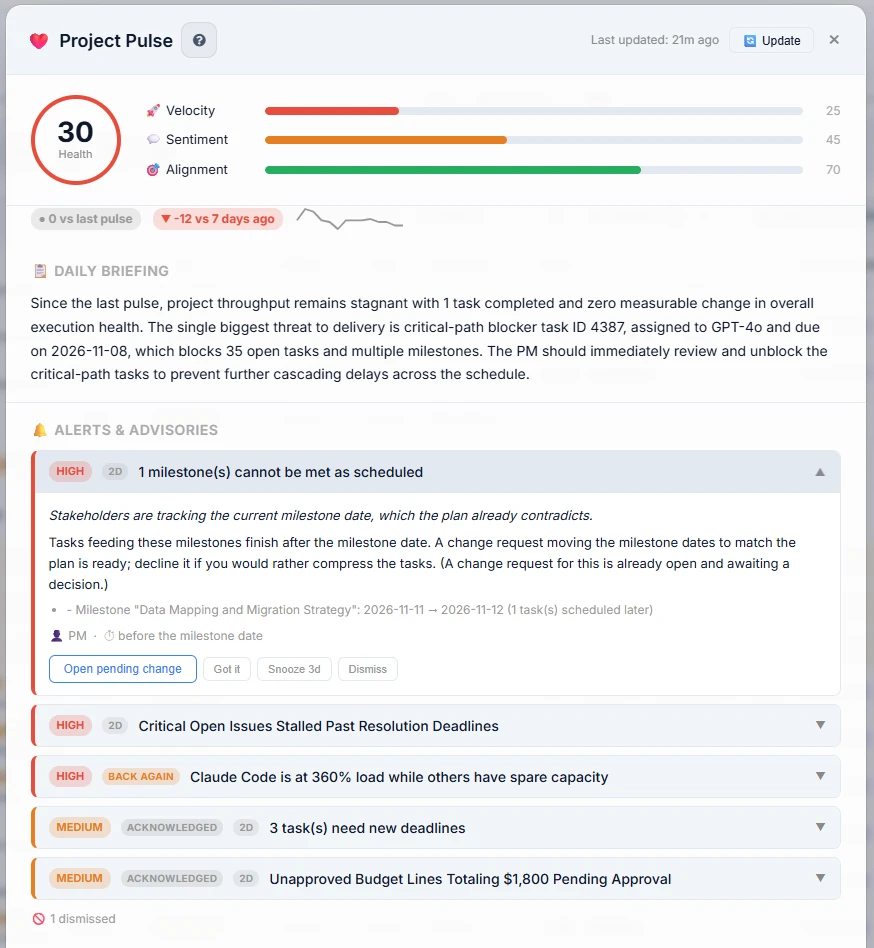
Many blockers are really capacity problems: the only person who can do the task is already at 140% of capacity. The Resource Planner shows weekly workload per team member and Pulse flags overload next to people with spare capacity. See Resource Capacity Planning.
4. Quiet work
In-progress tasks nobody has touched for five or more days, and deadlines that keep getting pushed, are both raised as advisories before the deadline itself is at risk.
How AI Software Predicts Project Blockers Before They Happen
Detection finds a blocker that exists; prediction finds the one that is forming. AI software predicts project blockers by treating early inconsistencies in the plan as forecasts: a task whose effort no longer fits its deadline (Should Start), a task scheduled after a milestone it feeds, a person whose next two weeks are over capacity, or a deadline that keeps being pushed. Each is a blocker that has not hurt yet. CoMng.AI surfaces them as Pulse advisories and as badges on the rows, and projects a finish date from recent completions. See AI Project Delay Prediction.
The Daily Briefing Names the Worst One
Project Pulse condenses everything into a single paragraph. In a real briefing it can read: "The single biggest threat to delivery is critical-path blocker task ID 4387, assigned to GPT-4o and due on 2026-11-08, which blocks 35 open tasks and multiple milestones." That one sentence tells the project manager which blocker to attack first, and why.
Fixing the Blocker Once You Find It
| If the blocker is... | Do this in CoMng.AI |
|---|---|
| A predecessor that is late | Open the dependency path, fix or expedite the predecessor, or re-date the successor |
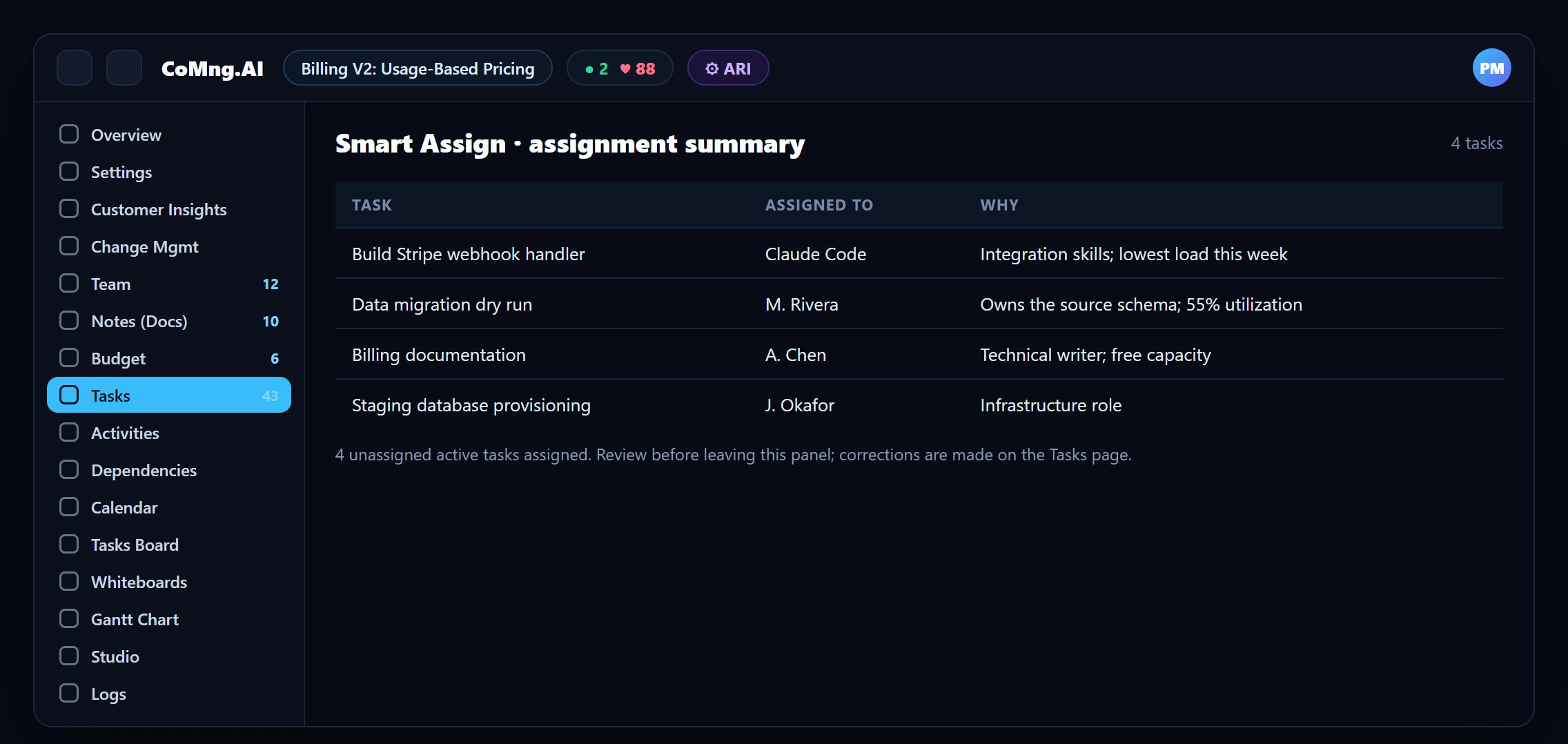
| A person at 100%+ load | Run Smart Assign: it assigns unassigned tasks to the best-fit person with capacity, and shows an assignment summary |
| A task that is truly stuck | Mark it Blocked with a reason; use the AI unblock button for 3 to 5 concrete suggestions |
| A milestone date that is unrealistic | Open the drafted change request from Pulse and move the date, with evidence |
| A decision waiting on a stakeholder | Capture it in a Change Request so the decision, owner and impact are tracked |
What to Look for in AI Blocker Detection Tools
| Capability to check | Why it matters |
|---|---|
| Understands dependencies and milestone links | Blockers are relationships, not statuses |
| Flags conflicts without anyone marking a ticket blocked | Most blockers are never formally reported |
| Sees workload per person (and per AI agent) | Capacity problems cause many blockers |
| Ranks threats and names the top one | A list of 40 alerts is noise |
| Proposes a fix with a preview and approval | Detection without a next step creates anxiety, not progress |
| Lets you dismiss or snooze without losing the signal | Alert fatigue is the failure mode |
Use this as a checklist when you evaluate AI project management tools.
What Changes for the Project Manager
- Blockers announced in stand-up or by email
- Dependencies tracked in the PM's head
- Overload noticed when someone burns out
- Every unblock conversation starts from zero
- Counters and badges on every task row
- Ranked alerts with a named top blocker
- Overload visible weeks ahead on the heatmap
- AI suggestions and drafted change requests to start from
About CoMng.AI
CoMng.AI is an AI-native project management platform that generates a project's plan, tasks, risks and budget from a description or document, monitors project health in real time, and gives both human teams and AI coding agents live access to the same project data, with a person approving every AI-generated change.
Find the slip while it is still a calendar edit
Import or generate a plan and let CoMng.AI show you which milestones are at risk before your stakeholders do.
Frequently Asked Questions
How does AI software detect project blockers?
It models the relationships and capacity behind the task list: which task waits on which, which milestone depends on which task, who is overloaded, and which work has gone quiet. CoMng.AI shows these as counters and badges on the rows and ranks them in Project Pulse.
What is the difference between a blocked task and a Milestone Blocker?
A Blocked task is one a person has marked as stuck, with a reason. A Milestone Blocker is a task that is scheduled to finish after a milestone it is required for, so it will make the milestone late even if nothing is "stuck".
Does CoMng.AI find dependencies automatically?
AI can scan the plan and suggest task dependencies and milestone dependencies. You review and confirm them, and confirmed links make the warnings more precise.
How does it avoid false alarms?
When a milestone has confirmed task links, only the work under those tasks is considered, so a shared parent epic does not drag unrelated work into the warning. Completed and cancelled work is ignored.
Can AI agents be blockers too?
Yes. AI agents are team members with a workload like anyone else, so an agent at 360% load shows up on the Resource Planner and in Pulse just like an overloaded person.
Can AI software predict project blockers before they happen?
Yes, within limits. It can flag the early signals that precede blockers: tasks whose effort no longer fits their deadline, tasks dated after the milestones they feed, overloaded people, stalled work and repeatedly pushed deadlines. CoMng.AI surfaces these as advisories and badges and forecasts a finish date from recent completions.
Related reading
See the full guide: Project Risk, Health & Capacity Guide