Best AI Project Management Tools in 2026: How to Choose
"AI-powered" now sits on nearly every product page. This guide skips the rankings and gives you the criteria that separate tools with AI features from tools built around live project intelligence, and how to test them in a week.
Choose an AI project management tool with a weighted scorecard rather than a ranking: does the AI work on live project data, act safely with approval, import your history, see risk and capacity, connect to your assistants, generate reports, and fit your budget? Test with one real project for a week.
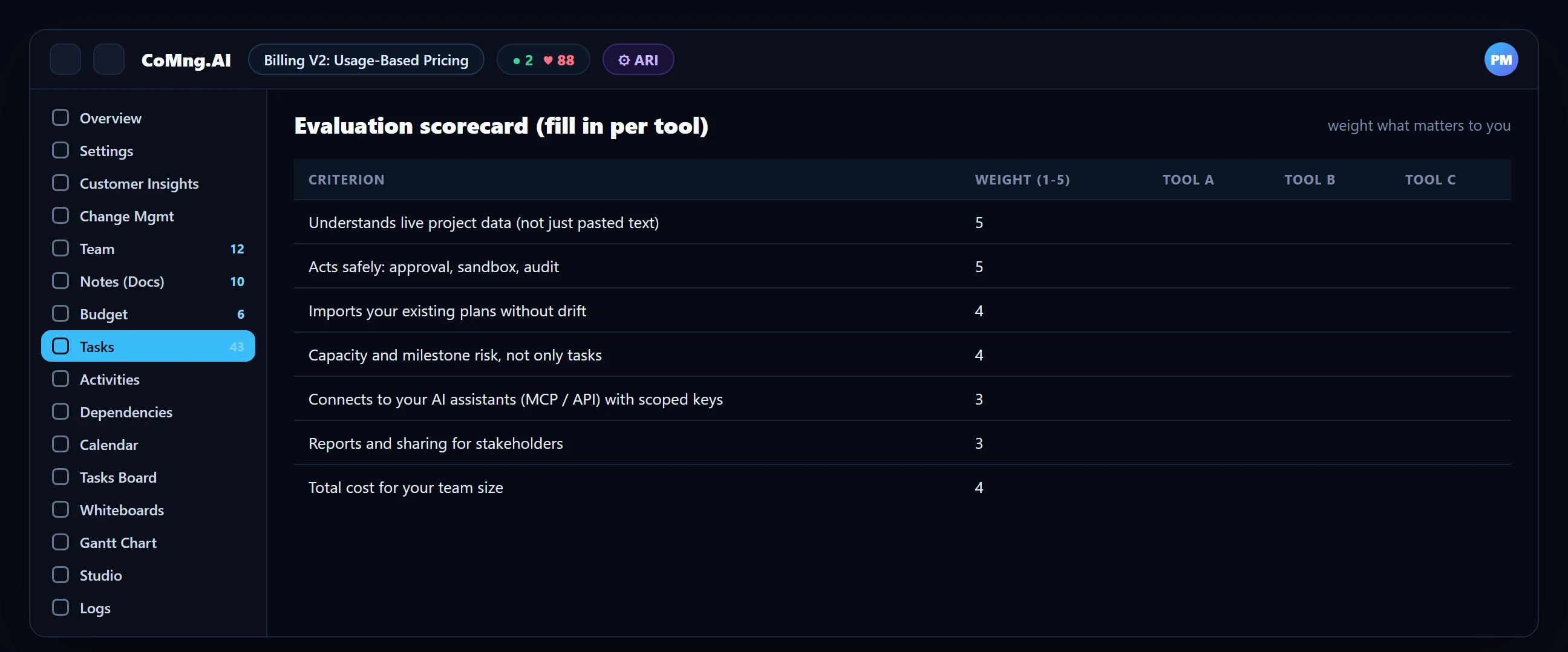
- Use criteria, not lists: the right tool depends on your team size, methods and risk; a scorecard beats a ranking.
- Seven criteria: live data, safe action, imports, risk and capacity, AI connectivity, reporting and total cost.
- Test with a real project: a one-week trial on a real plan reveals more than a demo.
- Be wary of: AI that only works on pasted text, no approval gates, and no way to import your existing plans.
Three Kinds of Tools Wearing the Same Label
| Kind | What it is | Fit |
|---|---|---|
| Task trackers with an AI button | A tracker where AI summarises or drafts text | Small teams who want light assistance |
| Suite or work-management platforms with AI add-ons | Broad platforms that added AI features | Organisations already standardised on the suite |
| AI-native project platforms | Built around live project data, health monitoring and governed AI action | Teams where delivery risk, capacity and change control matter |
The distinction matters more than any feature list: an AI button on a tracker and a platform designed around AI-readable project data solve different problems.
Seven Criteria That Matter
Works on live project data
Can the AI see your tasks, dates, dependencies, budget and decisions, or only what you paste into a chat?
Acts safely
Does AI propose changes behind approval, with a preview of the effect and an audit trail? Are bulk or destructive edits flagged?
Imports your history
Can you bring in MS Project, Jira, Asana or spreadsheet plans without rebuilding them, and can you verify the result?
Sees risk and capacity, not just tasks
Does it flag milestone conflicts, forecast the finish date and show workload per person per week?
Connects to your AI assistants
Is there an API and an MCP server with scoped keys so agents can work in the plan?
Reports and shares
Can it generate reports and share them to the channels your stakeholders use?
Total cost
What does your team size cost per month, and what does the free tier let you test?
Red Flags
- AI features that only operate on text you paste in.
- No approval step: the AI "just does it".
- No way to export your data or import an existing plan.
- Pricing that hides the cost of the AI features you were shown in the demo.
- Claims of fully autonomous project management; accountability cannot be delegated to software.
Comparing AI Project Controls Platforms for Major Projects
Major projects add requirements that lightweight tools skip. When you compare AI project controls platforms for large, high-value work, test these ten capabilities explicitly:
| Control | What to ask | In CoMng.AI |
|---|---|---|
| Schedule integrity | Are dependencies enforced and milestone links explicit? | Task and milestone dependencies; planning-conflict flags |
| Critical path | Can it show what drives the end date? | Critical Path Analysis in the Project Management Hub |
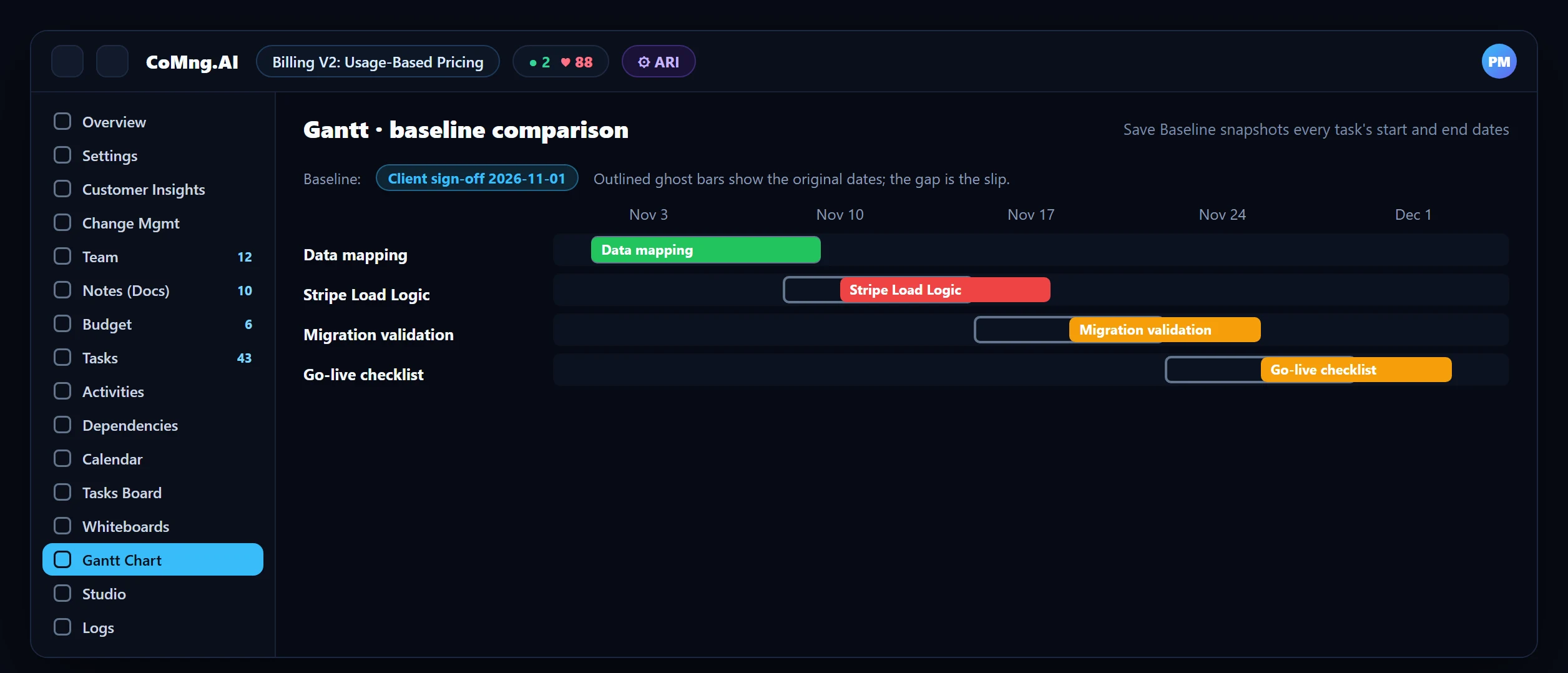
| Baselines | Can you snapshot and compare? | Save Baseline with ghost-bar comparison on the Gantt |
| Change control | Is every change assessed and approved? | Change requests with AI impact assessment, sandbox, approval |
| Cost control | Is cost linked to progress? | Budget lines linked to tasks; CV, CPI and EAC |
| Risk register | Is it scored and owned? | Probability x impact, owner, AI-drafted response, Materialize |
| Resource control | Capacity across the portfolio? | Project and organisation-wide Resource Planner |
| Assurance | Audit trail and access control? | Audit Logs, roles, scoped API keys |
| Portfolio view | Roll-up for leadership? | Organisation Gantt, org-wide health score |
| AI governance | Can AI act without approval? | Proposals only; bulk changes flagged in code |
A One-Week Test That Tells You Something
- Import or create one real project, not a demo.
- Ask the tool to tell you what is at risk. Is the answer specific to your plan?
- Ask it to change something. Is there a preview, an approval and a record?
- Check the workload view with real assignments.
- Generate the report you actually send and compare the effort.
- Try to connect an assistant or agent and see what it can and cannot do.
Where CoMng.AI Fits
CoMng.AI is an AI-native platform. In terms of the criteria: it works on live project data and ARI has the project's context; AI changes go through change requests with sandbox preview and approval; plans import from MS Project XML, Jira, Asana, Trello, Monday and spreadsheets; Pulse, milestone flags and the Resource Planner cover risk and capacity; an MCP server and scoped API keys connect assistants and agents; and Studio generates reports and shares them to the usual channels. It is desktop-first for deep planning work, with a mobile app for quick updates (see Desktop-First).
It may not be the right fit if you only need a lightweight personal task list, or if your organisation is committed to a single suite. For cost details see AI Project Management Software Cost and ROI.
- Choose from a ranking list
- Judge by demo
- Discover gaps after rollout
- Choose from a weighted scorecard
- Judge by a trial on a real project
- Gaps found in week one
About CoMng.AI
CoMng.AI is an AI-native project management platform that generates a project's plan, tasks, risks and budget from a description or document, monitors project health in real time, and gives both human teams and AI coding agents live access to the same project data, with a person approving every AI-generated change.
Run your next project with live health, not weekly guesses
Create a free project, import or generate a plan, and see Pulse, milestone flags and capacity in the first hour.
Frequently Asked Questions
What is the best AI project management tool?
It depends on your size, methods and risk profile. Use a weighted scorecard covering live data, safe action, imports, risk and capacity, AI connectivity, reporting and total cost, and test with a real project.
What should I look for in AI project management software?
AI that works on live project data, proposes changes behind approval and audit, imports your existing plans, watches risk and capacity, connects to your AI assistants and generates reports.
Are there free AI project management tools?
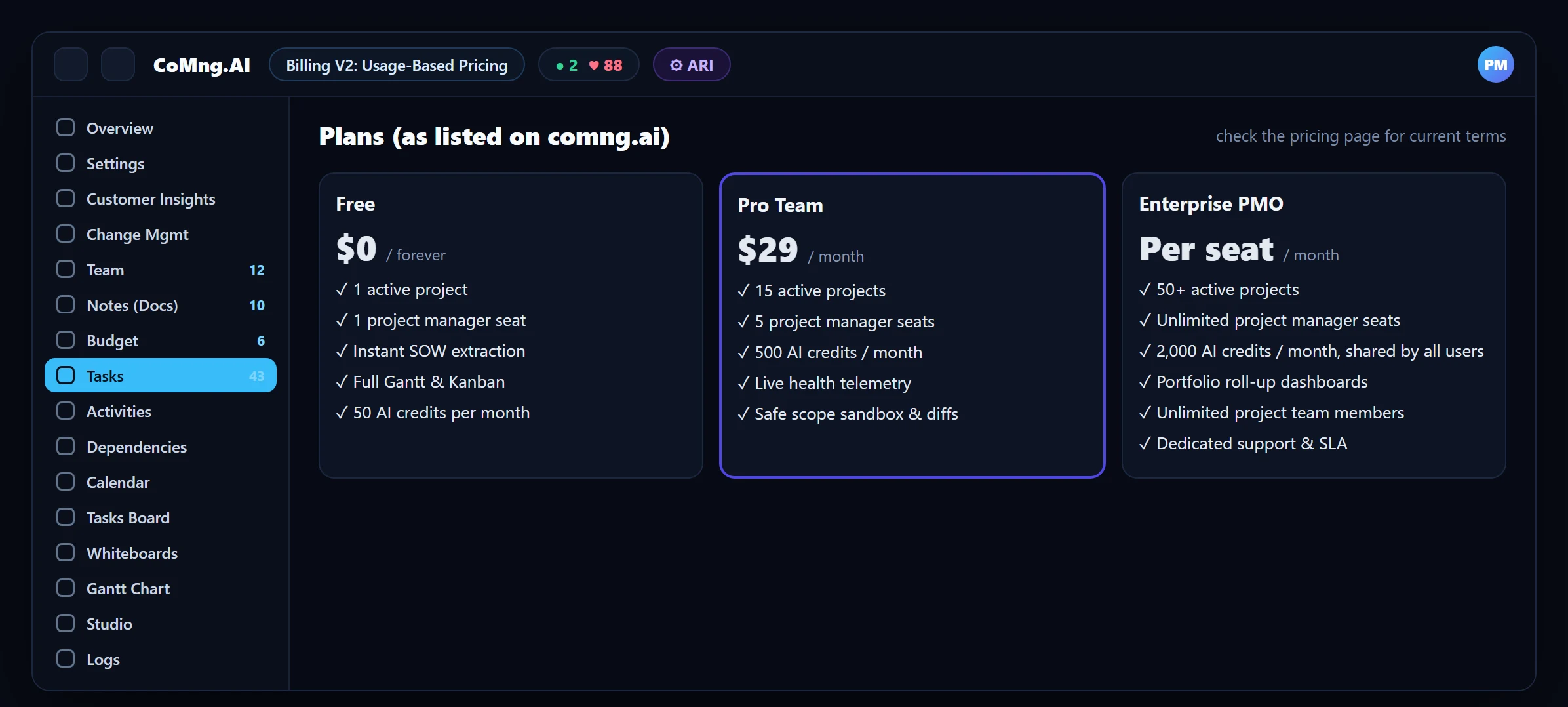
Many offer free tiers. CoMng.AI has a free plan with one active project and 50 AI credits per month, which is enough to test on a real project.
How do I avoid "AI-washing"?
Ask what the AI can see (your project or only pasted text), whether it can act with approval, and how its changes are previewed and audited.
How long should an evaluation take?
One week on a real project is usually enough to see whether the signals are specific to your plan and whether the workflow fits your team.
How do I compare AI project controls platforms for major projects?
Test schedule integrity, critical path, baselines, change control, cost control, risk register, resource control, audit and access, portfolio roll-up and AI governance explicitly, using a real project plan rather than a demo.
Related reading
See the full guide: AI Project Management Strategy & Buying Guide