AI Project Timeline Optimization: Reschedule Safely With Optimize Timeline
Rescheduling a plan by hand means juggling effort, dependencies and who is free when. AI-driven project scheduling does that arithmetic across the whole task graph at once, and the safe way to use it is to review the result before it touches the live plan.
AI project timeline optimization analyses every task's effort, dependencies, assignee workload and due date, then proposes a revised schedule that de-risks milestones and levels workload. In CoMng.AI, Optimize Timeline can apply changes directly or, safer, save them as a change request for a person to approve.
- What it analyses: effort, dependencies, assignee workloads, due dates and milestone dependencies for the whole project.
- Two safe modes: Auto Apply (shows a results panel afterward) or Create Change Request (nothing changes until approved).
- Milestone-aware: confirmed milestone dependencies are treated as ground truth for which tasks gate a milestone.
- Measure the effect: save a baseline before and compare on the Gantt to see exactly what moved.
Why Timelines Need Optimizing, Not Just Editing
A schedule drifts for ordinary reasons: a batch of tasks is added, a scope change lands, someone gets overloaded. Each fix by hand (move this date, push that task) solves one problem and creates another, because dates, dependencies and people are all coupled.
AI project timeline optimization treats it as one problem: given each task's effort, its predecessors, who is assigned and how loaded they already are, and the dates that matter, propose a coherent revised schedule.
How Optimize Timeline Works in CoMng.AI
Run it from the Tasks toolbar
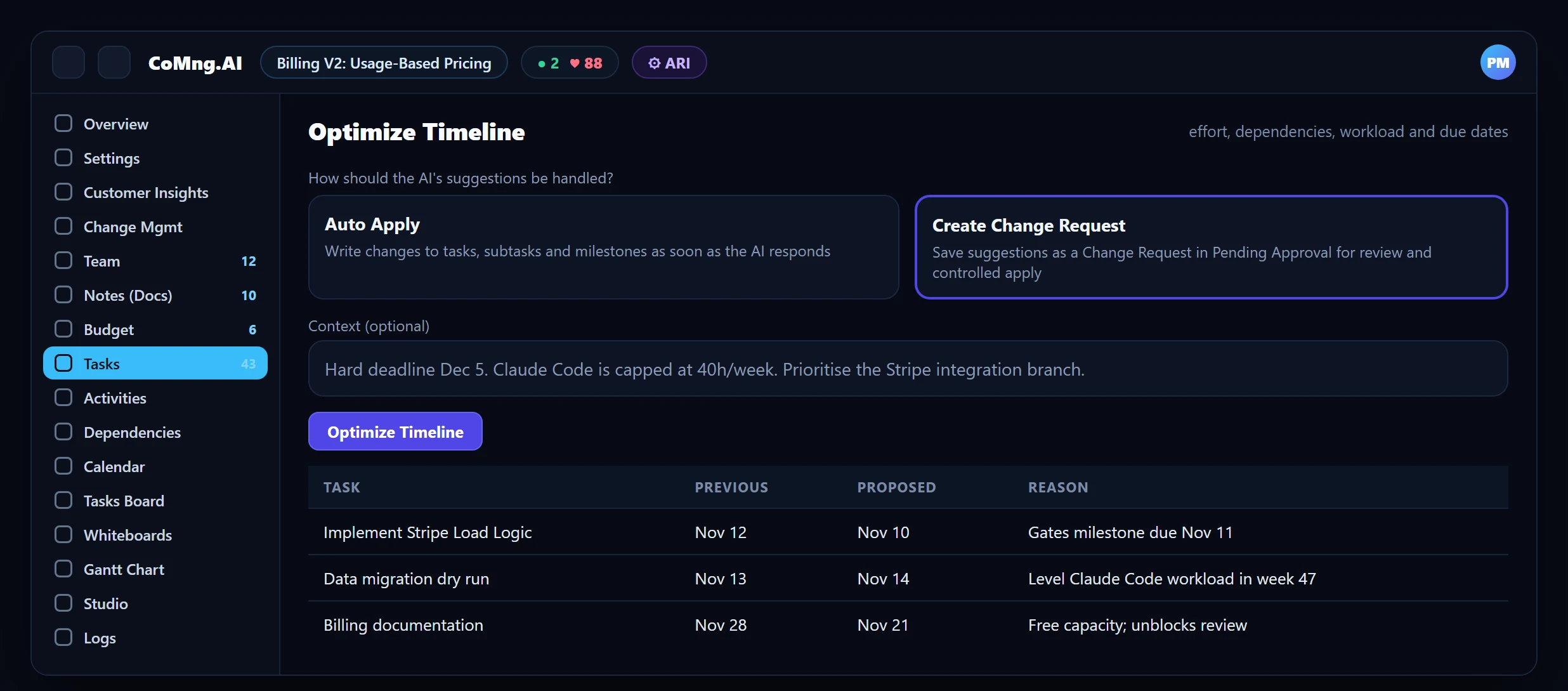
Optimize Timeline analyses all tasks (or a branch, or a single task) using their effort, dependencies, assignee workloads and due dates.
Choose how suggestions are handled
Auto Apply writes changes to tasks, subtasks and milestones as soon as the AI responds. Create Change Request makes no change and saves the suggestions as a request in Pending Approval.
Add context
State hard deadlines, resource constraints or tags to target, so the proposal respects real limits.
Review the result
A results panel lists every rescheduled item with its previous date, new date and reason. In change-request mode you are taken to the request to authorise and apply each change.
Auto Apply has no automatic undo; you can see exactly what changed, but you cannot revert in one click. Create Change Request keeps the live plan untouched until a person approves, and records the decision. See Change Request Impact Assessment.
The Same Two Modes as Other AI Generators
The choice between Auto Apply and Create Change Request is not unique to Optimize Timeline: the AI Task Builder and AI Brief offer the same two modes when they generate tasks. Learn it once and it applies across the Tasks page. See Task Capture.
Garbage In, Garbage Out: The Inputs That Matter
- Effort on every task. Even a rough estimate (2 h versus 40 h) improves the proposal considerably; leaving effort blank on all tasks starves the optimiser.
- Dependencies. Let AI scan and suggest task dependencies, then confirm them; they define what can move.
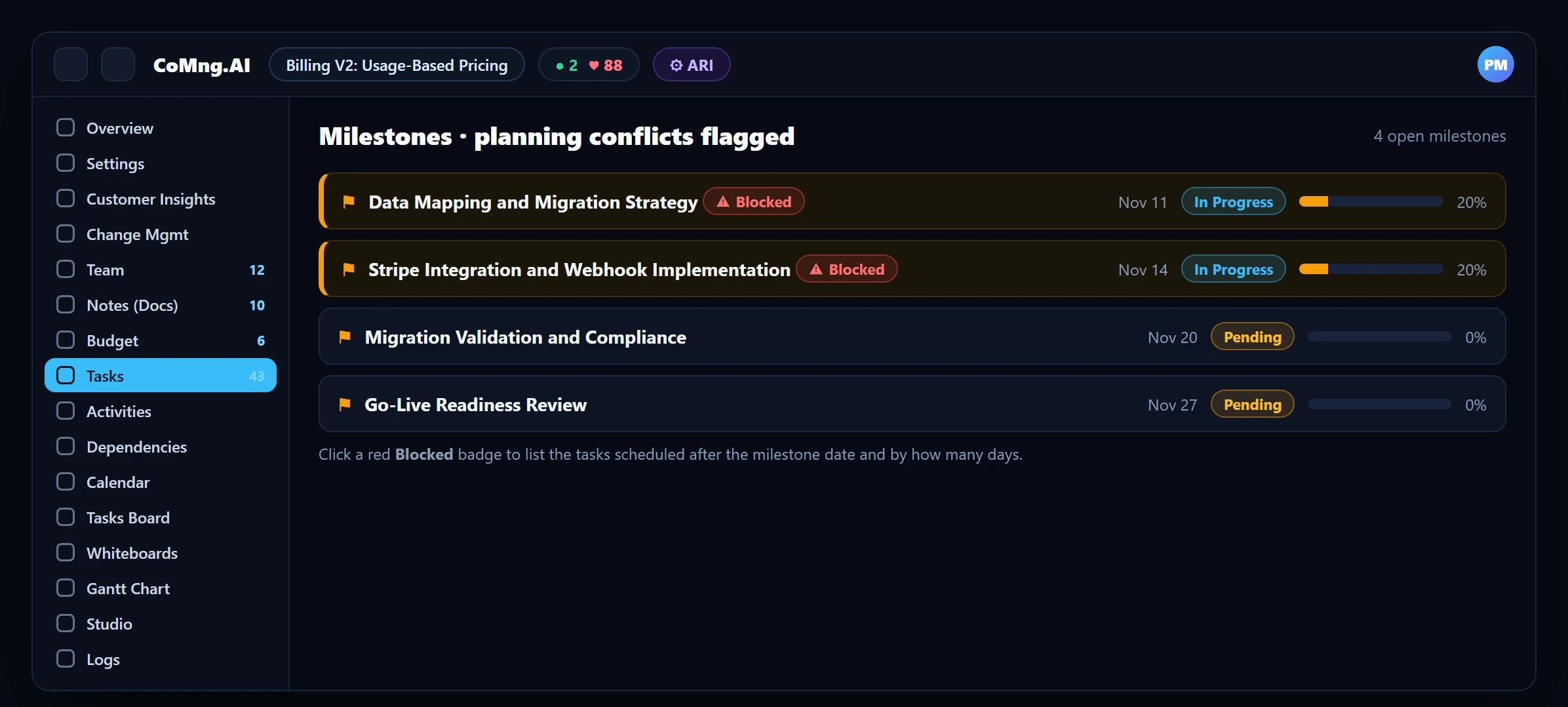
- Milestone dependencies. Confirmed links tell the optimiser which tasks gate each milestone, so it does not guess from due-date proximity. After applying, it reports any milestone still left in conflict.
- Assignees and capacity. Workload per person per week is part of the calculation, so assignments matter.
Prove It Worked: Baselines
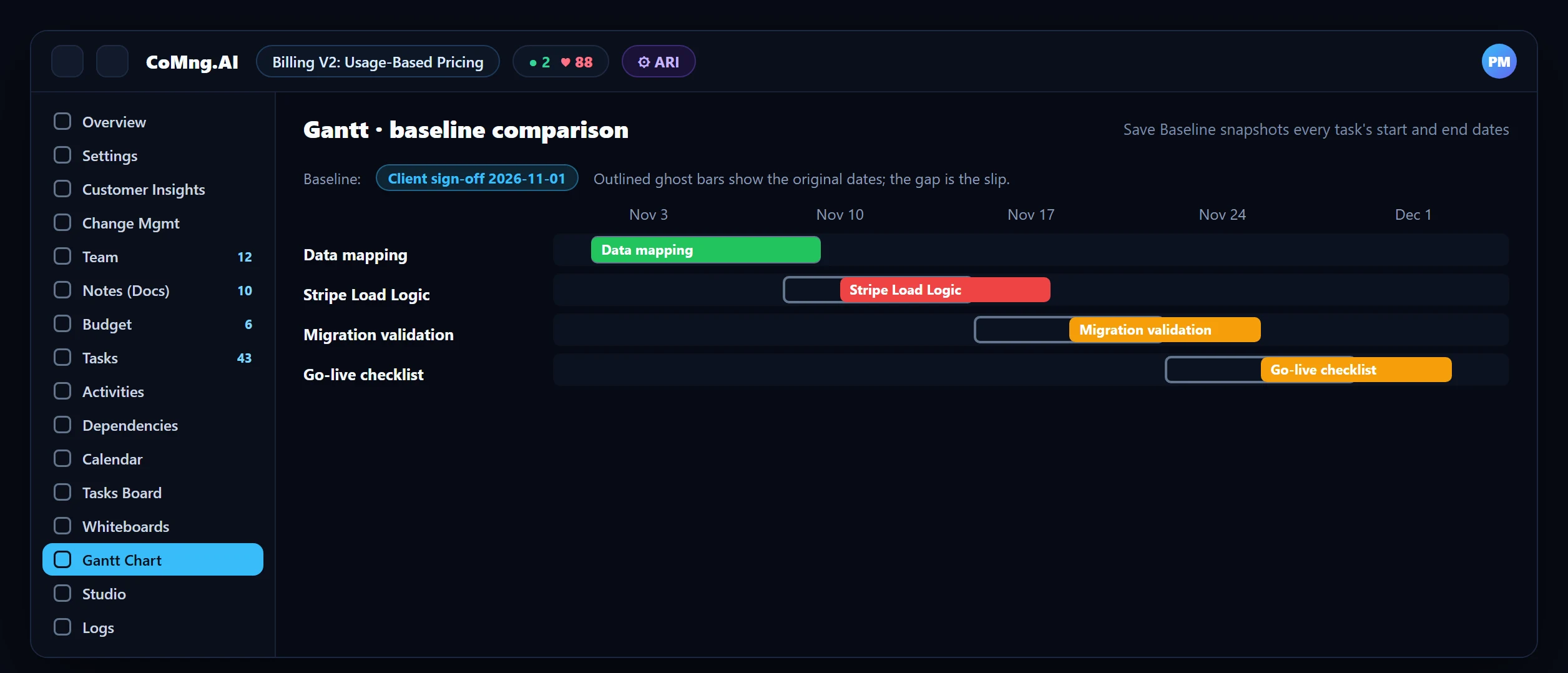
Before you optimise, save a baseline from the Gantt toolbar: a named snapshot of every task's start and end date. After the change, select the baseline and the Gantt draws a ghost bar at each task's original dates, so the shift is visible per task. The Gantt chart itself is a read-only visualisation: you change dates on the Tasks page or through the optimiser, then use the Gantt to see the result.
When to Run It
- After adding a batch of new tasks.
- After a scope change is approved.
- When Project Pulse flags a milestone that cannot be met as scheduled.
- When the Resource Planner shows dark-red weeks and you want the AI to re-level.
Pair with AI Project Delay Prediction to find the problem and Change Request Impact Assessment to control the fix. Use the What-if Scenario tool to test a deadline move before committing, and Cost of Delay Analysis to put a price on a slip.
- Date edits by hand, one conflict at a time
- Fixes that create new overloads
- No record of why dates moved
- The whole task graph considered at once
- Workload levelled in the same pass
- Reasons listed per change, approvable as a change request
About CoMng.AI
CoMng.AI is an AI-native project management platform that generates a project's plan, tasks, risks and budget from a description or document, monitors project health in real time, and gives both human teams and AI coding agents live access to the same project data, with a person approving every AI-generated change.
Try it on one real project, free
Create a free project, import or generate a plan, and see Pulse, milestone flags and capacity in the first hour.
Frequently Asked Questions
What is AI project timeline optimization?
Using AI to propose a revised project schedule from task effort, dependencies, assignee workload and due dates, so milestones are protected and workload is levelled in one coherent pass rather than through piecemeal edits.
Does Optimize Timeline change my dates automatically?
Only if you choose Auto Apply, which writes changes immediately and lists them in a results panel. The safer Create Change Request mode saves the suggestions as a request in Pending Approval and changes nothing until you approve.
What data does AI scheduling need?
Effort on tasks, dependencies, assignees and due dates. Confirmed milestone dependencies make the result more precise.
How do I see what the optimisation changed?
In Auto Apply mode a results panel lists previous and new dates with reasons. For a visual comparison, save a baseline first and use the Gantt baseline comparison.
Can AI scheduling replace a scheduler?
It speeds up the arithmetic and surfaces conflicts, but a person reviews and approves, especially for hard deadlines and commitments.
Related reading
See the full guide: Planning, Scope & Change Control Guide