Zero-Drift Migration: Moving Your History from Jira and Asana
A migration succeeds when the new system agrees with the old one on the facts: who owns what, what is done, when it is due. "Drift" is any silent disagreement. Here is how to move without creating it.
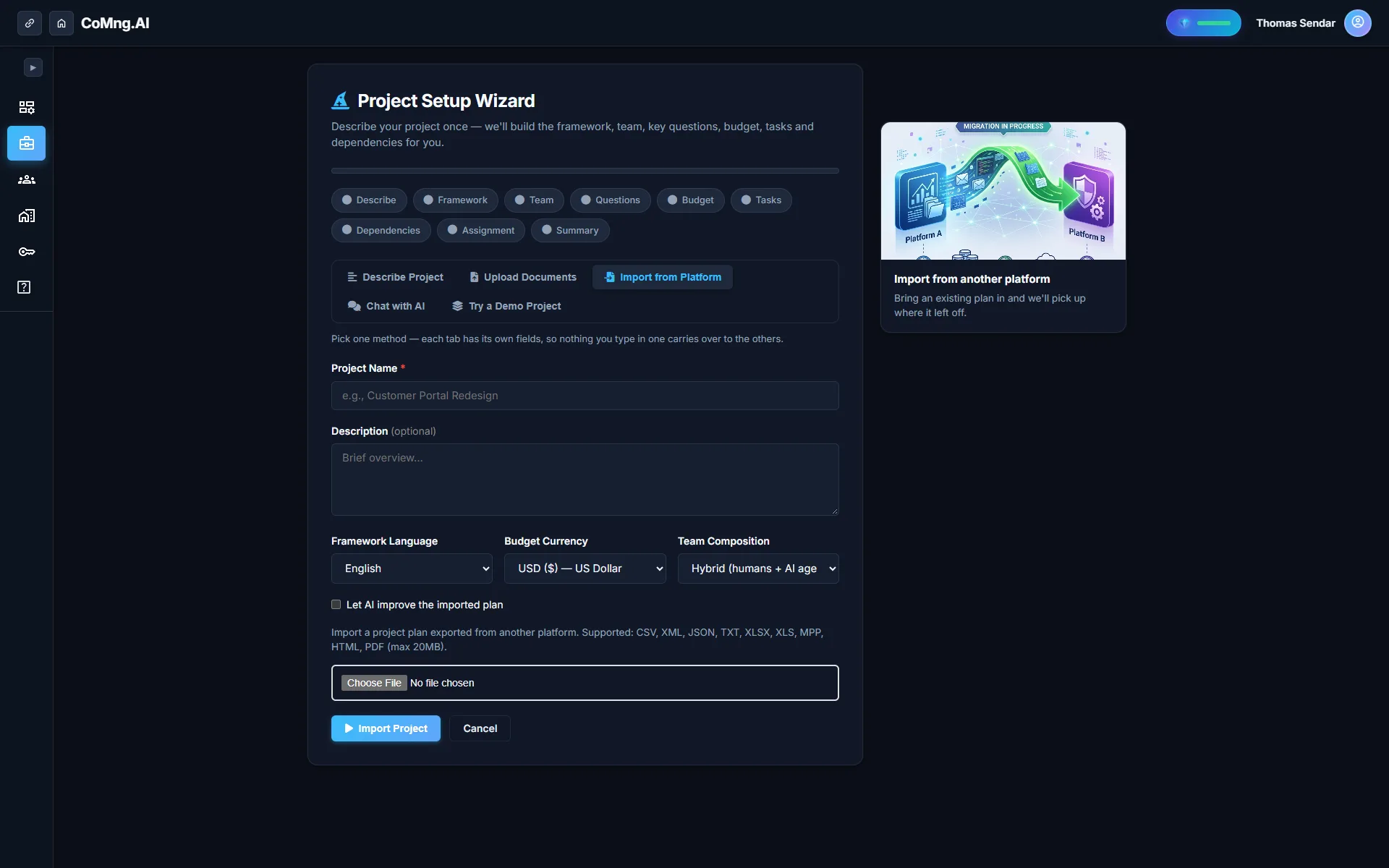
To migrate from Jira, Asana, Trello or Monday.com, export the project as a file and upload it through Import from Platform in CoMng.AI. Statuses, assignees, existing dates and financial figures are preserved exactly, and tasks, dependencies, milestones and budget lines in the export are rebuilt for review.
- Export, upload, review: export from the source platform, upload one file (up to 20 MB) and CoMng.AI reconstructs the project.
- What is rebuilt: task statuses, dates, assignees, dependencies, milestones, budget lines and team members present in the export.
- Facts are preserved: statuses, assignees, existing dates and financial figures stay exactly as in the source.
- Round trips are exact: CoMng.AI XML exports import with no AI pass and no loss.
What "Drift" Looks Like
Drift is the Monday-morning surprise after a migration: a task that was done is open again, an assignee is blank, a dependency is gone, a due date moved to the import date. Each is small, none is announced, and together they destroy trust in the new system faster than any missing feature.
The antidote is a migration that treats the source as authoritative for facts and uses AI only for what is genuinely ambiguous.
How the Import Works
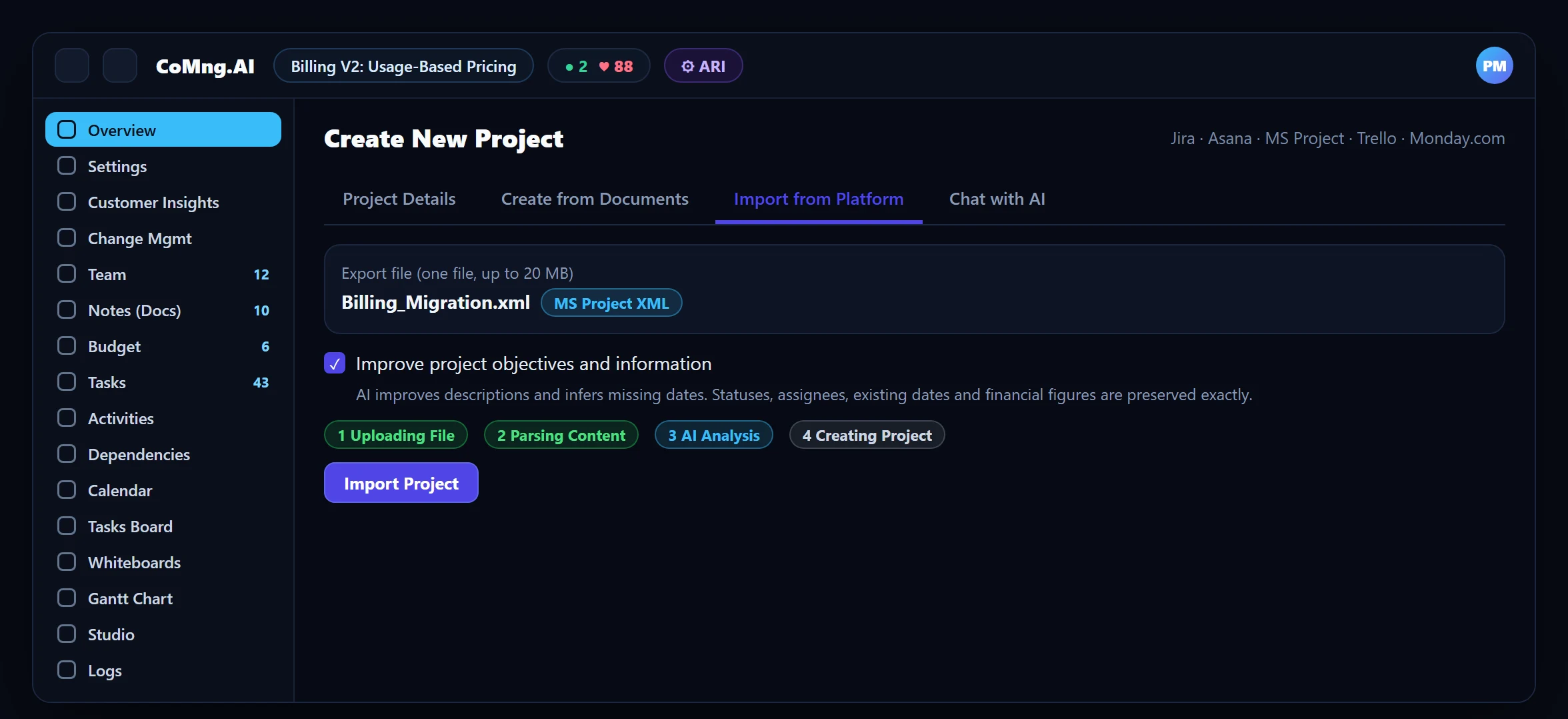
On the Import from Platform tab you upload the export from Jira, Asana, MS Project, Trello, Monday.com or another tool. Four steps run: uploading the file, parsing the content by format, AI analysis to extract and structure the data, and creating the project. A CoMng.AI XML export skips the AI step entirely and imports exactly.
Migrate Jira Issue Tracking Data to an AI-Native Platform
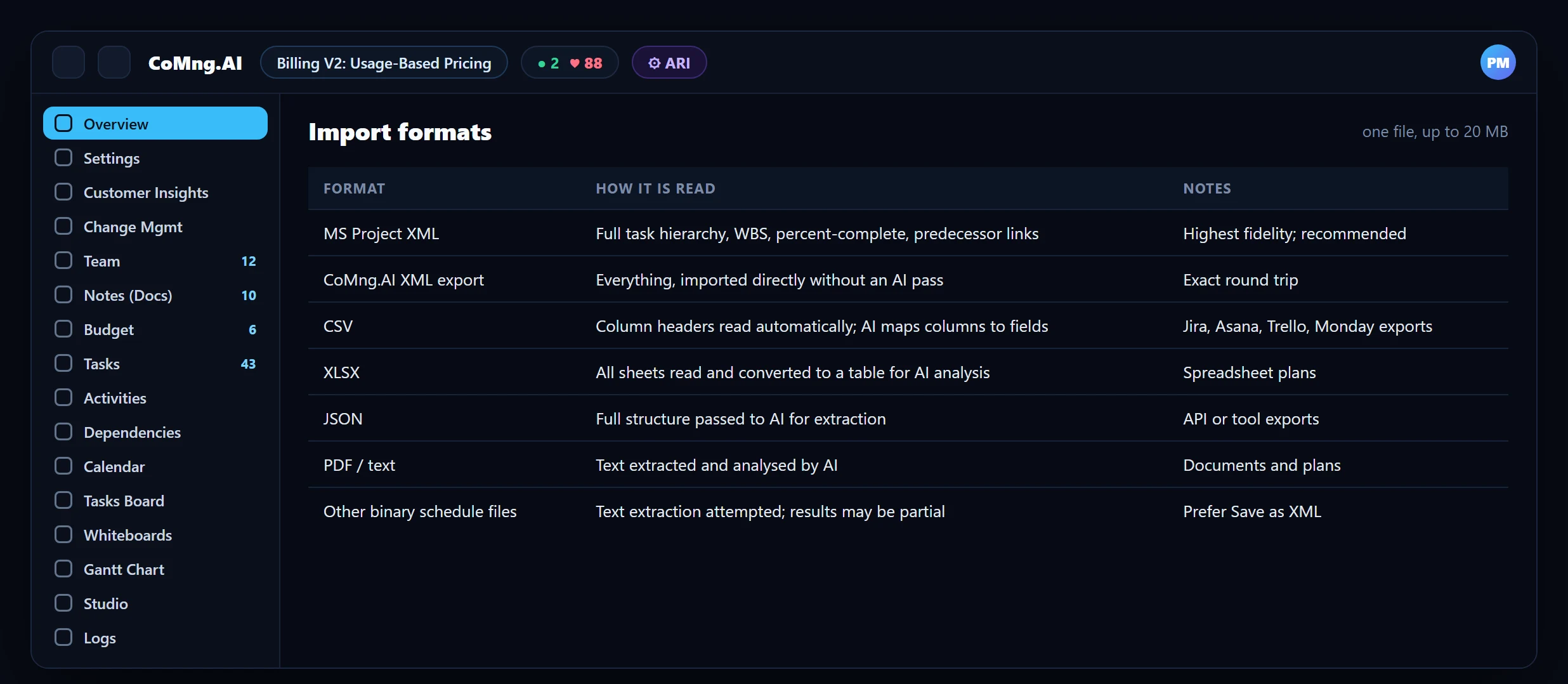
For Jira, export the issues from your Jira instance (CSV, XLSX or JSON, whichever it offers), open Import from Platform and upload the file. Column headers are read automatically and AI maps them to project fields; statuses, assignees, dates and financial figures present in the file are preserved exactly. Epic or parent relationships are rebuilt where the export includes them, so include those columns when you export.
| Jira export content | In CoMng.AI |
|---|---|
| Summary and description | Task title and description (description optionally improved by AI) |
| Status | Task status, preserved |
| Assignee | Assignee, preserved |
| Due and created dates | Dates, preserved where present; missing dates optionally inferred |
| Parent or epic (if exported) | Hierarchy where the export carries the relationship |
| Links (if exported) | Dependencies, reviewed after import |
After the import: scan milestone dependencies, run Verify Plan Coverage and save a baseline. See also CoMng.AI vs Jira.
What Is Preserved, and What AI May Touch
| Item | Treatment |
|---|---|
| Task statuses (completed, cancelled, in progress) | Always preserved |
| Assignees and dates present in the source | Preserved exactly |
| Financial figures | Preserved exactly |
| Descriptions and project objectives | Optionally improved by AI (the improve option is on by default) |
| Missing dates | Inferred from the project timeline and dependencies when improve is on |
If you want descriptions copied verbatim, switch the improve option off before importing.
A Drift-Proof Checklist
- Export from the source in the richest format available (XML where offered; otherwise CSV or XLSX with all columns).
- Record counts in the source: tasks, open tasks, milestones, members.
- Import into a new project, not an existing one.
- Compare the counts and reconcile ten tasks across statuses, assignees and dates.
- Scan milestone dependencies and run Verify Plan Coverage to find gaps the export could not describe.
- Run both systems in parallel for one cycle, then freeze the old one.
After the Move: Get Value Quickly
The import is the start, not the finish. Within a day you can have the project health read from Pulse, the weekly capacity picture from the Resource Planner, and a clear view of milestone risk. See Early Blocker Identification. For schedules in MS Project, see MS Project Alternative.
- Facts silently changed in the move
- Re-keying hundreds of tasks
- Weeks of parallel confusion
- Source facts preserved exactly
- One upload rebuilds the project
- A short, structured parallel run
About CoMng.AI
CoMng.AI is an AI-native project management platform that generates a project's plan, tasks, risks and budget from a description or document, monitors project health in real time, and gives both human teams and AI coding agents live access to the same project data, with a person approving every AI-generated change.
Import your existing plan and review it in minutes
Upload an MS Project XML, a Jira or Asana export, or a spreadsheet and see your tasks, dates and dependencies rebuilt in CoMng.AI.
Frequently Asked Questions
How do I migrate from Jira or Asana to CoMng.AI?
Export the project from the source platform, open Import from Platform in CoMng.AI, upload the file (one file, up to 20 MB) and name the project. The tasks, statuses, dates, assignees, dependencies, milestones, budget lines and members in the export are rebuilt for your review.
Which platforms are supported?
Jira, Asana, MS Project, Trello, Monday.com and other tools that can export CSV, XLSX, JSON, XML, PDF or text, as well as previous CoMng.AI exports.
Will statuses and assignees stay as they were?
Yes. Task statuses are always preserved and so are assignees, existing dates and financial figures.
Can AI change my task descriptions?
Only if the improve option is on, which is the default. Turn it off to copy descriptions verbatim.
Can I re-import a CoMng.AI export?
Yes. A CoMng.AI XML export is imported directly with no AI pass, so all data is preserved exactly.
How do I migrate Jira issue tracking data to an AI-native platform?
Export the issues from Jira as CSV, XLSX or JSON, upload the file through Import from Platform in CoMng.AI, and review the rebuilt project. Statuses, assignees, existing dates and financial figures are preserved; include parent and link columns in the export so hierarchy and dependencies can be rebuilt.
Related reading
See the full guide: Migration & Enterprise Guide