CoMng.AI vs Jira: Issue Tracking vs Delivery Risk Management
"Are we tracking the work?" and "Will the project land?" are different questions. Jira is built for the first. This comparison is about the second, and about when to use each.
Jira is built around issues, boards, sprints and workflows, which suits engineering backlogs. CoMng.AI is built around delivery risk: milestone conflicts, capacity, budget, change control and AI agents on one project. Many teams use Jira for work items and CoMng.AI-style tooling to see whether the project will actually land; you can also import Jira exports into CoMng.AI.
- Different questions: Jira answers what work exists and who owns it; delivery risk tools answer whether milestones, budget and capacity add up.
- Use both or switch: you can keep Jira for engineering issues, or import a Jira export into CoMng.AI and run the project there.
- What imports: statuses, dates, assignees, dependencies, milestones and budget lines present in the export are rebuilt for review.
- Control moves in-tool: CoMng.AI adds change requests, Pulse health and milestone flags on top of the work items.
Two Different Jobs
Jira's strength is the issue: a ticket with a workflow, an owner and a board position, which suits an engineering team shipping against a backlog. What teams often bolt on, through add-ons or spreadsheets, is the project view: do the milestones, budget and people add up?
CoMng.AI starts from that project view. Tasks, milestones and their dependencies, budget lines, team workload and decisions live in one project, so the platform can flag that a task is scheduled after the milestone it feeds, or that one person is at 140% next week.
Comparison
| Area | Jira (general) | CoMng.AI |
|---|---|---|
| Unit of work | Issue with workflow, board and sprint | Task with hierarchy, effort, priority, dependencies and acceptance criteria |
| Milestone risk | Typically via versions, roadmaps or add-ons | Blocked and Milestone Blocker flags from confirmed milestone dependencies |
| Capacity | Typically via add-ons or estimates | Weekly heatmap per person, 8 to 24 weeks, with drill-down |
| Budget | Outside the core product | Budget ledger linked to tasks; CV, CPI and EAC from task progress |
| Change control | Workflow transitions and approvals | Change requests with impact assessment, sandbox preview, audit trail |
| Health view | Dashboards you configure | Pulse: computed 0 to 100 health, ranked alerts, daily briefing, forecast |
| AI agents | Integrations vary | Agents on the roster, work orders, MCP server with scoped keys |
| Best fit | Engineering backlogs and sprints | Projects with milestones, budget and hybrid human and AI teams |
Migrate Jira Issue Tracking Data to an AI-Native Platform
To move a project from Jira to CoMng.AI, export the issues from Jira (CSV, XLSX or JSON, whichever your Jira instance offers), open Import from Platform and upload the file (one file, up to 20 MB). Column headers are read automatically and AI maps them to project fields; statuses, assignees, dates and financial figures in the file are preserved exactly, and an optional improve setting tidies descriptions and infers missing dates.
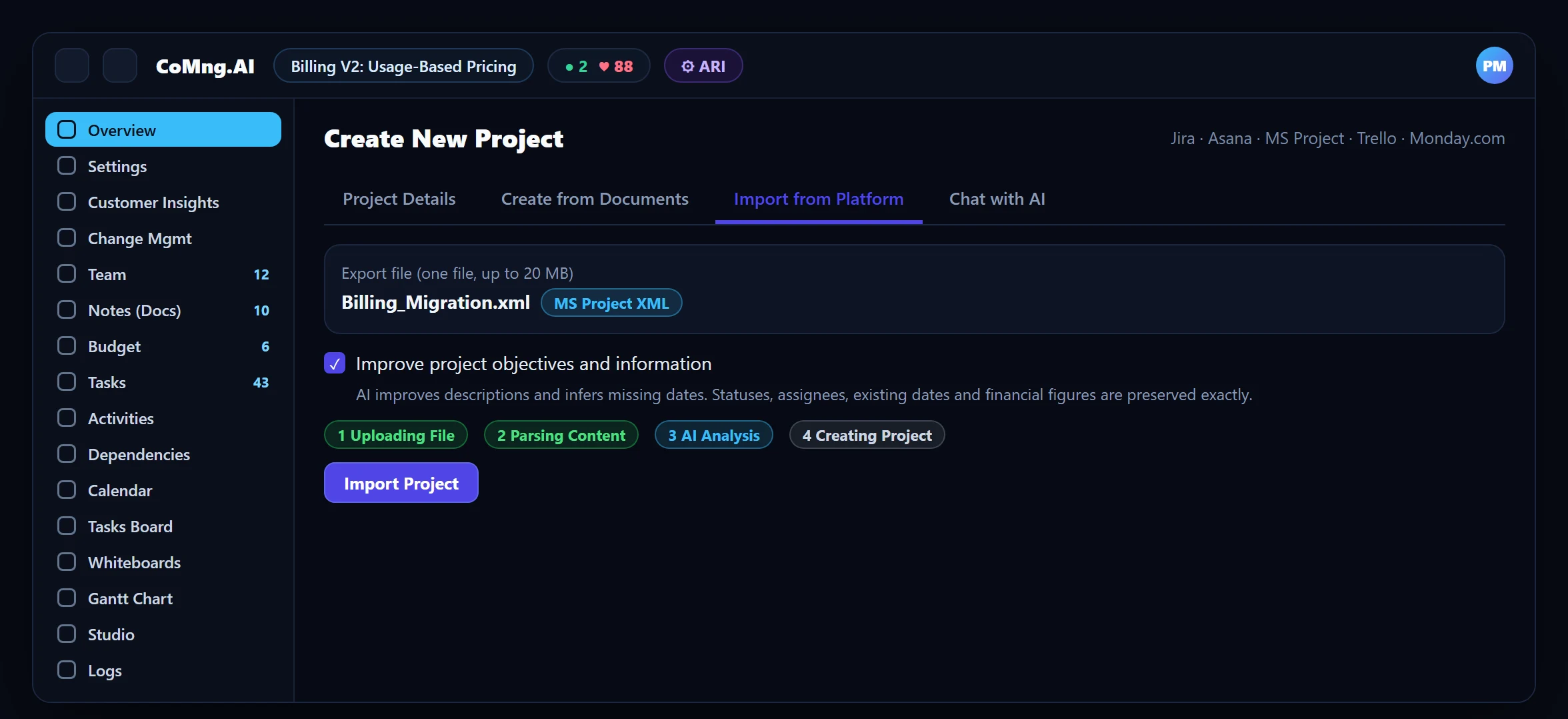
After import: scan milestone dependencies, run Verify Plan Coverage, and save a baseline. Full guidance: Zero-Drift Migration: Moving Your History from Jira and Asana.
Which Should You Use?
- Stay on Jira when your work is an engineering backlog and you mainly need boards and sprints.
- Add CoMng.AI (or move) when stakeholders ask "will we hit the date and the budget?" and you want that answered from live data.
- Consider hybrid: keep engineering detail in Jira and manage milestones, capacity, budget and change control at the project level.
- Backlog tracked, project risk guessed
- Capacity and budget in side spreadsheets
- Scope changes decided in comments
- Milestones, capacity and budget flagged from one model
- Budget linked to tasks
- Scope changes as change requests
About CoMng.AI
CoMng.AI is an AI-native project management platform that generates a project's plan, tasks, risks and budget from a description or document, monitors project health in real time, and gives both human teams and AI coding agents live access to the same project data, with a person approving every AI-generated change.
Try it on one real project, free
Create a free project, import or generate a plan, and see Pulse, milestone flags and capacity in the first hour.
Frequently Asked Questions
Is CoMng.AI a Jira alternative?
For project-level delivery management (milestones, capacity, budget, change control and AI agents) yes. For sprint-based engineering backlogs, Jira is built for that job; some teams use both.
How do I migrate Jira issues to CoMng.AI?
Export issues from Jira as CSV, XLSX or JSON, then use Import from Platform in CoMng.AI. Columns are mapped to project fields, and statuses, assignees, dates and financial figures in the file are preserved.
Will Jira statuses and assignees carry over?
Yes, those present in the export are preserved exactly. Descriptions can optionally be improved by AI.
Can I run Jira and CoMng.AI together?
Yes. Many teams keep engineering issues in Jira and use CoMng.AI for the project view; status content can also be shared to Jira, Slack, Microsoft Teams, Google Chat, Confluence or email.
Does CoMng.AI have sprints and boards?
It has a Kanban board grouped by status, tag or assignee. It is not a sprint-planning tool in the Jira sense.
Related reading
See the full guide: Migration & Enterprise Guide