Think about the last full week you spent managing a project.
How much of that time was judgment – reading a situation, making a call, navigating a difficult stakeholder conversation, recognizing that the team’s morale had quietly shifted, deciding to pull the scope before someone asked you to?
And how much was machinery – checking whether dates had slipped, chasing status updates, reformatting a report, recalculating effort after a team member went part-time, figuring out which of 60 tasks is most urgent right now, writing the Friday email that says what you already knew on Wednesday?
For most project managers, the honest answer is that the machinery takes around 70% of their week – industry data puts PM time spent on admin and status reporting at exactly that figure. That’s not a talent problem. It’s a tool problem. And it’s been treated as inevitable for so long that most PMs have stopped noticing it – the way you stop noticing the noise of a highway after you’ve lived next to it long enough.
The machinery shouldn’t require your attention. The machinery should run itself.
The Administrative Tax
The phrase comes from CoMng.AI’s own framing of the problem, and it names it precisely.
In any complex project – a cloud migration, an infrastructure build, a high-stakes product launch – the human manager is the single point of failure. Everything that the system can’t do on its own routes through them. Status updates that need chasing. Plans that need rebuilding after scope shifts. Reports that need writing. Risk registers that need updating. Tasks that need assigning when someone new joins the team.
This is the Administrative Tax: the overhead that consumes the manager’s most valuable hours and replaces strategic thinking with clerical execution.
The tax is real, it compounds, and it scales with project complexity. A PM running one small project can absorb it. A PM running three large, parallel, stakeholder-heavy projects cannot – not without dropping balls, not without working nights, and not without silently degrading the quality of the only work that actually requires their judgment.
Traditional project management tools were built to organize the machinery, not to run it. They give you a better filing cabinet. They do not give you a co-manager.
The distinction matters more now than it ever has – because the alternative now exists.
What the Centaur Model Actually Means
In chess, a centaur is a human-AI pair that consistently outperforms both human grandmasters playing alone and AI engines playing alone. The human brings pattern recognition, intuition, and strategic vision. The AI brings calculation speed, exhaustive evaluation, and tireless consistency. Neither alone produces the result that both together do.
The Centaur Manager is the same model applied to project execution.
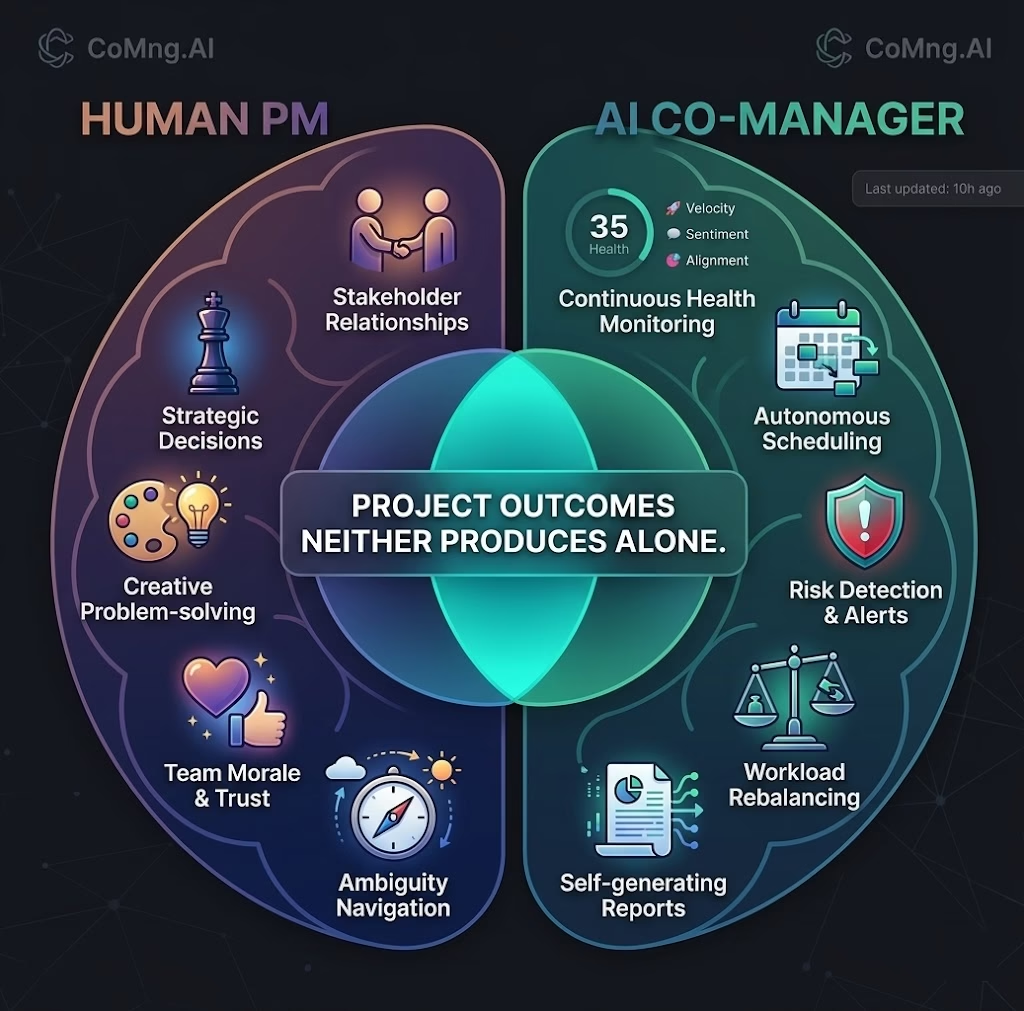
The human PM brings what only humans can bring: trust-building with stakeholders, judgment under genuine ambiguity, the soft read of a team that’s quietly losing faith, the creative problem-solving that turns a failing project around. These are irreplaceable. No AI produces them.
The AI co-manager brings what machines do better than humans: continuous monitoring across all project dimensions simultaneously, pattern detection across 60+ tasks without fatigue, autonomous recalculation of the schedule when reality shifts, proactive surfacing of risks before they become crises, and self-generating documentation that pulls from live data rather than from someone’s memory.
Together, they produce project outcomes that neither produces alone. The PM focuses exclusively on judgment. The machine handles everything else.
The result isn’t a PM who works less. It’s a PM who works on the right things – which means a PM who can take on 5× the portfolio without hiring 5× the staff, without working 5× the hours, and without accepting 5× the risk.
The Critical Difference: Waiting vs. Watching
Here is the question that exposes the gap between most project management tools and a true AI co-manager:
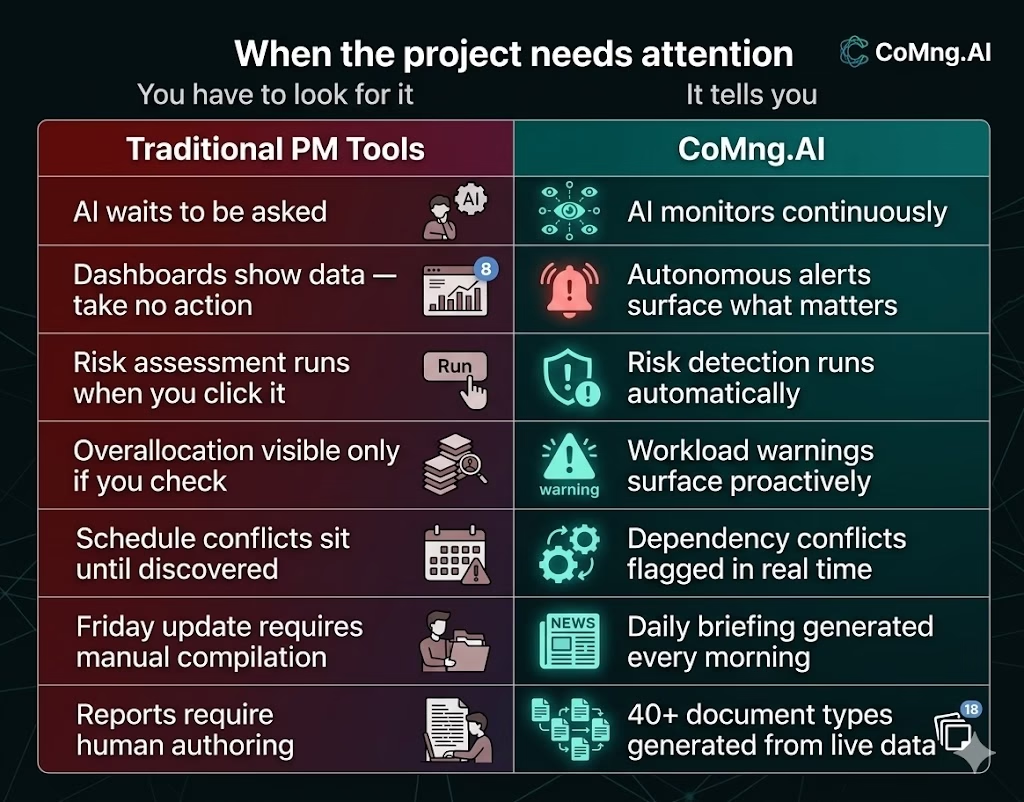
Does the AI wait to be asked – or does it watch?
In every conventional PM platform with AI features, the AI waits. It waits for you to open a panel and request a risk assessment. It waits for you to click “analyze” before it will tell you the schedule is broken. It waits for you to ask before it surfaces the fact that one team member has 40 tasks and another has 5. The intelligence is available – but only when you know to seek it.
This is a fundamental design limitation. It treats the AI as a sophisticated search engine: powerful when queried, silent when not.
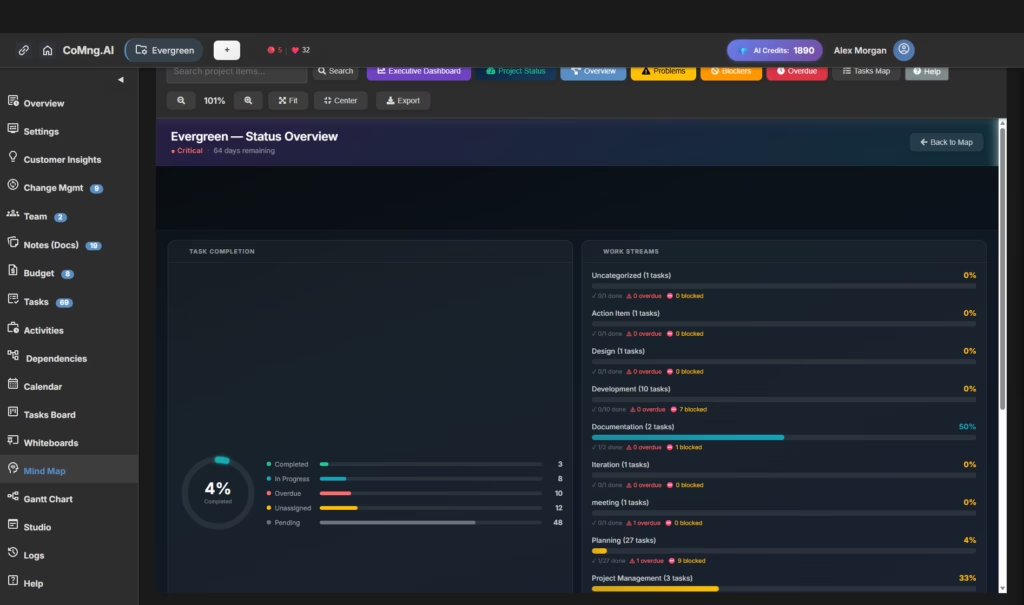
CoMng.AI is built on a different premise. The AI watches continuously. It monitors every project dimension – task completion rates, milestone proximity, resource loading, budget burn, open risks, dependency conflicts – and surfaces what matters without being prompted.
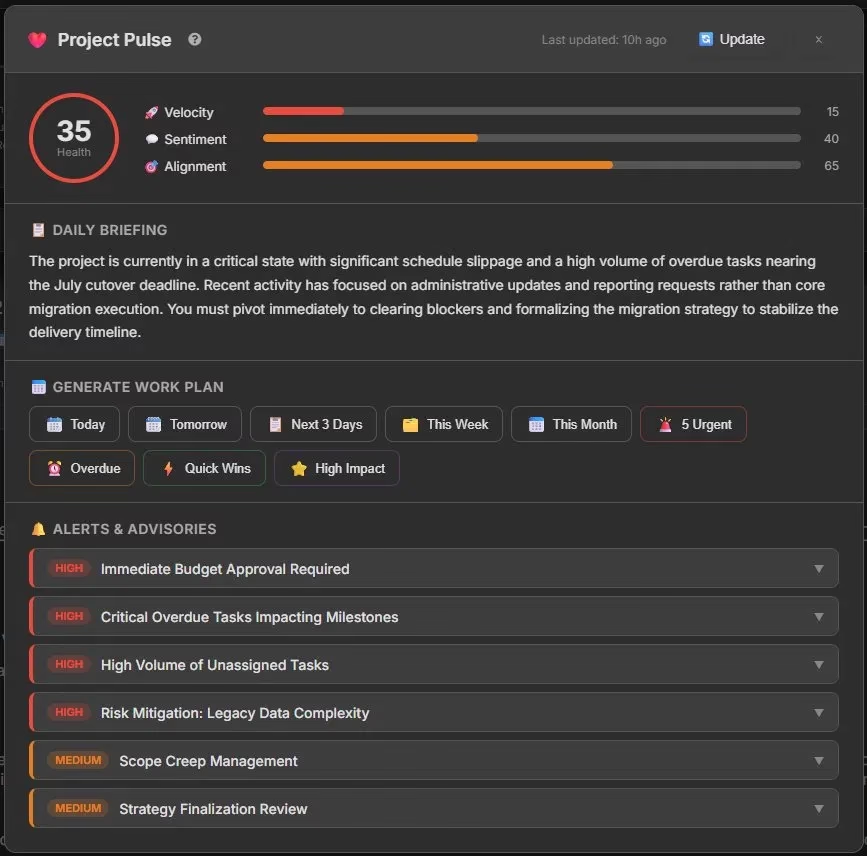
Project Pulse, the live health brain at the core of CoMng.AI, doesn’t wait for a Monday morning check-in. It produces a daily briefing automatically, and it’s always visible and always current. Every time the PM opens Pulse, they see:
- A Health Score (0–100) shown as a color-coded gauge – green (70–100), orange (40–69), or red (0–39 Critical)
- Three AI-computed metric bars: Velocity (task completion pace), Sentiment (team and project tone), and Alignment (project coherence with goals)
- A Daily Briefing – a full paragraph of contextual AI analysis written in plain language: what’s happening, why the score changed, and what the project needs next
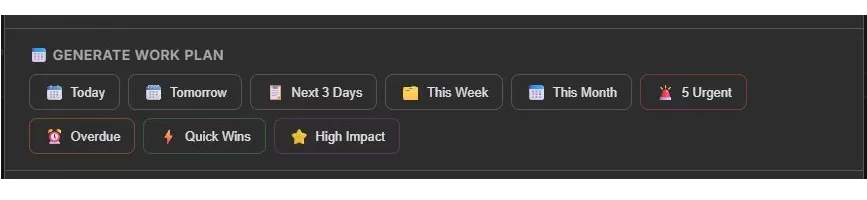
- A Generate Work Plan panel with nine one-click options: Today, Tomorrow, Next 3 Days, This Week, This Month, 5 Urgent, Overdue, Quick Wins, High Impact
- An Alerts & Advisories section – prioritized HIGH and MEDIUM flags covering the specific issues the AI has identified, each expandable for detail
That briefing isn’t generated because you asked. It’s generated because the project is alive and the system is always watching.
The difference between “AI that waits” and “AI that watches” is the difference between a dashboard and a co-manager. That difference has a name in the UI: Alerts & Advisories – a live, prioritized feed that tells you what the project needs before you think to ask.
What Autonomous Monitoring Looks Like in Practice
Abstract descriptions of AI monitoring are easy to write. Concrete examples are more useful.
Critical Path Conflicts – Surfaced Before They Break
A dependency conflict happens when Task B is scheduled to start before Task A – which it depends on – has completed. In a 60-task project this can happen silently: someone moves a date, the downstream impact isn’t immediately obvious, and two weeks later a milestone slips.
CoMng.AI’s continuous analysis tracks the full dependency graph. When a conflict emerges, it surfaces in the health score as a schedule impact, in the daily briefing as a flag, and as a prioritized alert – before the milestone slips, not after. The PM can see it, decide how to respond, and act. The machine found it; the human resolves it.
Workload Imbalance – Visible Without Asking
When Smart Assign runs across all unassigned tasks, it doesn’t just recommend assignments. It evaluates current workload against capacity across the entire team and flags overallocation risks – without the PM needing to open the Team page, run a workload report, or cross-reference a spreadsheet. The imbalance is surfaced. The PM decides how to rebalance.
The Plan That’s Never Out of Date
The most common silent failure in project management is the plan that everyone knows is wrong but nobody has updated. Dates that slipped but weren’t pushed forward. Tasks assigned to people who left the team six weeks ago. Milestones that are three weeks past due and still marked “Pending.”
CoMng.AI’s Optimize Timeline isn’t a one-time tool – it’s designed to be run continuously: after scope changes, after sprint boundaries, after any significant deviation from plan. When the plan goes stale, the AI rebuilds it. The output is a schedule that reflects current reality, not the optimistic fiction from the kickoff meeting.
Self-Writing Documentation
Every status report a PM writes manually is an hour that could have been spent on something a machine cannot do. CoMng.AI’s Studio (Composer) generates 40+ document types automatically – kickoff emails, status reports, risk escalation letters, stakeholder briefings, budget justifications, SOWs, and team briefs – pulling from live project data rather than from memory.
The PM doesn’t write the Friday update. The system generates it. The PM reviews it, adjusts the tone if needed, and sends it. The difference is 5 minutes of review versus 45 minutes of authoring.
The Five Dimensions the AI Co-Manages
The Centaur Manager model works because artificial intelligence in project management at CoMng.AI isn’t a feature – it’s the operating layer across every module. Here’s what that looks like across the five dimensions that determine whether a project succeeds:
1. Schedule – Autonomous timeline monitoring, critical path analysis, and AI-driven rescheduling when reality deviates from plan. The schedule self-corrects rather than requiring manual intervention after every change.
2. Resources – Smart Assign evaluates skills, workload, and availability across the team and recommends optimal task assignments. Workload Analysis identifies overloaded and underutilized members before capacity breaks down.
3. Risk – AI-powered risk assessment runs continuously, not just when the PM requests it. Risks are predicted before they become issues, mitigations are proposed automatically, and early warning indicators are monitored so the PM is alerted before thresholds are crossed.
4. Budget – Budget lines are suggested automatically on project initialization. AI justification documents, cost-of-delay analyses, and OKR frameworks for each expense reduce the budget management burden from hours to minutes.
5. Communication – The Studio (Composer) generates 40+ project communication and document types automatically: kickoff emails, milestone updates, risk escalation letters, SOWs, team briefs, and more. The PM directs the communication strategy; the machine writes the drafts.
Across all five dimensions, the pattern is the same: the AI runs the machinery, the PM makes the decisions.
Why This Changes the Math on PM Capacity
The claim that one PM can manage 5× more with an AI co-manager isn’t a marketing figure. It’s an arithmetic consequence of where PM time actually goes.
If 70% of a PM’s week is machinery – status chasing, report writing, schedule rebuilding, assignment reviews, risk register updates – and an AI co-manager handles the bulk of that machinery autonomously, then the effective available time for judgment work more than doubles. A PM managing 2 projects at full capacity can now manage 4 or 5 at the same quality level – because the ceiling was never their judgment capacity. It was their machinery capacity.
For organizations, this means portfolio expansion without headcount growth. For individual PMs, it means doing the work they became project managers to do: the strategy, the relationships, the problem-solving. Not the machinery.
The Administrative Tax was never a feature of project management. It was a failure of the tools.
Getting Started: What Changes on Day One
When you onboard a project into CoMng.AI, the shift from tool to co-manager begins immediately:
The AI scaffolds the framework. Describe your project – or upload a SOW, a brief, or a document – and the AI generates goals, milestones, tasks, risks, requirements, and team roles. You skip the 40+ hours of initial setup that every other platform demands.
Project Pulse activates. From the moment the project exists, the health brain starts watching. The first Daily Briefing appears before you’ve written a single task manually. The Alerts & Advisories section surfaces what needs attention immediately – no configuration required.
The workplan runs on demand. Directly inside Project Pulse, the Generate Work Plan panel offers nine one-click options – Today, Tomorrow, Next 3 Days, This Week, This Month, 5 Urgent, Overdue, Quick Wins, High Impact. Sprint planning becomes a review exercise, not a construction project. (A full project-level Generate Plan is also available from the Project Tools menu in the Hub.)
The machinery starts running itself. Assign tasks with Smart Assign. Rebuild the schedule with Optimize Timeline. Generate the status report from the Studio (Composer). Each action takes minutes rather than hours – because the AI already understands the project’s full context.
The adjustment period is short. The relief is immediate.
CoMng.AI’s own data shows 80–90% reduction in planning time, 40% better resource utilization, and 50–75% fewer project overruns. Those aren’t feature claims. They’re the natural consequence of returning project managers to the work only they can do – and letting the machine handle everything else.
The machinery should run itself. See what that looks like for your project – start free at CoMng.AI.
Relevant reading
- Auto-Optimize Your Project Schedule in One Click
- Beyond Status: Three Kanban Views for Better Team Visibility
- AI Workplan Export for Coding Agents
- How to Turn Meeting Notes into a Formal Change Request
- The Centaur concept in chess – Wikipedia
- PMI Pulse of the Profession report on PM productivity
Leave a Reply