Scope creep doesn’t announce itself.
It arrives as a sentence at the end of a client call: “Oh, and we’d also like the dashboard to support multi-user logins.” It lands as a paragraph in a follow-up email: “Following our discussion, we’d like to add the reporting module to Phase 1.” It lives in the notes your team member took at last Tuesday’s steering committee: “Stakeholder requested expanding data retention from 90 days to 2 years.”
Each of those is a scope change. None of them is a change request.
The gap between “something was said” and “something was formally approved” is where projects quietly lose control. Teams absorb the change because it seems small. Nobody creates a task for it. Nobody documents the impact. Three weeks later, the project is running two weeks late and nobody can trace exactly why.
The fix isn’t more process. It’s a workflow that makes converting any note or email into a formal, governed change request as easy as clicking a button – and that’s exactly what this article covers.
Why Scope Changes Keep Getting Lost
The Informality Trap
Project managers are taught to use change request forms. But clients and stakeholders don’t communicate in change request forms. They communicate in emails, Slack messages, call notes, and meeting minutes – and the burden of translating that informal communication into formal documentation falls entirely on the PM.
When that translation is manual – open the change request form, copy the relevant text, interpret the scope impact, estimate effort, identify affected tasks, flag risks, route for approval – most teams skip it unless the change is large enough to be obviously undeniable. Small-to-medium changes get absorbed informally. They accumulate. And then the project is late and overscoped and nobody knows precisely when or how it happened.
The “We’ll Document It Later” Lie
Teams that do recognize informal scope changes often tell themselves they’ll create a formal change request later, after things settle down. Later never comes. The note sits in the project’s knowledge base, the change gets built, and when the client questions the budget overrun six weeks later there’s no paper trail showing that their own request drove it.
The Missing Link Between Insight and Action
The same problem appears from the other direction when feedback comes in from customers. A client emails a complaint that’s actually a scope change request in disguise – “the system doesn’t handle X the way we expected” often means “we need you to add X.” That email gets logged somewhere, maybe forwarded, maybe not. It almost never becomes a formal change request unless someone manually creates one.
The pattern is always the same: unstructured input → informal note or email → nothing → absorbed scope change with no audit trail.
What’s needed is a direct path from the unstructured input to the governed output. That path now exists.
Three Paths from Unstructured to Formal
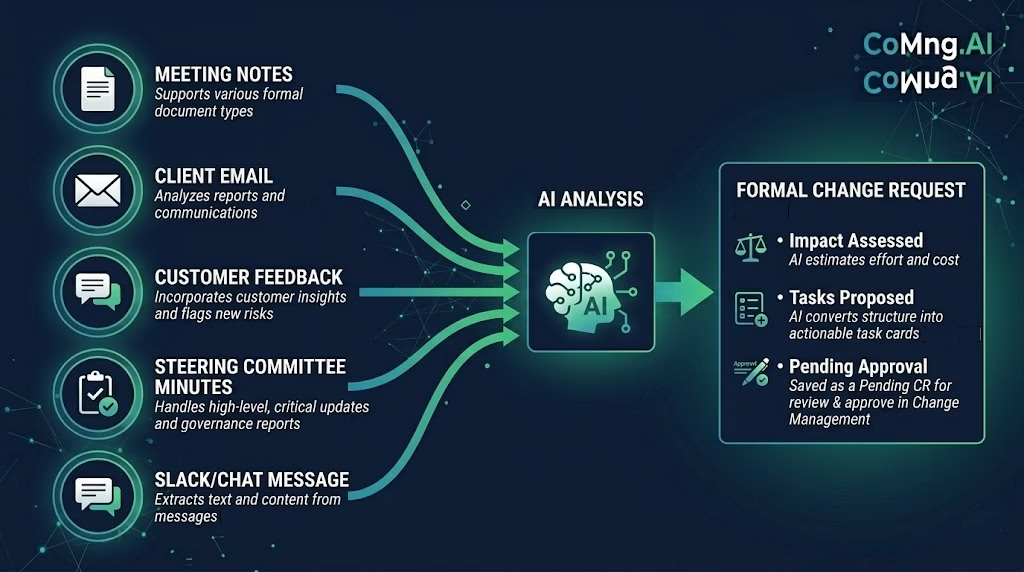
CoMng.AI gives you three distinct workflows depending on where the change was captured. All three end in the same place: a formal change request in Change Management with status Pending Approval, a full AI impact assessment, and proposed implementation tasks ready to review.
Path 1: From a Project Note – Make Change Request
This is the primary workflow for meeting notes, decision records, and any internal documentation where a scope or schedule change was captured.
The workflow:
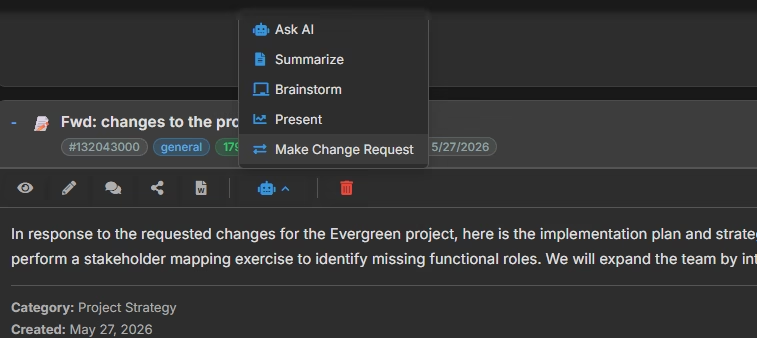
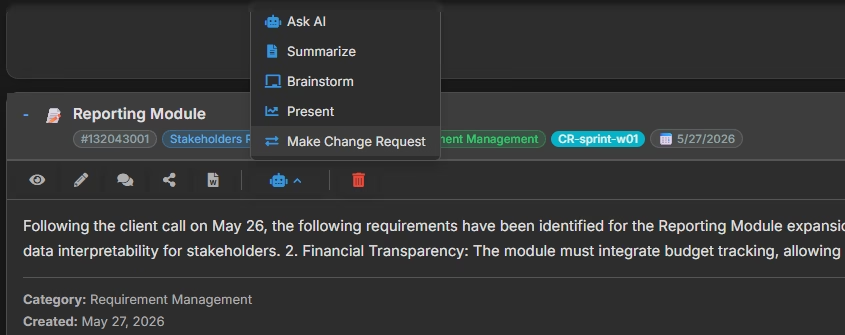
Every note in CoMng.AI’s knowledge base has an AI action menu – a small dropdown on the note card that gives you AI-powered actions on that specific note. The actions include Summarize, Ask AI, Brainstorm, Present, and Make Change Request.
When you click Make Change Request on a note:
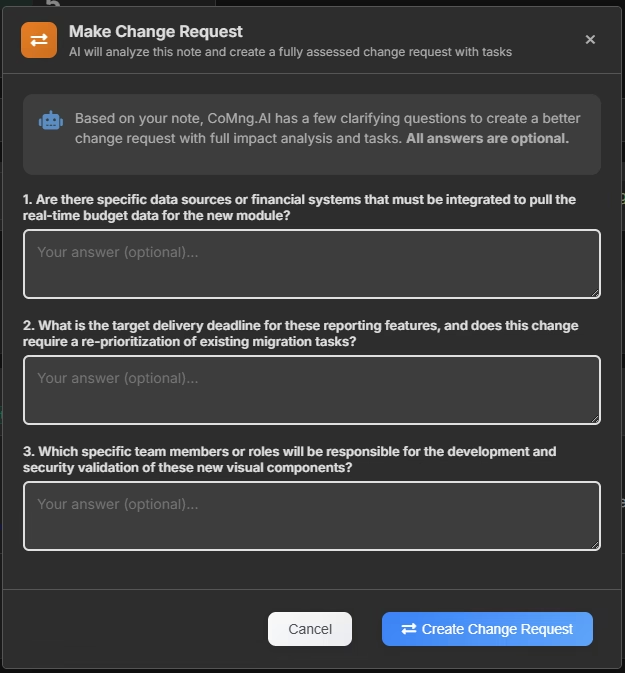
Step 1 – The AI asks clarifying questions. The system reads the note and asks 2–4 questions about intent, scope, and timeline. Examples: “Is this a scope addition or a scope change to existing work?” “What is the expected delivery timeline for this change?” “Are there specific team members or phases this affects?” All questions are optional – you can skip them and proceed directly.
Step 2 – The AI generates the change request and runs a full impact assessment in a single pass. Using the note content, your answers, and full project context across all modules, it produces:
- A formal change request with description and rationale
- An impact summary – what this change affects and why
- Proposed task items – the actual work needed to implement the change
- Milestone or budget adjustments if the change affects delivery dates or costs
- Risk flags – what could go wrong if this change is applied
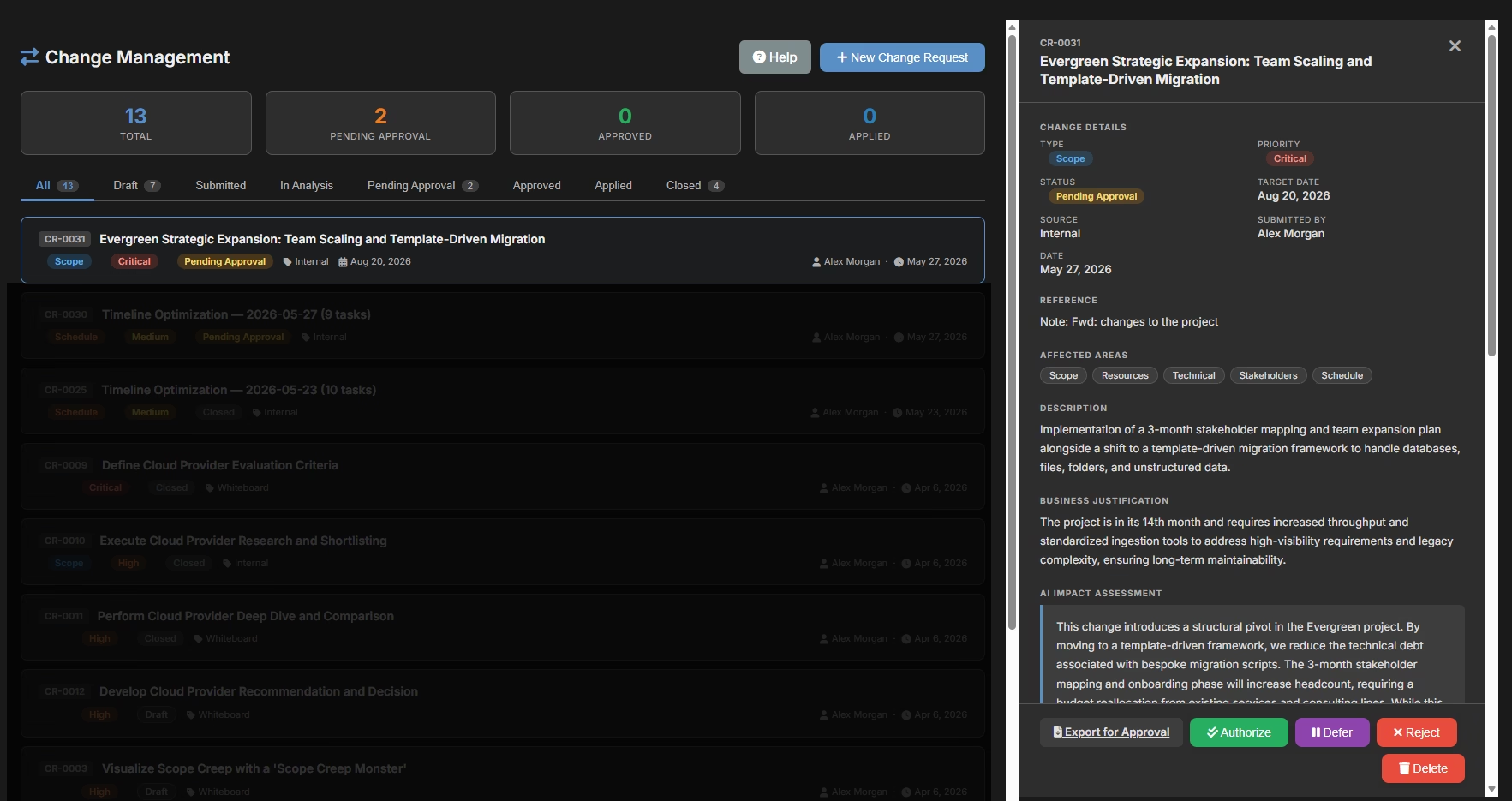
The change request lands in Change Management at Pending Approval status. You review it, adjust anything the AI got wrong, and approve or escalate. No separate assessment step needed. No manual form-filling.
When to use this path: Any time a meeting note, decision log, or project note captures a change that needs to be formally tracked. Immediately after writing the note is the best moment – the content is fresh, the AI has full context, and the 60-second conversion keeps the workflow clean.
Path 2: From a Customer Email – Via Customer Insights
Sometimes the scope change doesn’t come from an internal meeting. It comes from a client email or customer feedback message. This is where the Customer Insights Integration (CII) module becomes relevant.
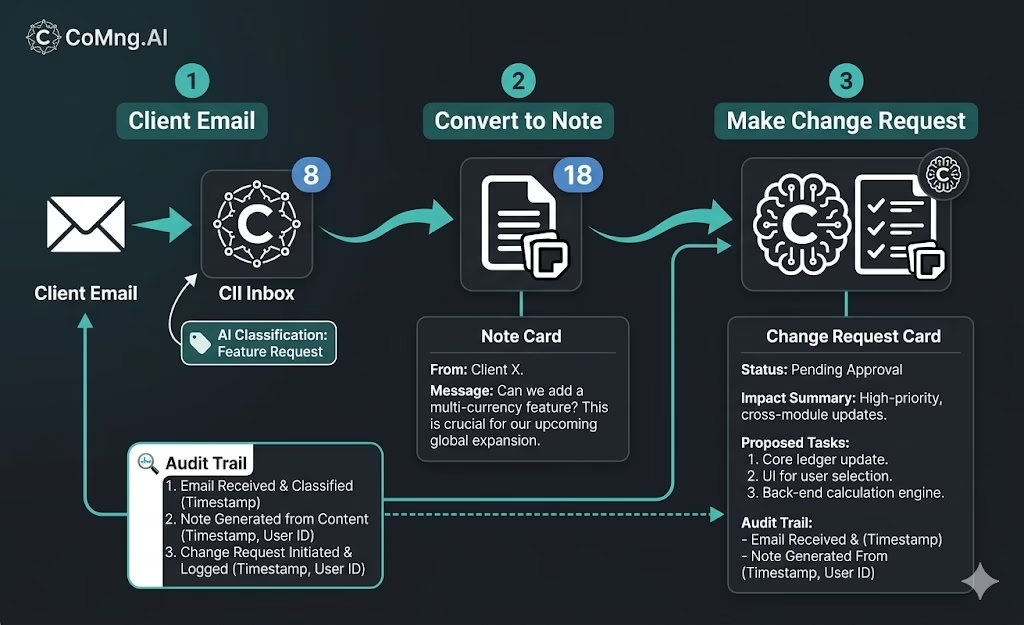
CII is CoMng.AI’s dedicated customer feedback inbox, built directly into the project. Every piece of inbound feedback – complaints, feature requests, questions, suggestions – lands as an insight in the CII page. Feedback can arrive manually (you add it) or automatically via a unique project email address that routes directly into the inbox.
When a client email contains a scope change request:
- The email arrives as an insight in CII – either because it was forwarded there manually, or because the client used the inbound email address directly
- The AI automatically classifies the insight intent (Feature Request, Suggestion, Feedback, etc.)
- From the insight, click Convert and select Note – the insight text becomes a project note, with a clear audit trail from the original client message
- From that note, click Make Change Request – the AI reads the note (which contains the original client language) and generates the full change request with impact assessment
The result: a client email that said “we’d like to add X” becomes a formally assessed, stakeholder-visible change request in under 3 minutes – with the original client message preserved in the audit trail.
Why this matters: When a client later asks “why did costs increase?” you have a traceable chain from their original email, through the insight log, through the note, to the approved change request that authorized the additional work. That chain is your defense.
Path 3: From an Uploaded Document – Analyze File + Make Change Request
Sometimes the scope change isn’t a note you wrote – it’s a document someone sent you. A revised SOW. An updated specification. A client-submitted change proposal in PDF form.
For these cases, CoMng.AI’s note system accepts file attachments, and attached notes get an additional AI action: Analyze File.
The workflow:
- Create a note and attach the document (PDF, image, Word file)
- Click Analyze File – the AI reads the full document content, extracts key information, summarizes it, and returns insights in the context of your project
- Review the AI’s analysis in the note view
- Click Make Change Request – the AI now has both the document content and its own analysis as context for generating the change request
This is particularly powerful for documents that arrive as formal proposals from clients or third parties – they often include scope language that maps directly to implementation tasks, and the AI can parse that structure and propose the right tasks without manual interpretation.
What the AI Produces: The Change Request Package
Regardless of which path you use, the output is the same structure. Here’s what lands in Change Management:
Change Request Header
- Title (AI-generated from note content, editable)
- Description – formal language describing what is being changed
- Rationale – why this change is being made
- Status: Pending Approval
Impact Assessment
- Summary of what this change affects in the project
- Affected milestones and whether they need adjustment
- Budget implications if cost impact is detected
- Risk flags – what could go wrong if this is applied
Proposed Implementation Items
- Task list – the actual work items needed to implement the change
- Each task has a name, description, and estimated effort
- Tasks are not created in the project until the CR is approved
Review and Approval Once the CR is in Change Management, the PM (or designated approver) can:
- Review and edit any item the AI generated
- Accept the CR – all proposed tasks and adjustments apply to the project
- Reject the CR – nothing changes, but the record of the proposed change is preserved
- Add comments for the requester or approver
This is the structured output that most teams either don’t have at all (because changes are absorbed informally) or spend 45–60 minutes creating manually (because the forms are tedious). The AI produces it in under 2 minutes from a note.
The Audit Trail You’re Building
Every change request created via this workflow is traceable in both directions.
Forward: From the note → to the change request → to the tasks created → to the impact on milestones and budget. If a project overruns, you can show exactly which approved changes drove the overrun and when each was approved.
Backward: From any project task → to the change request that created it → to the note that triggered the CR → to the original client communication that started it. If a client disputes that they requested something, you have a complete record.
This is what project change management looks like when it’s built into the system rather than bolted on. Change governance isn’t a separate process you run alongside your project – it’s the way the project records and responds to every significant input.
Common Mistakes This Workflow Prevents
Mistake 1: Writing a note but never converting it
The note sits in the knowledge base. The team implements the change anyway because it was “agreed.” No formal record, no approved budget adjustment, no task-level traceability. Three months later, nobody can explain why the budget overran.
The fix: Convert immediately. The 60-second conversion is cheaper than the 60-minute scope dispute.
Mistake 2: Creating a CR manually without the AI impact assessment
The PM creates a change request form, describes the change, and routes it for approval – but doesn’t assess impact. The approver signs off not knowing that this change affects a milestone, adds 3 weeks, and creates a resource conflict. The CR is approved in good faith and the consequences appear later.
The fix: The AI impact assessment runs automatically. Impact is always visible before approval.
Mistake 3: Client emails living only in email
A client’s scope request exists in the PM’s inbox. It gets implemented. It generates an invoice dispute. The PM has to dig through email threads to prove the client requested it. The client disputes the wording. The relationship is damaged.
The fix: The CII → Note → CR workflow creates a system-of-record version of the client’s request within 3 minutes of receiving it.
Mistake 4: Waiting to batch change requests
Teams sometimes accumulate informal changes and plan to formalize them “all at once” during a review meeting. By then, some changes are half-built, impact is harder to assess accurately, and the approval meeting becomes a lengthy negotiation.
The fix: Convert each note the moment it’s written. Small, immediate conversions are faster and more accurate than batched, retrospective ones.
Getting Started
The fastest path to your first note-to-CR conversion:
- Open any project note in CoMng.AI (or create one from today’s meeting)
- Click the ▾ AI button on the note card to open the AI action menu
- Select Make Change Request
- Answer the optional clarifying questions – or skip them and proceed
- Review the generated CR in Change Management → Pending Approval
The whole sequence takes 60–90 seconds for a well-written note. For a long or complex note, slightly longer – but the AI is doing the work of interpreting, structuring, assessing impact, and proposing tasks. What used to take a PM 45 minutes of form-filling happens in the time it takes to read the result.
For client emails: Set up CII inbound email capture on any active project. Share the project email address with clients you expect scope feedback from. Their emails arrive as classified insights, ready to convert to notes and then to change requests without manual forwarding or copying.
Scope creep starts as a note. Scope control starts with converting that note – immediately, formally, and with AI doing the interpretation work. That’s the difference between a project with a defensible record and one that ends in a budget dispute nobody can resolve.
Ready to close the gap between “it was mentioned” and “it was approved”? Start free at CoMng.AI and run your first note-to-change-request conversion today.
Relevant reading:
- Auto-Optimize Your Project Schedule in One Click
- Beyond Status: Three Kanban Views for Better Team Visibility
- How to Import a Task List from a Spreadsheet, PDF, or Screenshot
- PMI on change management best practices
- Wikipedia: Change control in project management
Leave a Reply