CoMng.AI vs MS Project: An Honest Comparison for Delivery Teams
These tools solve different halves of project delivery. One is strongest where a scheduler edits a detailed plan; the other is strongest where a team needs to see risk, control change and automate administration. Here is the comparison, including the places where MS Project wins.
MS Project is a mature desktop scheduling tool built around a detailed Gantt editor. CoMng.AI is an AI-native project platform built around live health monitoring, milestone risk flags, change control and AI agents. Choose MS Project for deep schedule editing; choose CoMng.AI to monitor delivery risk continuously and automate project administration.
- Different centres of gravity: MS Project centres on detailed schedule authoring; CoMng.AI centres on continuous project health, change control and AI assistance.
- Where MS Project is stronger: in-depth scheduling features and an editable Gantt; CoMng.AI's Gantt is a read-only visualisation.
- Where CoMng.AI is stronger: Pulse health, milestone conflict flags, capacity heatmaps, AI generation, ARI and change requests with sandbox preview.
- Migration is practical: MS Project XML imports with hierarchy, WBS, percent-complete and predecessor links; save a baseline right after import.
Why This Comparison Is Being Asked in 2026
Two things push teams to compare: Microsoft's announced retirement of Project Online (scheduled for 30 September 2026; confirm what applies to your edition and tenant in Microsoft's current notices, since customers have asked about extensions), and a wider move toward tools that monitor risk instead of only recording a plan.
This page compares CoMng.AI with MS Project as a category of scheduling tool. It states what CoMng.AI does (verified against its documentation) and describes MS Project in general terms; check Microsoft's documentation for your exact edition.
Side-by-Side
| Area | MS Project (general) | CoMng.AI |
|---|---|---|
| Core idea | Detailed schedule authoring in a desktop-style Gantt editor | Live project platform: plan, health monitoring, change control, AI assistance |
| Gantt chart | Editable: drag bars, set links and constraints | Read-only visualisation with dependency arrows and milestone lines; dates and links are edited on the Tasks page |
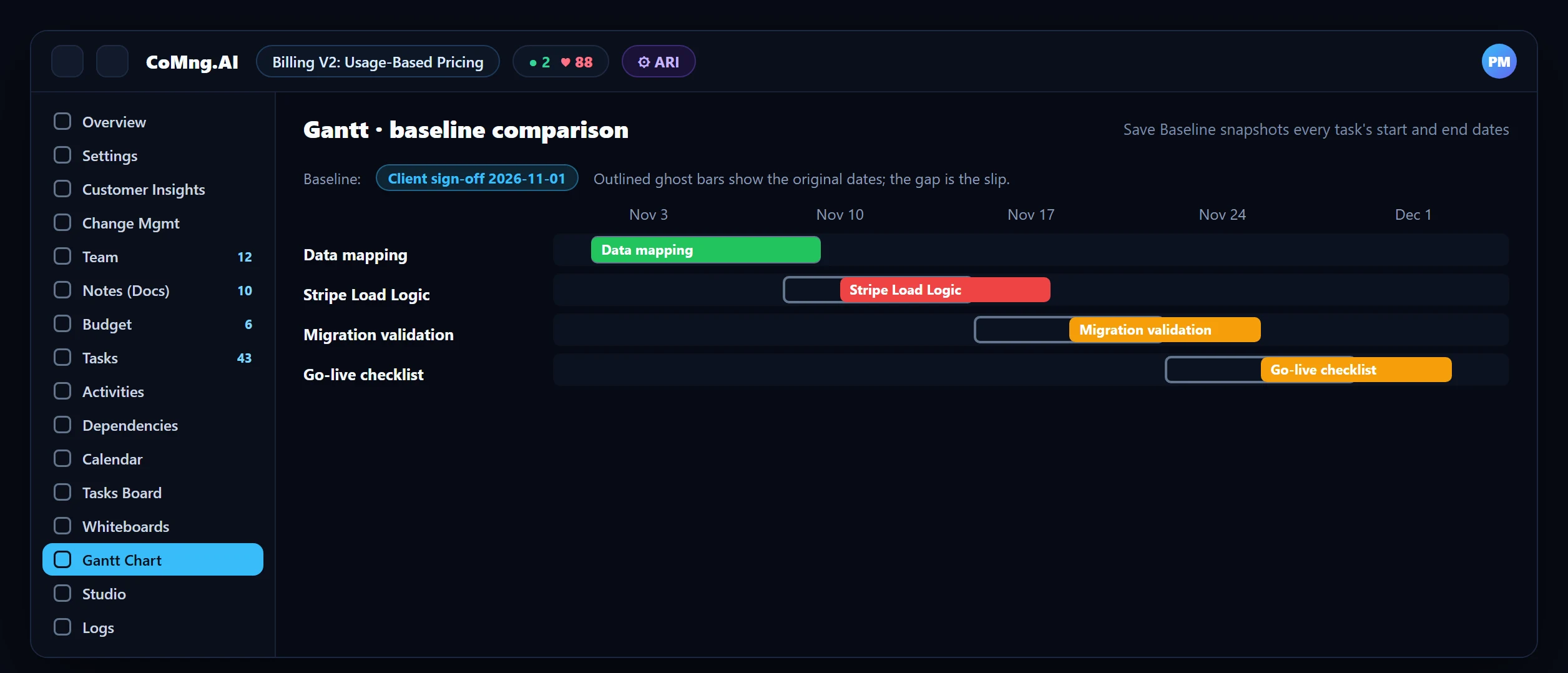
| Baselines | Built-in baselining with comparison | Save Baseline snapshots every task's start and end dates; compare with ghost bars on the Gantt |
| Critical path | Core scheduling feature | Critical Path Analysis in the Project Management Hub identifies the chain that drives the end date |
| Risk monitoring | Reports you run; third-party add-ons | Project Pulse: health score, ranked alerts, forecast; milestone Blocked and Milestone Blocker flags |
| Resource view | Resource sheets and levelling | Weekly heatmap per person across 8 to 24 weeks, project and organisation-wide |
| AI | Limited, depends on edition and add-ons | Plan generation from documents, structure, priority scoring, timeline optimisation, ARI |
| Change control | Edit the plan; process lives outside the tool | Change requests with AI impact assessment, sandbox preview, approval and audit log |
| AI agents | Not a focus | Agents on the roster, work orders, MCP server with scoped API keys |
| Platform | Windows desktop heritage | Browser-based, desktop-first; mobile app for quick updates |
Where MS Project Is Still the Better Fit
- Deep schedule authoring. If your core work is hand-tuning a large, constraint-heavy schedule on an editable Gantt, MS Project's scheduling depth is hard to beat, and CoMng.AI's read-only Gantt will feel limiting.
- Existing enterprise tooling. Organisations deeply integrated with the Microsoft ecosystem may prefer to stay.
- Very specific scheduling conventions that your standards or contracts require.
Where CoMng.AI Is the Better Fit
- Noticing risk early: Pulse, milestone flags and forecasts monitor the plan continuously. See How AI Software Detects Project Blockers.
- Controlling change: every change as a request with an impact preview and an audit trail.
- Removing admin work: plans generated from documents, status derived from the work, reports generated from live data.
- Hybrid teams: people and AI agents on one roster and one workload view.
Migrating From MS Project
Export the schedule as MS Project XML and import it through Import from Platform: the hierarchy, WBS, percent-complete and predecessor links are parsed. Other schedule file types may extract only partially, so XML is recommended. MS Project baselines are not documented as imported; the practical step is to save a baseline in CoMng.AI immediately after import so you have a reference point from day one. Then scan milestone dependencies, run Verify Plan Coverage and reconcile ten tasks. Full steps: MS Project Alternative: Migrate Without Data Loss and the 2026 migration guide.
- Plan maintained by a scheduler, risk found in reports
- Change control outside the tool
- Admin retyped for each audience
- Plan monitored continuously for risk
- Change requests with preview and audit
- Reports generated from live data
About CoMng.AI
CoMng.AI is an AI-native project management platform that generates a project's plan, tasks, risks and budget from a description or document, monitors project health in real time, and gives both human teams and AI coding agents live access to the same project data, with a person approving every AI-generated change.
Try it on one real project, free
Create a free project, import or generate a plan, and see Pulse, milestone flags and capacity in the first hour.
Frequently Asked Questions
Is CoMng.AI an MS Project alternative?
For delivery teams that want continuous risk monitoring, change control and AI-assisted administration, yes. For teams whose core work is detailed, constraint-heavy schedule authoring on an editable Gantt, MS Project's scheduling depth remains a strong fit.
Can I import my MS Project schedule into CoMng.AI?
Yes. Export as MS Project XML and use Import from Platform. The task hierarchy, WBS, percent-complete and predecessor links are parsed. Other binary schedule formats may extract only partially.
Does CoMng.AI support baselines and the critical path?
Yes. Save Baseline snapshots every task's dates and the Gantt compares against it with ghost bars, and Critical Path Analysis identifies the chain driving the project end date. MS Project baselines are not imported as baselines, so save one after import.
Can I edit the Gantt chart in CoMng.AI?
No. The Gantt is a read-only visualisation. You edit dates and dependencies on the Tasks page, and the Gantt reflects the changes.
Is MS Project being retired?
Microsoft announced the retirement of Project Online for 30 September 2026. Check Microsoft's current notices for what applies to your edition and tenant.
Related reading
See the full guide: Migration & Enterprise Guide