You’ve got Claude Code running in your terminal. Gemini CLI is ready. Maybe you’ve even set up Devin or Cursor AI for your dev team. The tools are there.
But here’s the problem nobody talks about: your AI agents are only as good as the context you give them.
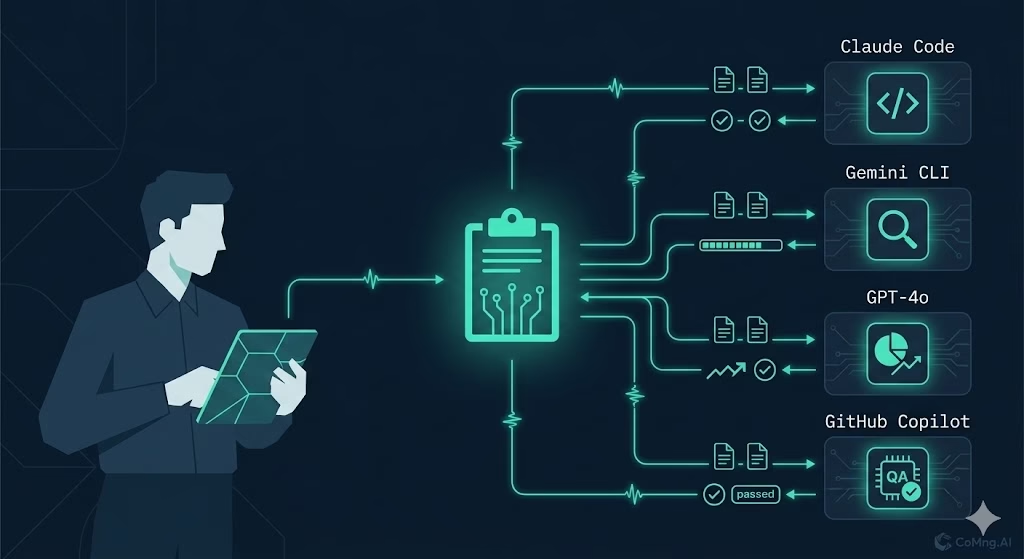
Right now, most teams are doing this manually – copying task descriptions into chat windows, pasting project context from Notion, writing one-off prompts that lose all the structure the moment the conversation ends. It works, kind of. But it doesn’t scale. And it definitely doesn’t close the loop back into your project.
What if your project management system could brief your AI agents automatically – with full task context, dependencies, effort estimates, and acceptance criteria – and let those agents report their progress back in real time?
That’s exactly the gap CoMng.AI closes.
What Is AI Agent Task Management, Really?
AI agent task management isn’t just assigning a task to a bot. It’s the full cycle: plan → brief → execute → update.
Most teams today only have the first part figured out. They plan in Jira or Asana, then manually translate that plan into prompts for their AI agents. The execution happens in a completely separate environment, and the results – if they get tracked at all – have to be manually copied back into the project.
That’s three disconnected steps that eat hours every week and introduce errors every time.
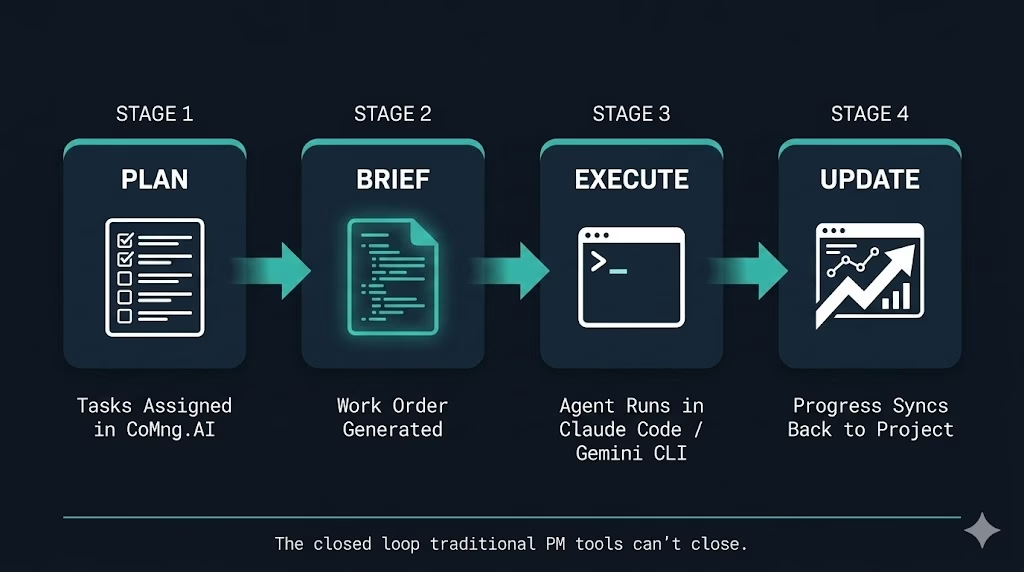
True ai agent task management means:
- AI agents are first-class team members in your project
- Each agent gets a structured, context-rich work order (not a vague prompt)
- The agent can execute in its preferred environment – terminal, IDE, browser
- Progress, blockers, and completion status flow back into the project automatically
This is what separates an autonomous execution system from a task tracker with a chatbot bolted on.
The Gap Between PM Tools and AI Execution
Jira is a task database. Monday.com is a spreadsheet with a nicer UI. Even the best traditional PM tools share one fundamental limitation: they’re designed for humans to read, not for AI agents to consume and act on.
When an AI coding agent starts a task, it needs:
- The full project objective and scope (not just the task title)
- Dependencies – what has to be done first
- Acceptance criteria – what “done” actually means
- Effort estimates, deadlines, and priority signals
- Knowledge of who else is working on what
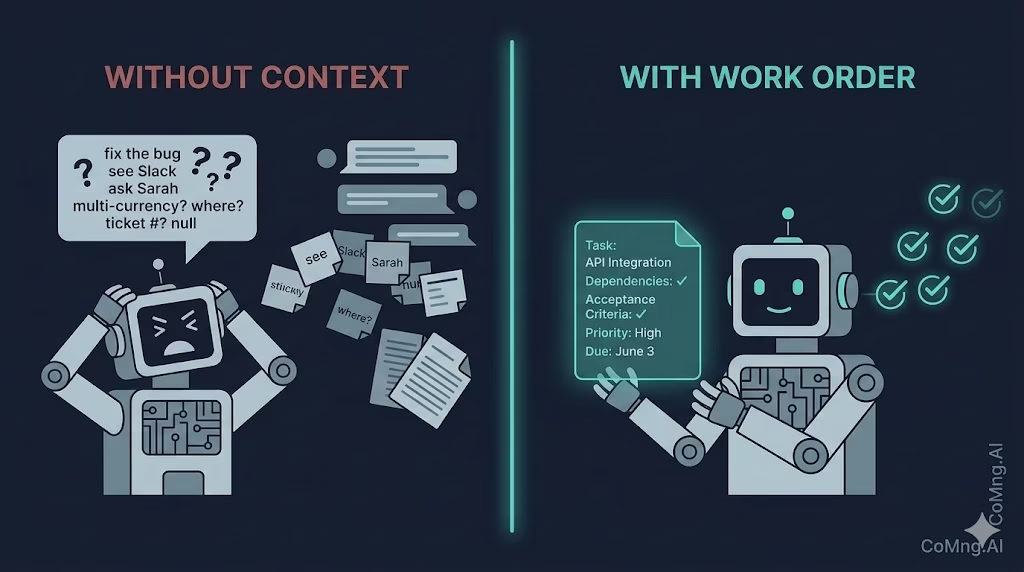
None of that lives in a single Jira ticket. It’s scattered across comments, wikis, Slack threads, and the project manager’s head.
This is the context gap. And it’s the reason teams with powerful AI tools are still getting mediocre outputs.
Garbage in, garbage out – even with Claude.
How CoMng.AI Solves This: AI Agents as Team Members
CoMng.AI treats AI agents exactly like human team members – because in terms of project delivery, they are.
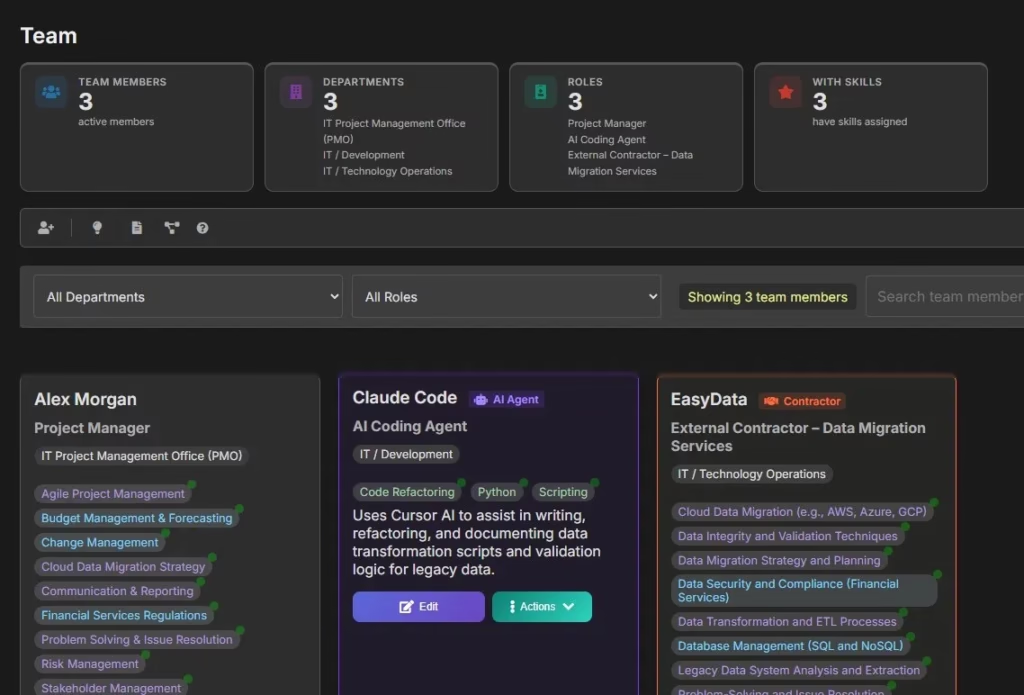
When you add a team member to a project in CoMng.AI, you can designate them as an AI Agent. The platform supports autocomplete for common systems: Claude Code, Claude Sonnet, GPT-4o, Gemini CLI, GitHub Copilot, Cursor AI, Devin, and others. You give them a role, a department, and the skills relevant to your project.
From that point on, the AI agent exists in your team roster alongside your human developers, analysts, and contractors. They can be:
- Assigned tasks manually by the PM
- Assigned tasks automatically by CoMng.AI’s Smart Assign engine (which weighs skills, workload, and dependencies)
- Included in your RACI matrix
- Tracked against deadlines and milestones on your Gantt chart
This isn’t cosmetic. The agent’s assignments are real project records – with effort estimates, success criteria, dependencies, and priority scores.
The Work Order: From Project Context to Agent-Ready Brief
Here’s where the execution gap actually gets closed.
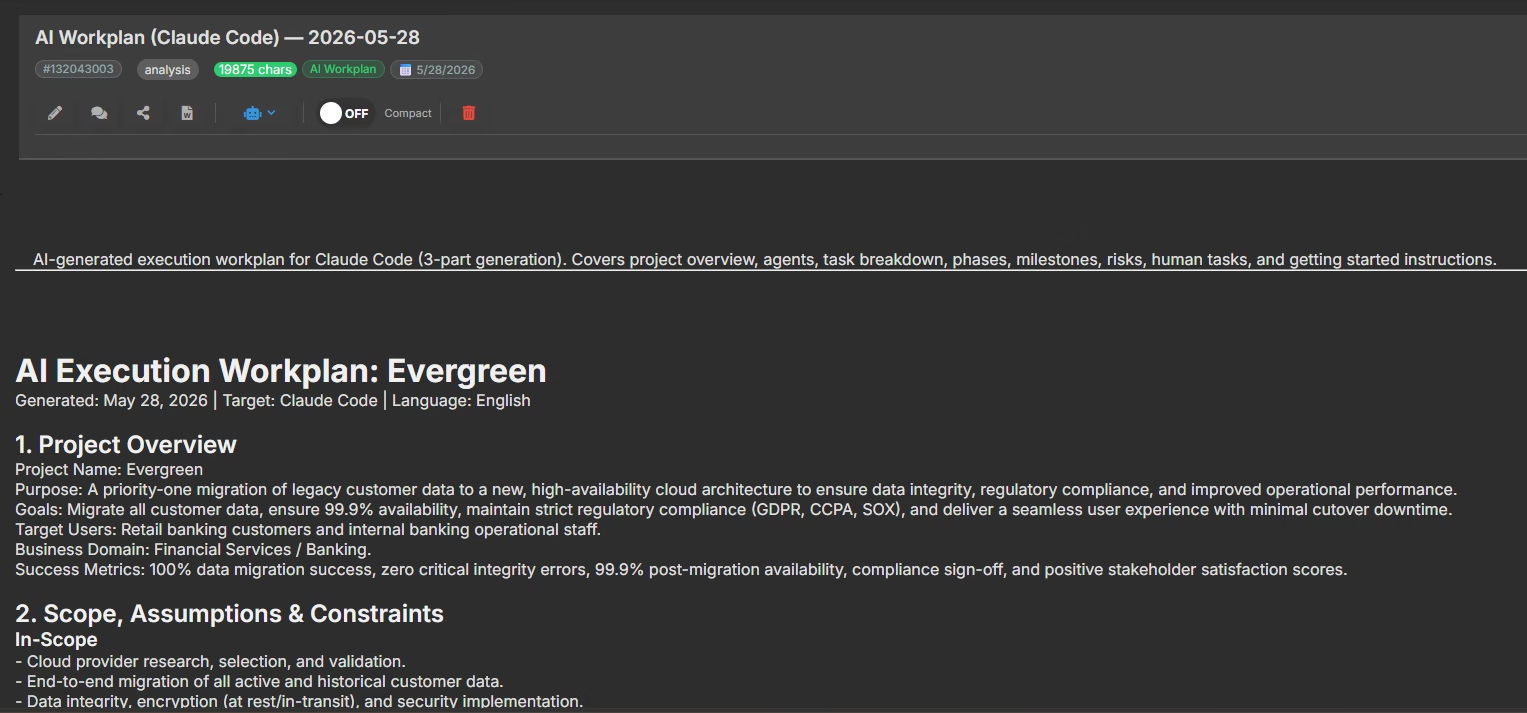
Once tasks are assigned to an AI Agent team member, you generate what CoMng.AI calls an AI Agent Work Order – a structured markdown document that packages everything the agent needs to start working immediately.
A Work Order for a Coding Agent might include:
- Project overview – objectives, scope, current status
- All assigned tasks – titles, full descriptions, acceptance criteria
- Effort estimates and due dates for each task
- Dependencies – what must complete before this agent can start
- Active blockers – issues flagged in the project’s RAID+ register
- Priority signals – which tasks are on the critical path
This isn’t a vague prompt. It’s a structured execution brief that a capable AI agent can consume and act on without follow-up questions.
You take that Work Order and pass it directly to Claude Code, Gemini CLI, or whichever agent is handling that scope. The agent has everything it needs. No context-hunting. No “can you share the full requirements?” back-and-forth.
One Workplan vs. Per-Agent Work Orders: Why the Difference Matters
There’s an important distinction worth making here.
Many teams experimenting with AI execution create one massive prompt – a single “AI workplan” that tries to describe the entire project. The idea is to give the AI maximum context. The reality is that you end up with an unfocused, overwhelming instruction set that produces inconsistent results.
CoMng.AI supports both approaches, but the per-agent Work Order model is where the real value is.
Here’s why:
A single AI workplan is useful for high-level planning – understanding what the project needs, generating an initial task structure, running risk assessments. CoMng.AI’s autonomous workplan engine will auto-generate 85+ tasks from a single project description, so you get that coverage immediately.
But for execution, you want per-agent specificity. Your AI Coding Agent doesn’t need to know what the AI QA Agent is doing. Your AI Data Analyst doesn’t need the API integration spec. Each agent gets a lean, focused brief scoped to exactly their assigned work – with full project context for coherence, but without the noise.
This is how real software teams are structured. It’s how CoMng.AI structures AI teams too.
Seeing This in Practice: A Cloud Migration Project
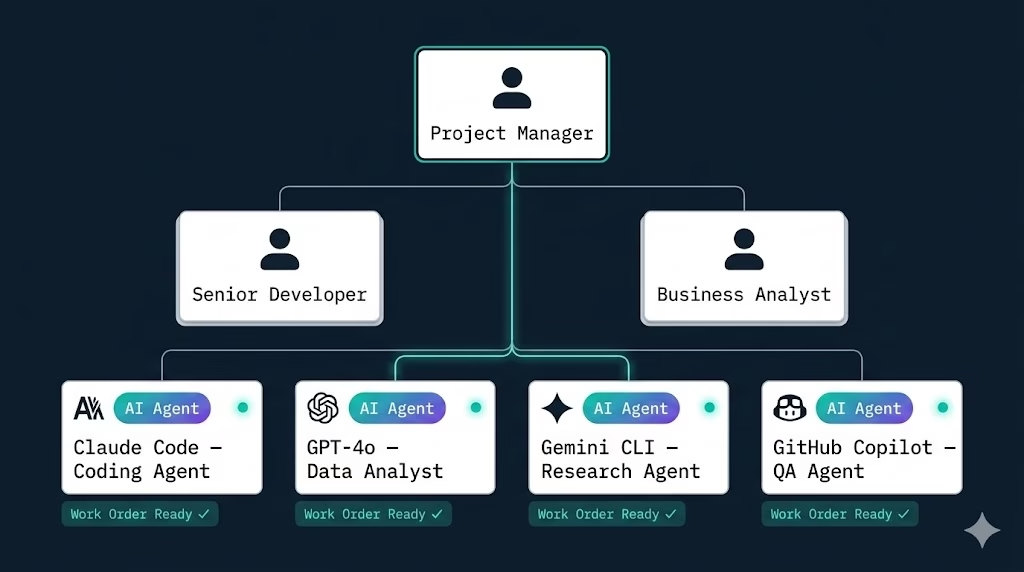
Consider a cloud migration project running in CoMng.AI with four AI Agent team members:
AI Data Analyst Agent – assigned to analyze migration logs, identify data discrepancies, and synthesize findings into executive reports. Uses GPT-4o.
AI Coding Agent – assigned to write, refactor, and document data transformation scripts and validation logic for legacy data. Uses Cursor AI.
AI Research Agent – assigned to research cloud provider benchmarks, regulatory updates, and document legacy system dependencies. Uses Claude Sonnet.
AI QA Agent – assigned to generate test cases and validate migration scripts against source data definitions. Uses GitHub Copilot.
Each of these agents lives on the team page. Each has tasks assigned with full context. When the PM clicks Generate Work Order on the Coding Agent’s card, CoMng.AI produces a markdown document listing every assigned task with descriptions, dependencies, effort, due dates, and blockers – ready to drop into Cursor AI or Claude Code.
The Coding Agent executes. As it works, it can update task progress directly in CoMng.AI – marking tasks in progress, flagging blockers, logging completion. The PM sees real-time status in the Kanban board and Gantt chart without chasing anyone down.
This is automated project execution AI – not as a concept, but as a workflow.
What Gets Automated (and What Doesn’t)
To set realistic expectations:
CoMng.AI automates:
- Task generation from project descriptions (85+ tasks from one brief)
- Optimal task assignment across human and AI team members
- Work Order generation with full project context
- Timeline optimization based on dependencies and workload
- Progress tracking as agents update task status
- Risk flagging when blockers are logged
You still control:
- Which AI agent systems you use for execution
- Reviewing and approving generated task plans before they apply
- The final judgment on scope, priority, and delivery decisions
The PM doesn’t disappear. The PM stops doing administrative work and starts doing actual management.
Why This Is the Right Time to Build This Way
The AI agent ecosystem is maturing fast. Claude Code, Gemini CLI, and OpenAI’s agent frameworks are increasingly capable of handling real engineering work autonomously. The bottleneck isn’t the agents anymore – it’s the infrastructure around them.
Teams that build proper agent management workflows now – with structured context, clear assignments, and closed-loop feedback – will execute faster than teams still copy-pasting prompts in 2025.
CoMng.AI is MCP-ready, meaning it can integrate directly into AI agent pipelines via its native MCP server and API. As the agent ecosystem evolves, the context handoff becomes increasingly automated. You’re not building for today’s workflow – you’re building for the one coming in the next 12 months.
The gap between project planning and AI execution is closing. The teams building the bridge now are the ones who’ll ship faster, with fewer overruns, and without scaling headcount to match.
Getting Started with AI Agent Task Management
If you want to start running AI agents as real team members in your projects:
- Set up your project in CoMng.AI – describe your project and let the autonomous workplan engine generate your task structure.
- Add your AI agents to the team – designate the systems you’re using (Claude Code, Gemini CLI, etc.) and assign them relevant roles.
- Assign tasks – use Smart Assign to let CoMng.AI recommend the right tasks for each agent based on skills and workload, or assign manually.
- Generate Work Orders – one click produces a structured markdown brief for each agent, ready for execution.
- Feed the Work Order to your agent – paste it into Claude Code, Gemini CLI, or your automation pipeline. The agent has everything it needs.
- Track in real time – as agents update progress, your project stays current without manual status meetings.
Tired of writing prompts from scratch every time you need your AI agents to work? See how CoMng.AI generates structured Agent Work Orders automatically – try it free.
Leave a Reply