Budget Stewardship: Linking Every Dollar to Deliverable Progress
A budget that lives in a spreadsheet tells you what you planned to spend. A budget linked to the work tells you whether the money is buying progress. That second question is where overruns are caught early.
Budget stewardship links every cost line to the work it pays for. CoMng.AI tracks lines from Draft through Approved to payment, lets AI suggest lines and drafts a justification per line, and computes cost variance, CPI and EAC from task progress on approved, task-linked lines.
- Estimate to payment in one ledger: budget lines move through Draft, Pending, Approved or Denied, and payments are tracked per line.
- AI at each step: suggested budget lines, auto-tags, document import, alternatives, OKRs, cost of delay and a justification document.
- KPIs from the work: cost variance (CV), cost performance index (CPI) and estimate at completion (EAC) are computed from task progress on approved, task-linked lines.
- Pulse watches too: unapproved lines and payments against budgeted amounts raise alerts.
The Gap Between Spend and Progress
Spend alone is a poor signal. Having spent 60% of a budget is fine at 70% complete and alarming at 30%. To tell the difference you need cost and progress in the same system, linked line by line. Most teams keep them apart: finance in a spreadsheet, progress in a tracker, and a monthly reconciliation that always arrives late.
One Ledger From Estimate to Payment
The Budget page is a per-project ledger. Every line has a category, amount, vendor, approver and status. Two separate fields matter: line status (Draft, Pending, Approved, Denied or Removed) tracks the approval decision, and payment status (Unpaid, Partial or Paid) tracks whether money has actually left. A KPI bar shows Total Budget, Approved (with pending as a sub-label), Spent (from recorded payments, not budgeted amounts), Remaining, % Utilized (green below 70%, orange 70 to 89%, red at 90% and above) and overdue payments.
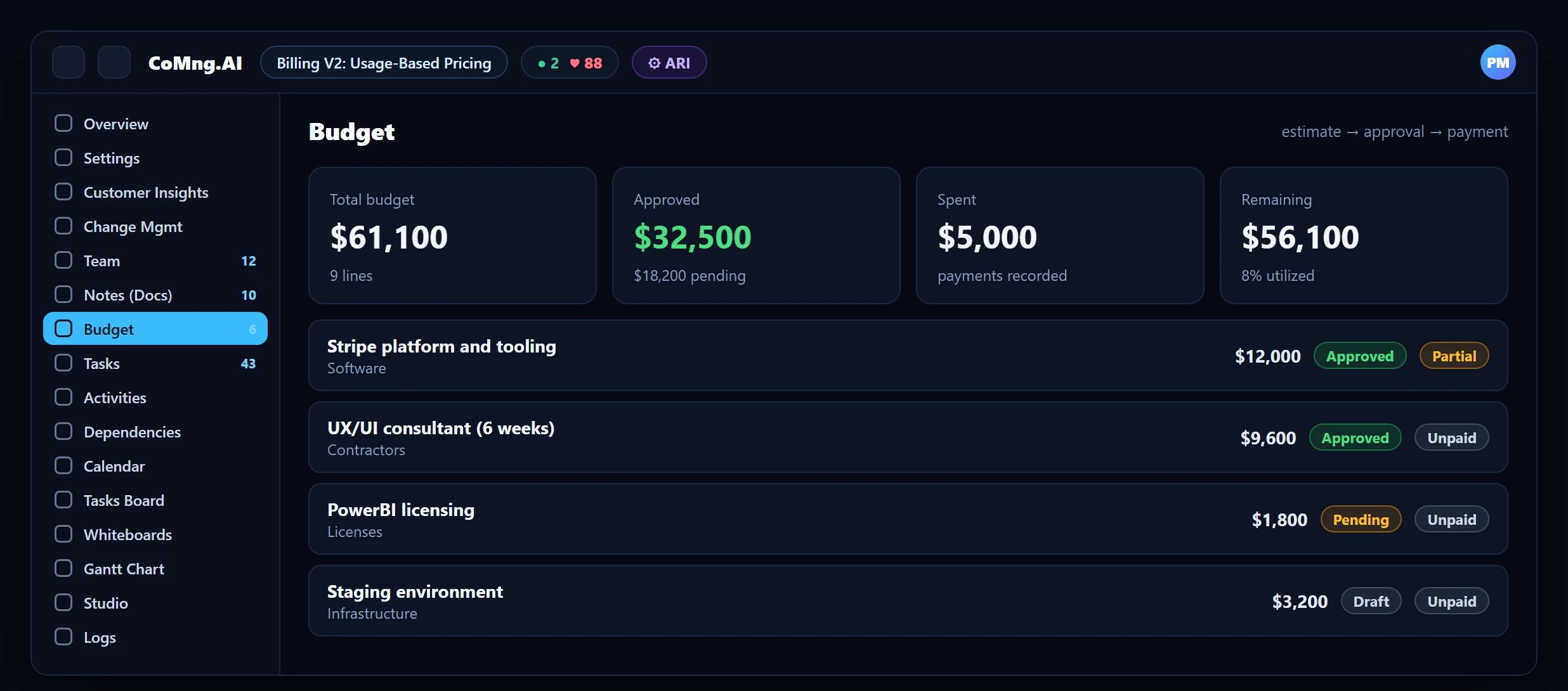
Use Removed rather than deleting a line when you want to keep history but exclude it from totals.
AI Help at Each Step
- Suggest Budget Lines: proposes likely cost categories and amounts from the project's goals, scope and risks, added as drafts for review.
- Import from a document: PDF or spreadsheet becomes budget lines.
- Auto-tag: the shared colour-coded tag system also labels budget lines.
- AI actions per line: Alternatives, Budget OKRs (objectives and key results with tasks auto-created), Cost of Delay and Brainstorm.
- Create Justification: drafts a justification document and saves it as a project note.
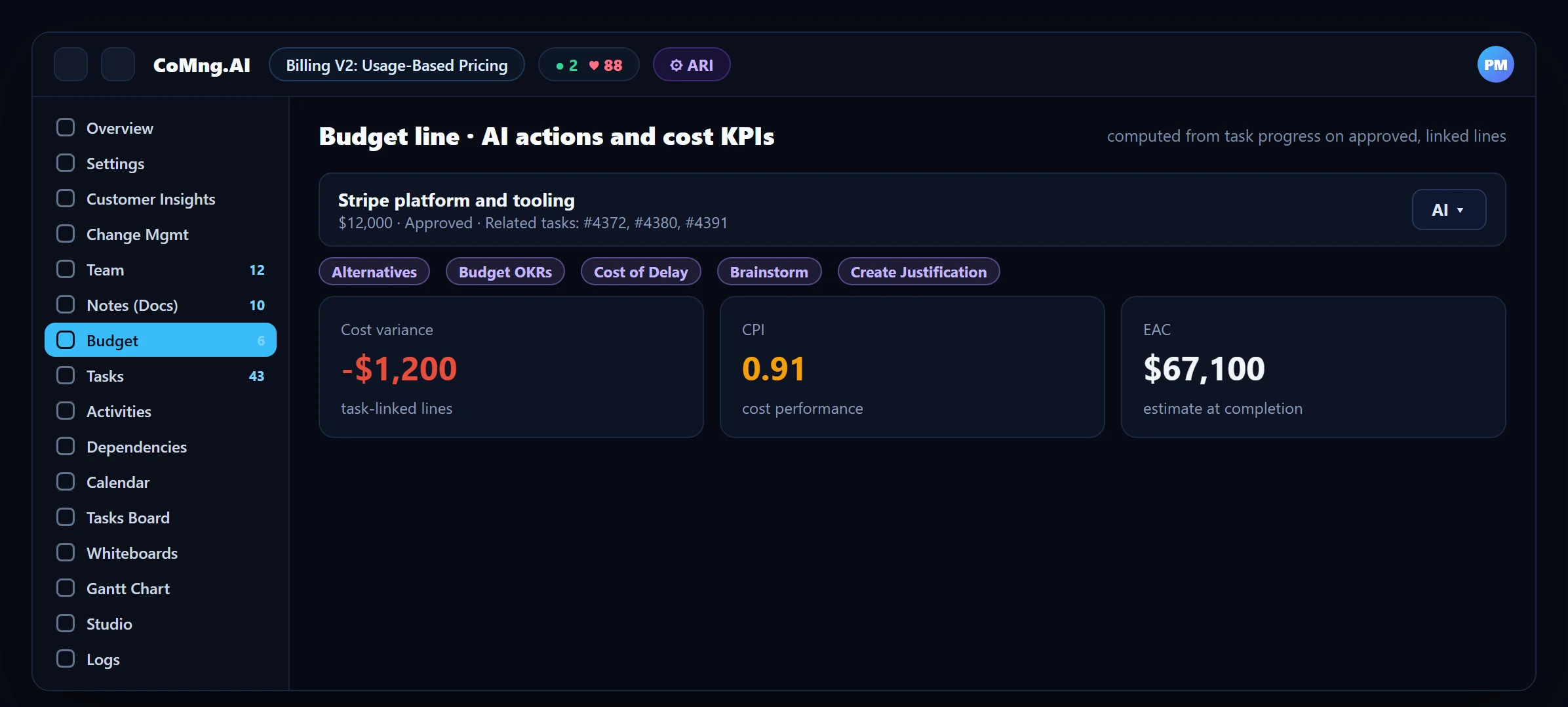
Create a Justification of Line Items Using AI
Each budget line has a Create Justification action: AI drafts a justification document from the line and the project context and saves it as a project note, which then appears as View Justification. For a consolidated justification across several lines, use the full exportable budget report together with the Document & Email Writer in Studio, which can pull real project data (including budget lines) into a draft. Always review amounts and rationale before sending to an approver.
Linking Lines to Tasks
A budget line can be linked to related tasks. That link is what makes the cost KPIs meaningful: CoMng.AI computes CV (cost variance), CPI (cost performance index) and EAC (estimate at completion) server-side from task-completion progress on approved, task-linked lines. Lines without linked tasks still count for budget and payments, but cannot show how much was delivered for the money, which is a good reason to link them.
| KPI | Question it answers |
|---|---|
| CV (cost variance) | Are we over or under budget for the work completed? |
| CPI (cost performance index) | How much value are we getting per unit of cost? |
| EAC (estimate at completion) | Where will the total land if the current pattern continues? |
What Pulse Watches for You
Project Pulse includes budget signals in its health read: unapproved budget lines pending approval, payments compared with budgeted amounts, and overspent lines, for which it can draft a change request. Budget changes themselves go through change requests, so an increase is approved with an impact assessment and recorded. See Change Request Impact Assessment and Predictive Project Risk Telemetry.
- Spend and progress in separate files
- Overruns found at month-end
- Budget changes approved by email
- Lines linked to tasks, KPIs from task progress
- Overspend raised as a Pulse alert
- Budget changes as change requests
About CoMng.AI
CoMng.AI is an AI-native project management platform that generates a project's plan, tasks, risks and budget from a description or document, monitors project health in real time, and gives both human teams and AI coding agents live access to the same project data, with a person approving every AI-generated change.
Link every dollar to the work it pays for
Open the Budget page, let AI suggest budget lines from your goals and scope, and track approval to payment in one place.
Frequently Asked Questions
How do I track a project budget in CoMng.AI?
Use the Budget page: create or AI-suggest budget lines, send them through approval (Draft, Pending, Approved or Denied) and record payments per line. KPI cards show total, approved, spent, remaining and utilization.
What is the difference between line status and payment status?
Line status tracks the approval decision. Payment status (Unpaid, Partial, Paid) tracks whether money has actually been paid. Only recorded payments count as Spent.
How are CV, CPI and EAC calculated?
Server-side from task-completion progress on approved, task-linked budget lines. Link budget lines to the tasks they pay for to get meaningful values.
Can AI create a budget for me?
Suggest Budget Lines proposes categories and amounts from the project's goals, scope and risks as draft lines. You review and approve them, and you can also import budget lines from a PDF or spreadsheet.
How are budget changes controlled?
Through change requests with impact assessment and approval. Pulse can also draft a request when a budget line is overspent.
Can AI write a budget justification for my line items?
Yes. Create Justification on a budget line drafts a justification document and saves it as a project note. For a consolidated version across lines, combine the exportable budget report with the Document and Email Writer, then review the figures before submitting.
Related reading
See the full guide: AI Project Management Strategy & Buying Guide