ARI: The In-Project Teammate for Governed Project Execution
General chatbots are impressive and context-blind. Project work needs the opposite: an assistant that starts with the project already loaded and works inside guardrails. Here is the comparison, dimension by dimension.
A generic AI chatbot only knows what you paste into it and gives you text to copy. An in-project assistant like ARI starts with the live project data, drafts real changes in the platform, and works behind approval gates, a sandbox preview and audit logs.
- Context is the difference: a chatbot answers from what you paste; ARI answers from live tasks, milestones, decisions and conflicts.
- Action is the second: ARI drafts real change requests and notes in the project; a chatbot gives you text to copy.
- Governance is the third: approval gates, sandbox preview and audit logs apply to ARI's output.
- When a chatbot is fine: brainstorming, drafting and research that does not need your project data.
Why a Generic Chatbot Falls Short for Project Work
Ask a general chatbot "is my Stripe migration on track?" and the best it can do is ask you for the plan. You paste tasks, dates and notes; it answers; you carry the answer back and edit the tracker by hand. Every step is manual, and the answer is only as current as your last paste.
That is fine for brainstorming. It is a poor fit for execution, where the value is in the live data and in making changes safely.
Side by Side
| Dimension | Generic AI chatbot | ARI (in-project) |
|---|---|---|
| Project knowledge | Only what you paste | Live tasks, milestones, dependencies, budget, team, notes and decisions |
| Schedule awareness | None | Knows detected milestone conflicts and confirmed milestone dependencies |
| Memory of decisions | Lost between chats | Reads recorded decisions from the settings lists, change requests and notes |
| Taking action | Text for you to copy | Drafts change requests, notes, tasks and comments in the project |
| Safety | Whatever the prompt says | Approval gate, sandbox preview, deterministic bulk-change flag, audit log |
| Customer text | Treated like any prompt | Customer input is evaluated, never obeyed as an instruction |
| Limits | May claim abilities it lacks | States what it cannot do (email, calendar, monitoring) |
Context Changes the Answer
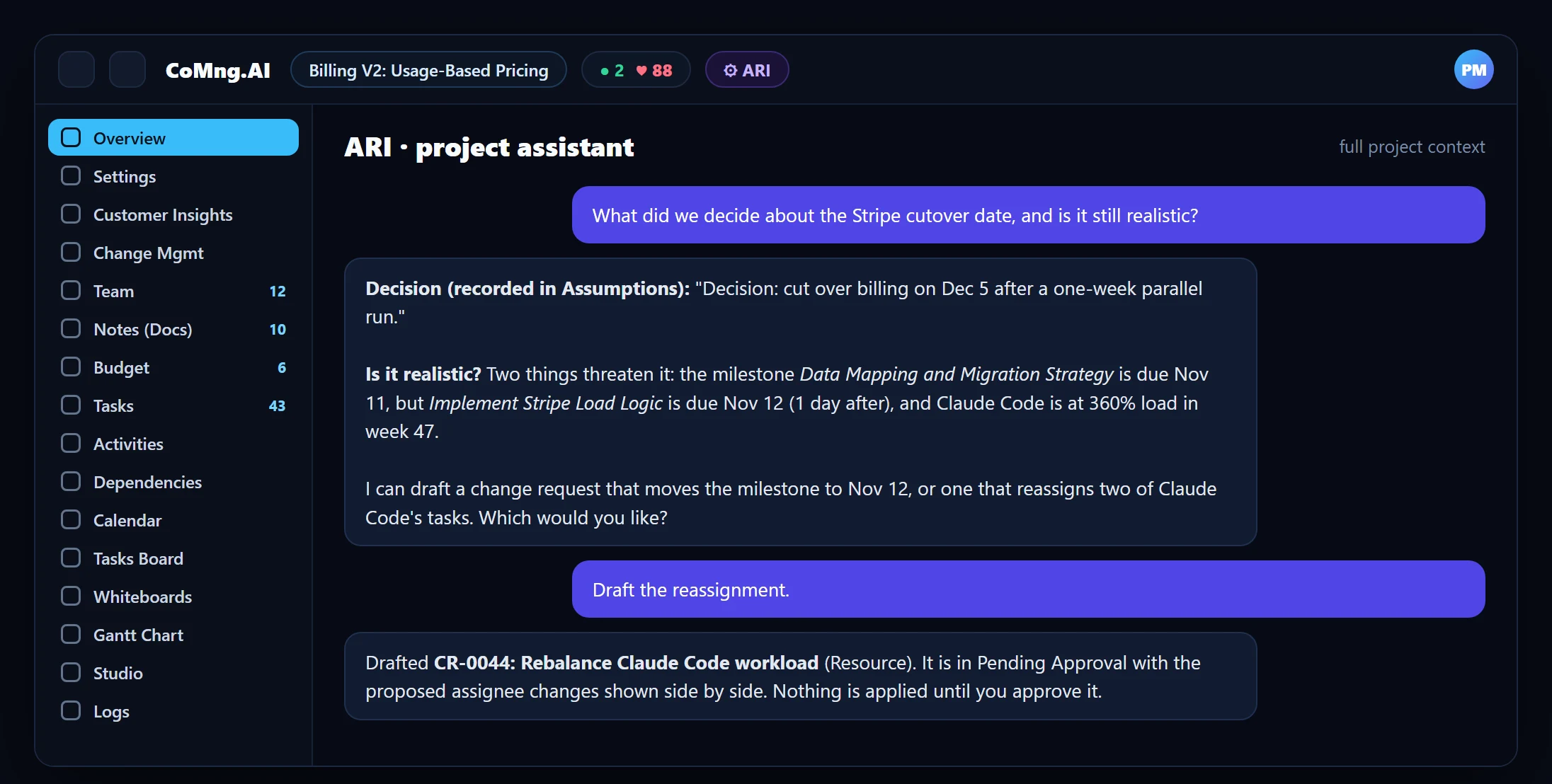
Take the same question: "Can we hold the Dec 5 cutover?" A chatbot gives general advice about cutovers. ARI knows that a milestone is flagged Blocked, that one person is at 360% load in week 47, and that a decision to run a one-week parallel test was recorded last month. The answer is specific, and so are the options it offers.
Action With Guardrails
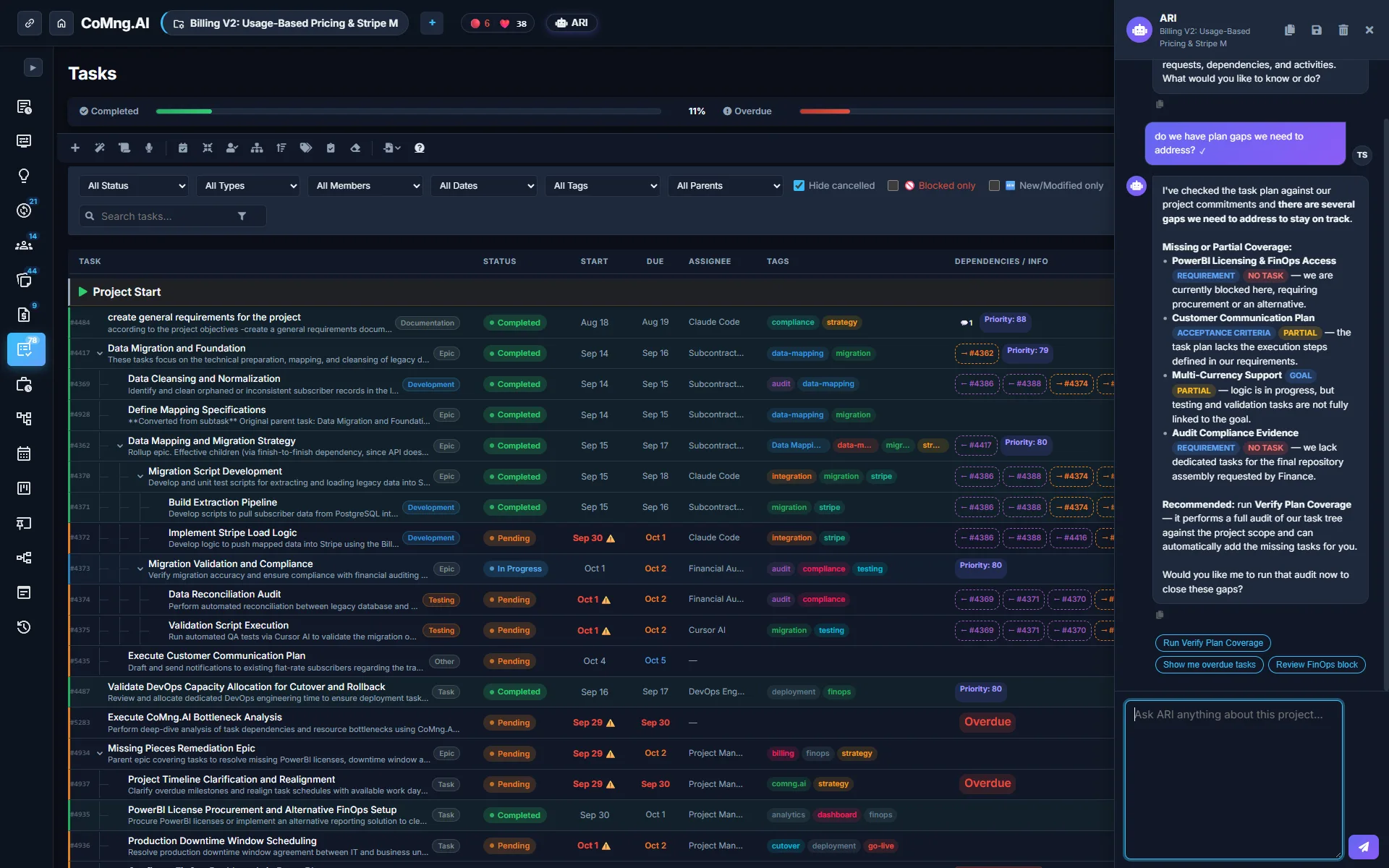
The practical risk of an AI that can act is that it acts wrongly. ARI's answer is structural: it drafts, a person approves. A change request opens in a sandbox with current and proposed values side by side, requests that sweep five or more objects are flagged by code, and applied changes land in the audit log. Details in AI Governance and Safety Gates and AI Project Assistant ARI.
When to Use Which
- Use a general chatbot for open-ended brainstorming, writing help and research that does not depend on your project data.
- Use ARI for anything where the answer depends on the plan: status, risks, scheduling, scope, decisions, and for any change you want tracked.
- Use both through MCP if you prefer a general assistant: it can connect to the project with a scoped API key and read and write through the same governed interface (see MCP Server for Project Management).
- Paste, ask, copy, edit by hand
- Answers that ignore the plan
- Decisions lost between chats
- Ask inside the project
- Answers grounded in live data
- Decisions recorded and recoverable
About CoMng.AI
CoMng.AI is an AI-native project management platform that generates a project's plan, tasks, risks and budget from a description or document, monitors project health in real time, and gives both human teams and AI coding agents live access to the same project data, with a person approving every AI-generated change.
See AI propose changes while a person stays in control
Open a project, ask ARI to draft a change request, and review the sandbox preview before anything is applied.
Frequently Asked Questions
How is ARI different from ChatGPT or Claude for project management?
General chatbots only know what you paste into them. ARI runs inside the project with live tasks, milestones, budget, team, notes and recorded decisions, and it can draft changes in the platform behind approval and audit controls.
Can I use my own AI assistant with CoMng.AI instead?
Yes. Through the MCP server and a scoped API key, assistants such as Claude, Claude Code, Codex CLI, Gemini CLI and Antigravity can read and write project data using the same governed interface.
Does ARI remember past decisions?
It reads decisions recorded in the Project Settings lists, pending change requests and notes, so it can answer what was decided and record new decisions through a change request.
Is ARI safe to let loose on a big project?
ARI drafts and a person approves. Large or destructive requests are flagged deterministically and set to Critical priority, and everything applied is audited.
What does ARI not do?
It cannot send emails, manage calendars or monitor systems outside CoMng.AI, and it will say so rather than imply it did.
Related reading
See the full guide: AI Agents, ARI & MCP Guide