
It’s Monday morning. Your grant report is due Friday. A new funder kicks off onboarding next week. Three of your team members are out – one sick, one at a conference, one who quietly gave notice last Thursday.
You open your laptop. Your inbox has 47 unread emails. Your spreadsheet has three conflicting versions. And you’re not sure who was supposed to send the program update to the board.
Sound familiar? That’s project management. It just doesn’t have a system.
What Is Nonprofit Project Management – and Why It Matters Now
Nonprofit project management is the practice of organizing people, tasks, timelines, and budgets to deliver programs and meet grant obligations – on time, within scope, and without burning out your team.
Here’s the thing: you’re already doing it. Every grant you run is a project. Every fundraising event is a project. Every new program launch, advocacy campaign, community service cycle – projects, all of them.
The difference is that most corporate project management tools were built for tech companies. They assume dedicated project managers, six-figure budgets for implementation, and staff who have time to learn a new platform.
Nonprofits have none of that. What nonprofits have is mission – and a team running on heroic personal effort.
Key takeaway: The problem isn’t that your team lacks skills. It’s that they’re managing complex, multi-stakeholder projects with no infrastructure to support them.
The Hidden Cost Your Organization Isn’t Counting
Here’s a number worth sitting with: nonprofits spend an estimated 15–25% of staff time on administrative coordination – status updates, spreadsheet maintenance, chasing people for progress reports, manually building funder reports from scratch.
For a 10-person team, that’s roughly 6–10 hours per person per week. Per year, you’re looking at 200–400 hours of mission-critical staff time going to administration instead of programs.
That’s not a people problem. That’s an infrastructure problem.
The most common workarounds – and why they fail:
- Spreadsheets track data but don’t manage work. They break when someone adds a column, and they tell you nothing about what’s actually at risk.
- Email threads are searchable in theory and unusable in practice. When someone leaves, they take the context with them.
- Shared drives are a filing cabinet, not a system. A filing cabinet that grows and grows and never gets organized.
- Project tools built for tech teams (Asana, Monday, Jira) require a level of process knowledge that most nonprofit staff don’t have – and a learning curve no one has time for.
The result: every grant cycle restarts from zero. New spreadsheet. New email thread. New shared folder. Same chaos.
| Action | 📋 Spreadsheets & Email | 🤖 CoMng.AI |
|---|---|---|
| Starting a new grant | Blank spreadsheet, rebuild from scratch | Upload grant doc → full plan in under 20 min |
| Tracking progress | Fragmented manual status updates | Live health score, auto-updated |
| Staff onboarding | Scattered docs & email threads | Living knowledge base, searchable |
| Funder reporting | Hours of data gathering & formatting | One-click export: milestones, budget, risks |
| Knowledge retention | Institutional knowledge lost in inboxes | Every decision captured & retained |
| Budget tracking | Separate spreadsheet, drifts from plan | Integrated with tasks & milestones |
| Risk management | Discovered when things go wrong | Auto-generated risk register from day one |
| Multiple grants | Separate files, no unified view | Multi-project dashboard with health scores |
The difference isn’t complexity – it’s whether your system helps you or makes you do all the work.
What a Real Project System Does for a Nonprofit
A proper project system isn’t about software. It’s about four things:
1. Starting with a plan, not a blank page. When a new grant is awarded, the team shouldn’t have to build the work plan from scratch. The grant agreement already contains the milestones, deliverables, reporting dates, and budget structure. A real system reads that document and builds the plan.
2. Keeping everyone aligned without meetings. Your team shouldn’t need a weekly status meeting to know where things stand. They should be able to open a dashboard, see what’s on track and what’s not, and act accordingly.
3. Making funder reporting fast. A report shouldn’t take three hours to build. If the data is in the system – tasks completed, budget spent, milestones hit – the report should write itself. Or nearly.
4. Preserving knowledge when people leave. When a program manager leaves, their replacement shouldn’t start from scratch. Every decision, every note, every update should live in the system – not in someone’s head or inbox.
This is what separates organizations that scale from ones that survive grant cycle to grant cycle.
How CoMng.AI Works for Nonprofits in Practice
Modern AI co-managers like CoMng.AI were built to close exactly this gap – without requiring a PMP certification or a dedicated operations manager.
Here’s what that looks like in real workflow:
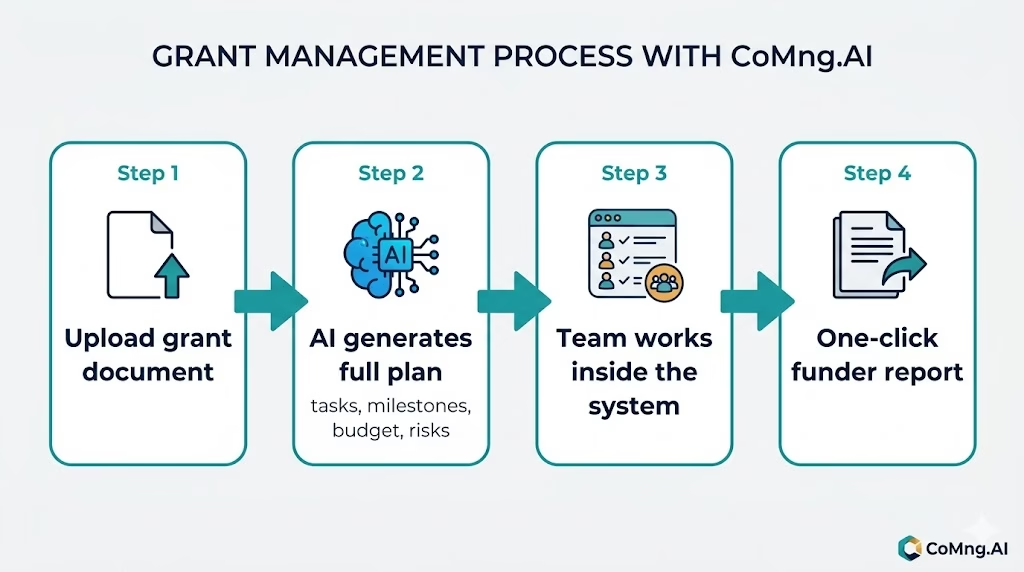
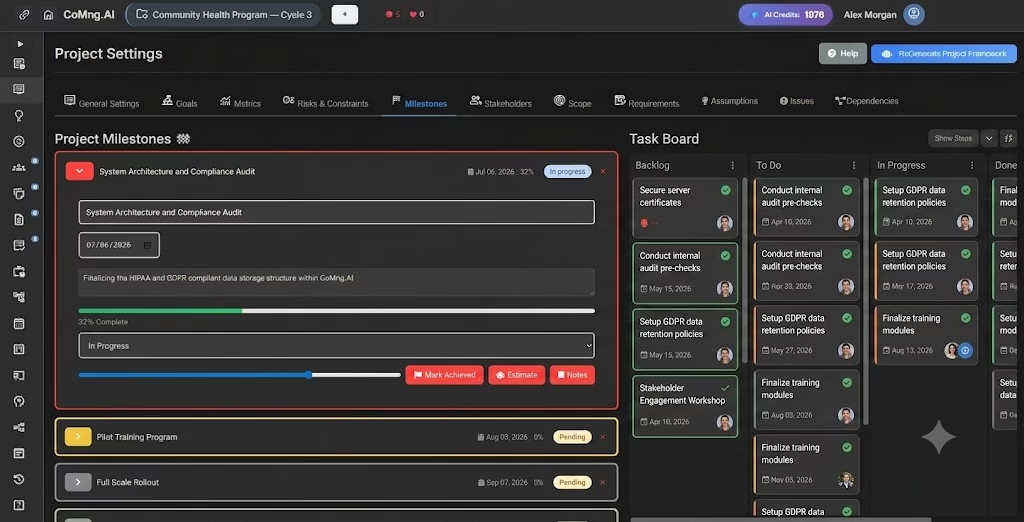
Upload your grant agreement. Get your project plan. CoMng.AI reads your grant document and generates a full project structure: tasks, milestones, timeline, budget line items, team roles, and a risk register. Not a template – an actual plan built from your document. What a consulting firm would charge thousands to produce, your team gets in under 20 minutes.
Your AI co-manager tracks progress for you. The platform monitors task completion, flags delays before they become problems, and surfaces risks your team might miss. You don’t need to run the weekly status meeting – CoMng.AI already knows what’s slipping.
One-click funder and board reports. When your report is due Friday, you don’t build it from scratch. CoMng.AI pulls together milestone completion, budget burn, open risks, and upcoming deliverables – and formats it for export. What used to take half a day takes five minutes.
Staff leave. Knowledge stays. Every decision, meeting note, and project update is captured in a living knowledge base. When someone leaves – and someone always leaves – their replacement gets fully up to speed in 30 minutes, not six weeks.
The key difference from traditional tools: you don’t need to know how to manage a project to use it. Describe what you’re trying to accomplish. Upload your documents. The AI does the structuring.
Five Signs Your Nonprofit Needs a Better System
Ask yourself these honestly:
- Do new grants start with a blank spreadsheet? If yes, you’re rebuilding from scratch every cycle.
- Does your team spend more than 2 hours a week on status updates? That time should go to programs.
- Would a staff departure cause a major project disruption? If yes, you have no knowledge infrastructure.
- Do funder reports take more than an hour to produce? The data exists – it just isn’t organized.
- Are you running 3+ grants simultaneously with no unified view? You’re managing a portfolio without a portfolio system.
If you answered yes to two or more of these, the good news is: the problem is structural, not personal. And structural problems have structural solutions.
The Nonprofits That Will Thrive Are the Ones That Get Organized
The sector is changing. Funders want more reporting. Programs are getting more complex. Staff turnover isn’t slowing down.
The organizations that will scale – the ones that can take on a new grant without their executive director having a panic attack – are the ones that build operational infrastructure now. Not when they can afford it. Now, while the mission still needs it.
You don’t need a full-time project manager. You don’t need to learn enterprise software. You need a system that does the organizing for you.
Start your first project free – no credit card, no training required. Try CoMng.AI at comng.ai
Leave a Reply