Title tag: Microsoft Project Online is Retiring in September 2026 – What to Migrate To Meta description: Microsoft Project Online retires September 30, 2026. Compare migration options – Planner Premium, Project Server SE, and CoMng.AI – and find out which fits your PMO. Target URL slug: /microsoft-project-online-retiring-2026-migration/
The deadline is not negotiable. On September 30, 2026, Microsoft Project Online goes dark. No grace period. No read-only mode. No extensions. Every project, every portfolio, every resource plan, every historical record inside your Project Web App – inaccessible, permanently, from that date forward.
Microsoft announced the retirement on September 5, 2025, giving organizations just over a year to plan. That window is now considerably shorter, and it got shorter faster than many PMOs expected. The April 2026 milestones – new tenant creation blocked from April 1, and the SharePoint 2013 workflows that power Project Online governance formally broken from April 2 – have already hit. If your PMO depends on workflow-driven project types, demand management, or approval routing, those processes are already broken or breaking now.
The migration conversation is no longer theoretical. It is urgent.
This article gives you the complete picture: what is actually happening and when, what your migration options are and what each genuinely offers, where each falls short, and why a growing number of PMO leaders are using this forced transition as an opportunity to move to something fundamentally better than what they had – not a like-for-like replacement of a legacy platform, but an AI-native system that actually runs the project alongside them.
What is happening – and the dates that matter
Project Online will officially retire on September 30, 2026. After that date, the service will be unavailable and all project data within it will no longer be accessible. Microsoft has been unambiguous: there is no read-only mode, no data recovery window, and no possibility of extension.
The timeline of critical milestones, in order:
October 1, 2025 – End of new sales. New Project Online-only SKUs are no longer available to new customers. If your organization was not already licensed, you cannot acquire new licenses. This milestone has passed.
April 1, 2026 – New tenant creation blocked. Starting April 1, 2026, current customers can no longer create new tenants in Project Online. Any test environments needed for migration validation had to be created before this date. This milestone has passed.
April 2, 2026 – SharePoint 2013 workflows broken. This is the hidden crisis inside the official retirement. Project Online’s governance, approvals, and stage-gate automation run on SharePoint 2013 workflows – and Microsoft has deprecated those. When these workflows were removed, automated PMO processes broke – six months before the platform itself goes dark. If your organization uses workflow-driven project types, demand management, or approval routing, the functional impact is happening now.
September 30, 2026 – Full retirement. After this date, all data becomes inaccessible. Microsoft’s statement is unambiguous: “After Project Online is retired in September 2026, you will no longer be able to access your projects or any associated data within the service.”
What is not affected: Project desktop remains available and is not impacted by this change. Project Server Subscription Edition and Microsoft Planner are also not affected.
Why Microsoft is retiring Project Online
Understanding the reason matters for choosing where to go next. Microsoft’s stated reason is that Project Online’s legacy architecture limits innovation and integration. With certain SharePoint Online workflow design tools deprecating in 2026, Microsoft is prioritising innovation within Planner, Microsoft 365 Copilot, and the Project Manager agent.
In plain terms: Project Online was built on a SharePoint foundation that is now too old to carry AI capabilities. It cannot be modernized without being rebuilt from scratch. Rather than rebuild it, Microsoft is directing users to Planner Premium – and is, in essence, conceding the enterprise PPM space to alternative platforms.
The retirement is due to legacy architecture and the lack of modern cloud AI and Copilot capabilities, as Microsoft partners have explained. IT buyers face a minimum three to six month window to successfully migrate enterprise project data.
This is not just a platform retirement. It is a signal that the era of manually configured, dashboard-centric, human-driven project management software is ending. The organisations that use this forced migration as an opportunity to move to genuinely AI-native systems will emerge in a fundamentally better operational position than those that simply swap one legacy tool for another.
Your migration options – an honest assessment
Every migration advisory will point you to three main options. Here is what each actually offers, where each genuinely falls short, and who each is right for.
Option 1: Microsoft Planner Premium (formerly Project for the Web)
Microsoft’s stated preferred successor. Planner brings together the simplicity of To Do, the collaboration of Planner, the power of Project for the web, and the intelligence of Microsoft 365 Copilot into a single experience. Premium features in Planner – included in Project Plan 3 and Project Plan 5 – deliver portfolios, baselines, dependencies, and Gantt charts.
What it does well: Deep Microsoft 365 integration, familiar interface for existing Microsoft users, included in many existing licences, and genuinely improved AI features via Copilot.
Where it falls short: Planner Premium caps at 3,000 tasks and 10 custom fields. For enterprise PMOs managing complex portfolios with hundreds of projects and thousands of tasks, this ceiling is hit quickly. It is also fundamentally still a task management tool with AI layered on top – Copilot assists when asked, but does not monitor, reason about, or act on your project autonomously. Some critical features, including EPT workflows, are expected to stop functioning around April 2026, affecting governance and approvals. Power BI reports feeding from the Project Online OData feed will break and need to be rebuilt.
Right for: Teams migrating from Project Online’s simpler use cases – task tracking, team collaboration, basic Gantt scheduling – who want to stay in the Microsoft ecosystem and are comfortable with Copilot’s prompt-based assistance model.
Option 2: Project Server Subscription Edition (PSSE)
For enterprise organisations with complex PPM needs, Project Server Subscription Edition is the functionally equivalent replacement that preserves full project management depth. It is Microsoft’s current on-premises project and portfolio management platform.
What it does well: Closest functional match to Project Online for organizations with deep PM methodology requirements – custom project types, resource capacity planning, portfolio analysis, governance workflows. Familiar interface reduces retraining burden.
Where it falls short: It is on-premises or hosted infrastructure – meaning your IT team owns server provisioning, patching, and uptime. It is expensive: licensing, implementation, and infrastructure costs are substantial. And critically, it is not AI-native. PSSE is an updated version of the same generation of thinking that produced Project Online. It is more maintainable, but it has not fundamentally rethought what project management software should do in the AI era. You are paying to preserve the past.
Right for: Large enterprises with advanced PPM needs, dedicated PMO infrastructure teams, existing investment in Project desktop workflows, and a preference for on-premises control. Not right for organisations looking to modernise rather than simply migrate.
Option 3: Third-party platforms – Smartsheet, Monday.com, Asana
Competitors view this April 2026 deadline as a rare opportunity. Platforms like Smartsheet, Monday.com, and Asana are aggressively positioning themselves as modern alternatives to legacy Microsoft tools. These platforms offer AI-native features that legacy Project Online users have never experienced.
What they do well: Modern interfaces, strong collaboration features, faster time to value than PSSE, and genuine AI features that go beyond what Project Online offered.
Where they fall short: These platforms share a fundamental architectural limitation – they are still built on the assistant model of AI. AI features respond to prompts, generate content when asked, and automate specific rules. None of them monitor your project continuously, reason about critical path risk, generate complete stakeholder-ready reports from live data autonomously, or scaffold a full project structure from a single description. They are modern task trackers with good AI bolted on. For a PMO leaving Project Online after a decade, this is a meaningful improvement – but it is not the transformational shift this migration moment makes possible.
Option 4: CoMng.AI – the migration that modernizes, not just replaces
There is a fourth option that most Microsoft-centric migration advisors do not include in their comparisons, because it does not fit the “replacement” framing. CoMng.AI is not a replacement for Project Online. It is a different category of system entirely.
Where Project Online was a project tracking system – a structured database of tasks, resources, timesheets, and status – CoMng.AI is an Autonomous Execution System: an AI Co-Manager that thinks, plans, and executes alongside the project manager. Not a tool you use to manage a project. A system that co-manages the project with you.
The deck from CoMng.AI’s investor briefing puts the category distinction precisely: “Every PM tool requires a human to do all the thinking. None reason, self-alert, or self-organize a project.” CoMng.AI was built to solve exactly this – the gap between plans that exist and execution that remains manual.
Here is what that means in practice.
From one description to a fully operational project – in minutes
In Project Online, setting up a new project meant manually configuring every field: project type, custom fields, resource assignments, milestone dates, task structures, dependencies. A complex project could take days or weeks to properly instrument.
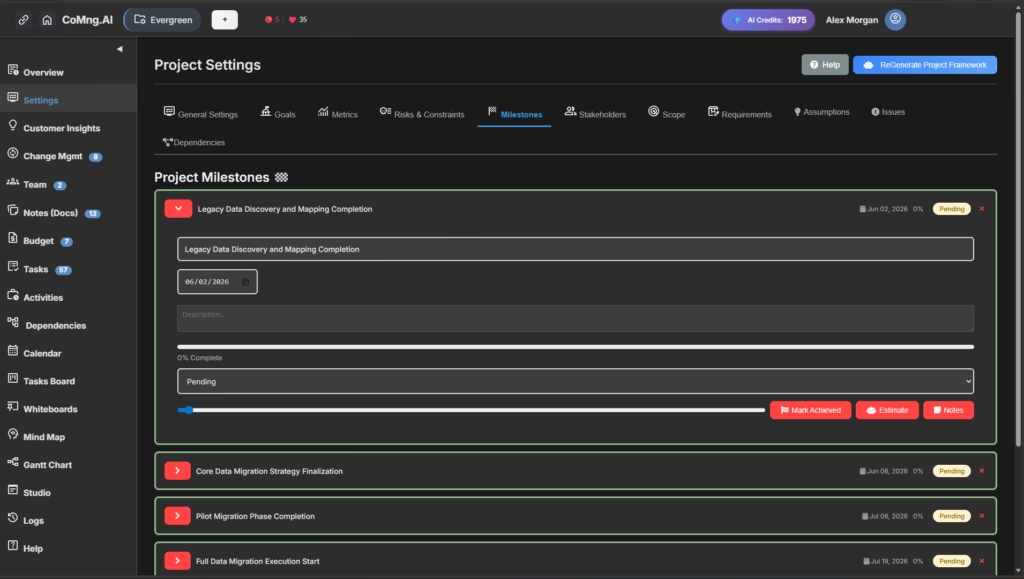
In CoMng.AI, you describe your project in plain language. The AI Co-Manager generates the complete framework automatically:
- Goals and success metrics – strategic objectives with measurable KPIs
- Timeline and milestones – realistic dates based on project scope
- Functional and non-functional requirements – fully defined from your description
- Stakeholders and roles – identified and mapped
- Risks and constraints – 25–35 identified risks with probability assessments and mitigation strategies
- Scope definition – clear boundaries generated from the project description
- 85+ tasks – each with subtasks, effort estimates, cost estimates, assignees, dependencies, and success criteria – generated automatically
Project Online never did this. It gave you a blank canvas and asked you to fill it in. CoMng.AI gives you a fully instrumented project in minutes – with no blank-slate problem.
Project Pulse: a live health score that replaces status meetings
Project Online had dashboards. They showed you what the data said. You still had to read the data, interpret it, identify what mattered, and write up the summary before it became a useful communication.
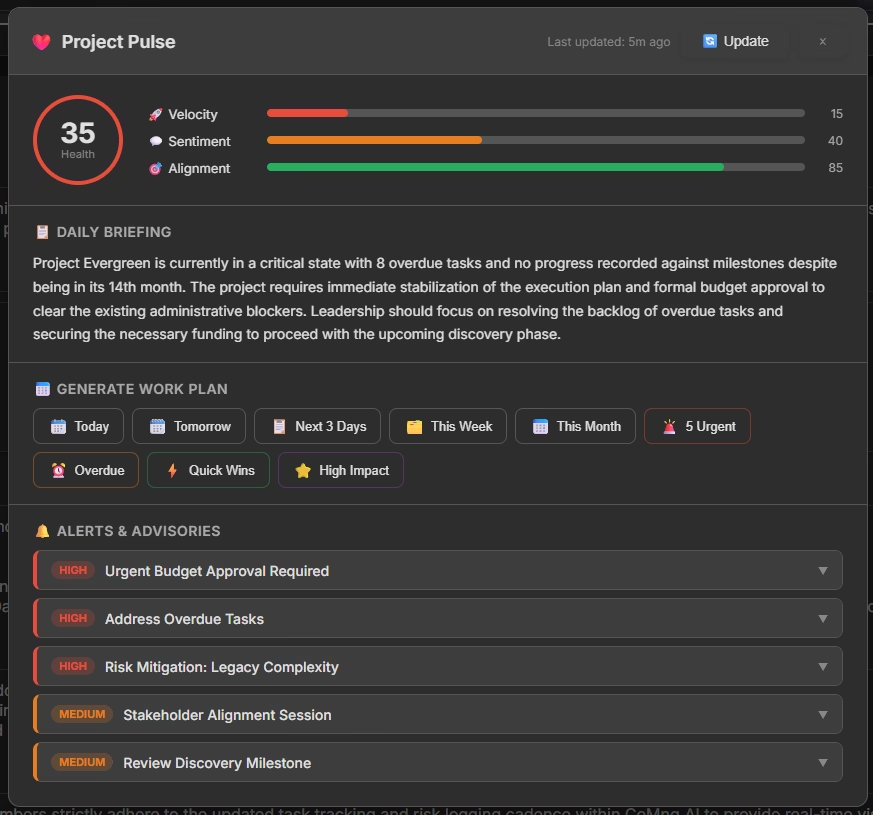
CoMng.AI has Project Pulse – a live health score composed of three dimensions: Velocity, Sentiment, and Alignment. This score updates continuously as project data changes, and is accompanied by a Daily Briefing: an AI-generated narrative summary of the project’s current state, delivered automatically, with priority-flagged action items (HIGH, MEDIUM, LOW) ranked by urgency.
Project Pulse replaces the Monday morning status meeting and the Friday afternoon reporting ritual. The AI has already read the project, decided what matters, and written the briefing. The project manager’s job is to review and act – not to compile.
Autonomous workplan generation – on demand or scheduled
Project Online required a human project manager to plan the work: define the tasks, assign the people, set the dates, manage the dependencies. Replanning after a scope change or delay meant hours of manual updating.
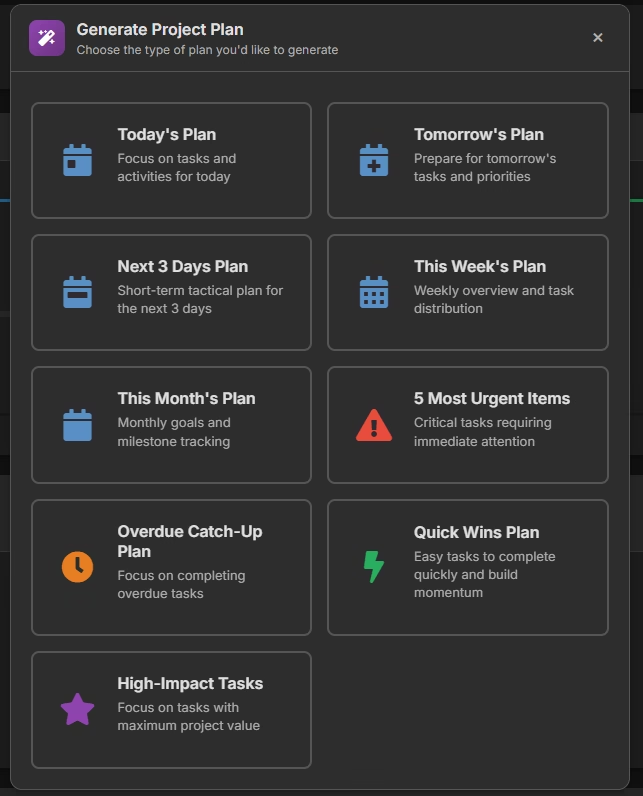
CoMng.AI’s Autonomous Task and Workplan Engine generates complete work plans on demand. Ask for today’s priorities, this week’s high-impact tasks, the five most urgent items, or the quick wins available to move the project forward. The AI generates the workplan from the live state of the project – not from a static plan that needs to be manually updated after every change.
Each generated task includes: subtasks, resources, estimated effort and cost, success factors, assignee, due date, scope group, tags, and AI-powered insights. The system replaces sprint planning ceremonies entirely for teams that want it to.
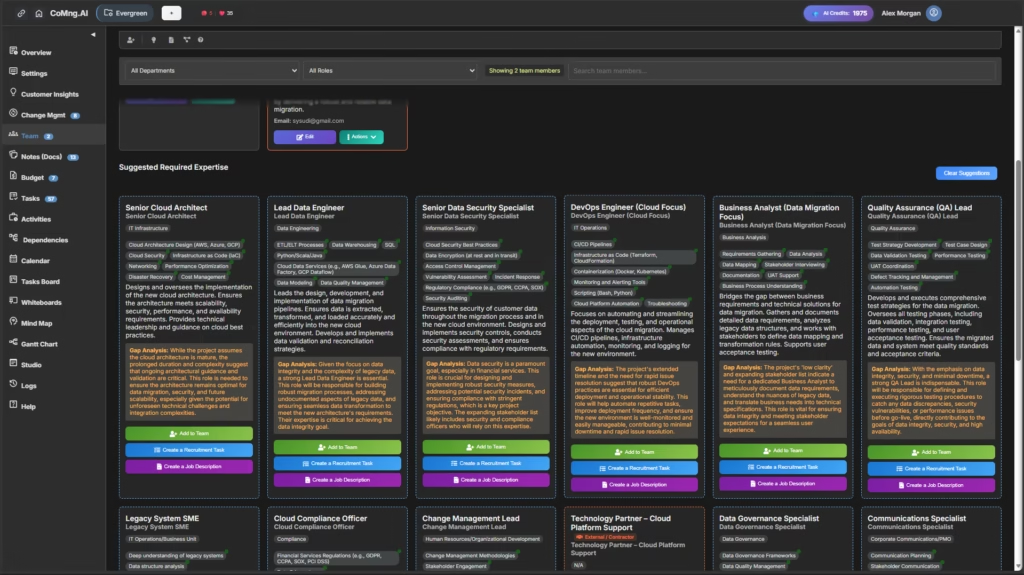
Autonomous Team Assembly Engine
One of the most expensive early-stage bottlenecks in project delivery is figuring out who you need and how to hire or engage them. Project Online tracked the team members you had. CoMng.AI identifies the team members you need.
The Autonomous Team Assembly Engine analyses your project’s requirements and automatically suggests required roles – Lead Mobile Web Developer, Backend Developer, UI/UX Designer, QA Tester – with full skill gap analysis, responsibilities, and a choice of actions: Add to Team, Create SOW, Create Job Description, or Create Recruitment Task. HR automation is built in.
AI-native collaboration surface – not bolted on
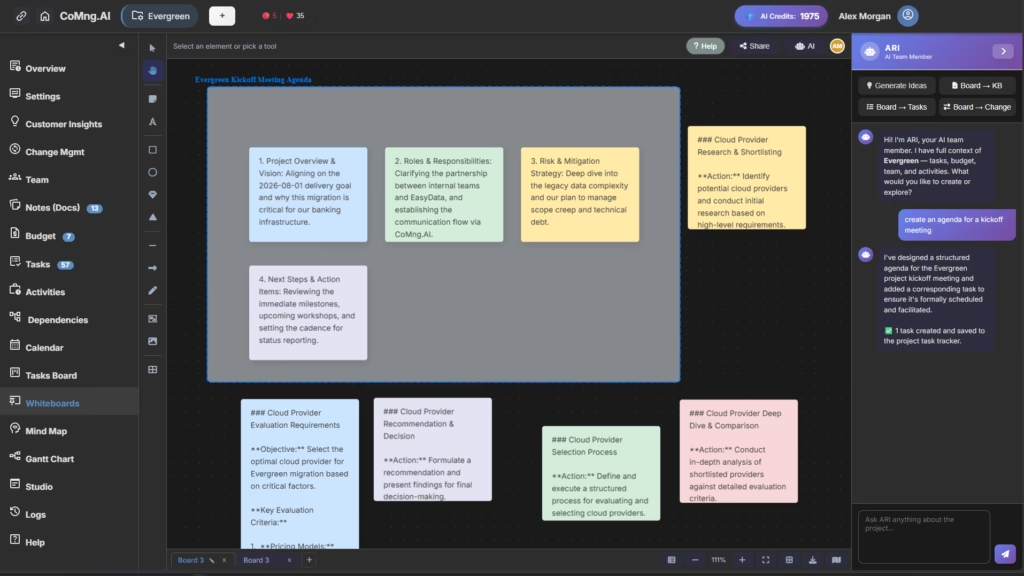
CoMng.AI’s collaboration features are not features added to a project management tool. They are native AI functions built into every surface of the platform.
ARI AI Whiteboard – an AI team member lives in the whiteboard. Ask it to generate ideas, convert whiteboard content into tasks, Knowledge Base entries, or Change Management items in real time.
Mind Map – an auto-generated, living mind map of the entire project, filterable by Executive Dashboard, Problems, Blockers, Overdue items, and Tasks Map, colour-coded by health status.
Studio / Composer – generates full structured documents from project context: kickoff emails, Statements of Work, status reports, team briefs – with Translate, Download, and Save options built in.
Notes + AI Insights – every project note is queryable with AI. Ask “what’s missing from this kickoff email?” and the AI answers in full project context.
Gantt Chart – auto-populated from AI-created milestones and tasks. Full timeline intelligence built in from day one.
Change Management – structured change lifecycle (Draft → Submitted → Analysis → Approval → Applied → Closed) with AI impact analysis included at every stage.
Full competitive separation from every alternative
From the investor deck, the capability comparison is direct:
| Capability | Jira / Linear | Asana / Monday | Notion AI | CoMng.AI |
|---|---|---|---|---|
| AI auto-generates project framework | ✗ | ✗ | Partial | ✓ Full |
| Live project health score (Pulse) | ✗ | ✗ | ✗ | ✓ Built-in |
| Autonomous workplan generation | ✗ | Partial | ✗ | ✓ On-demand |
| AI team role + gap analysis | ✗ | ✗ | ✗ | ✓ Full |
| AI whiteboard with embedded agent | ✗ | ✗ | ✗ | ✓ ARI |
| RAID+ register auto-generation | ✗ | ✗ | ✗ | ✓ Auto |
| Autonomous document composition | ✗ | ✗ | Partial | ✓ Full |
| Built-in change management | ✗ | Partial | ✗ | ✓ Full |
| API-first architecture | Partial | Partial | ✗ | ✓ Native |
No competitor – including the Microsoft-recommended replacements – offers the complete autonomous execution loop.
Enterprise-grade technical architecture
For IT directors and PMO leaders evaluating infrastructure requirements, CoMng.AI is built API-first with enterprise-grade security and extensibility:
- REST API – full external API with X-API-Key and Bearer token authentication. Any system can query and control CoMng.AI projects programmatically
- API Sandbox – built-in sandbox for testing integrations before production, with no risk to live projects
- AI Credit System – token-based AI usage model enabling metered, scalable billing with full cost visibility per project and per action
- Multi-Project Organization – full org management: multiple active projects, cross-project team management, scoped API keys per project
- 20+ integrated AI-native modules – every module shares a single unified intelligence layer; the AI has cross-module context simultaneously
How to think about this migration decision
Most migration advisors frame the decision as: what most closely replicates what you had? That framing leads to Planner Premium or PSSE – and traps organizations inside the same paradigm they were already in, now on a newer platform.
A better question is: what should project management look like now that genuinely autonomous AI is available?
The April 2026 deadline means the grace period is over. IT leaders must finalise their migration strategies immediately. If an IT buyer has to undertake a massive data migration anyway, they are much more likely to evaluate the entire market.
The organisations that will look back on September 2026 as the best thing that happened to their PMO are the ones that used the forced exit from Project Online to stop asking “what is most similar to what we had?” and start asking “what actually manages projects instead of just tracking them?”
If your priority is staying in the Microsoft ecosystem with minimum disruption: Planner Premium is the practical choice. It is included in most existing licences, integrates with Microsoft 365, and Microsoft will continue to invest in it. Understand its task limits and rebuild your Power BI reports from scratch.
If your priority is preserving complex enterprise PPM methodology: Project Server Subscription Edition is the right path. Engage a migration partner early – enterprise migrations take 8 to 12 months and the window is already tight.
If your priority is using this migration to fundamentally improve how your team manages projects: CoMng.AI is the only platform in this comparison that does not just track your work – it co-manages it. The difference is not in the feature list. It is in where the thinking happens.
Migration checklist – what to do before September 30, 2026
Regardless of which platform you choose, these steps apply immediately.
This month:
- Inventory your Project Web App environment – active projects, archived projects, custom fields, project types, and resource pools
- Identify which integrations and Power BI reports depend on the Project Online OData feed
- Document all SharePoint 2013 workflows (note: these are already broken as of April 2, 2026 – document what they were supposed to do)
- Make a formal platform decision – enterprise migrations take 8–12 months, and the window is now fewer than 5 months
Within the next 6 weeks:
- Extract and back up all historical project data via API – do not wait for Microsoft to provide export tools
- Set up your target environment and begin parallel operation for new projects
- Identify which historical data must be preserved, which can be archived, and which can be retired
- Rebuild critical Power BI reports against your new platform’s API, not the Project Online OData feed
Before September 30:
- Complete all data migration and validate integrity in the target platform
- Do not decommission Project Online access until you have confirmed every data category is fully migrated and accessible in the new system
- Conduct final parallel validation – run both systems simultaneously for at least 30 days before cutover
Teams that started planning last fall are finishing now. Teams starting today have less time than they think. The data export alone takes longer than expected – most teams underestimate the time needed to validate that an export is complete.
FAQ: Microsoft Project Online retirement and migration
When does Microsoft Project Online officially retire? September 30, 2026. After that date, the service is permanently unavailable and all project data within it becomes inaccessible. There is no grace period, no read-only mode, and no possibility of extension.
What happened in April 2026? Two things. From April 1, 2026, existing customers can no longer create new Project Online tenants. From April 2, 2026, the SharePoint 2013 workflows that power Project Online governance, approvals, and stage-gate processes were formally deprecated – meaning workflow-dependent PMO functions are already broken for many organisations.
What is Microsoft’s recommended replacement for Project Online? Microsoft’s recommended replacement is Planner Premium (formerly Project for the Web), included in Project Plan 3 and Project Plan 5 licences. For organisations with advanced enterprise PPM needs, Microsoft also recommends Project Server Subscription Edition as an on-premises or hosted alternative.
What are the limitations of Planner Premium? Planner Premium caps at 3,000 tasks and 10 custom fields per plan – a constraint that enterprise PMOs managing large portfolios will encounter quickly. It also does not replicate the full depth of Project Online’s portfolio management, resource capacity planning, or governance workflow capabilities. Power BI reports feeding from the Project Online OData feed will break and need to be rebuilt.
Why should I consider CoMng.AI instead of just migrating to Planner? Planner Premium is an AI-assisted project management tool – it responds to prompts and helps when asked. CoMng.AI is an Autonomous Execution System that co-manages your project continuously: generating the full project framework from a description, maintaining a live health score with daily AI briefings, autonomously generating workplans and risk assessments, producing stakeholder-ready reports from live data, and acting as an AI Co-Manager throughout the full project lifecycle. If the goal is to use this forced migration to modernize rather than just replace, CoMng.AI is the only platform in this comparison that offers autonomous AI execution – not just AI assistance.
How much time do I have left to migrate? As of May 2026, you have approximately four months until the September 30 retirement date. Enterprise migrations take 8 to 12 months in ideal conditions – meaning the window for a fully managed migration has technically already closed. Organizations should begin immediately, prioritize data extraction and backup above all else, and make a platform decision this month.
The window is closing – start now
September 30, 2026 is firm. Microsoft has been explicit. The question is not whether to migrate, but when to start planning. For many PMOs, that time was months ago. For those starting now, the priority is clear: get the data out first, then make the platform decision.
If you are going to make a platform change anyway – and you are, whether you chose to or not – make it count. The organizations that will look back on this moment as a turning point are the ones that stopped asking “what replaces what we had?” and started asking “what actually manages projects the way AI makes possible in 2026?”
The answer to that question is not Planner. It is not PSSE. It is a system that thinks, plans, and executes alongside you – one that makes the project manager a leader rather than an administrator.
See CoMng.AI in action – free, no credit card required →
Related reading
- AI Co-Manager vs. AI Project Assistant – what’s the difference? – understanding why the autonomous execution model is categorically different from AI-assisted project tools
- The full CoMng.AI feature list – what the AI Co-Manager does – every capability in the platform, with detail on how each works
- Who is CoMng.AI for? – enterprise project leads, PMO directors, and citizen managers
CoMng.AI is the world’s first AI-integrated project framework – an Autonomous Execution System that co-manages your project budget, baseline, and documentation so you can lead instead of administrate.