The blank page is the #1 reason projects start late
You’ve been there. A new initiative lands in your lap, you open your project management software, and you’re staring at an empty screen. Do you start with tasks? Milestones? A RACI? An SOW? Most teams waste their first week just deciding where to begin – and that’s before a single task gets done.
The problem isn’t a lack of project management software. It’s that nearly every tool treats project setup as your problem, not theirs. They hand you a blank template and wish you luck.
CoMng.AI was built to eliminate this entirely. There is no blank page. There is no “where do I start?” moment. Instead, there are five distinct ways to kick off any project – each designed for a different situation, team, and starting point. By the time you finish setup, you have a complete, AI-generated framework: goals, tasks, timelines, budgets, risks, and roles. Not a list of fields waiting to be filled.
Here’s how each method works, and when to use it.
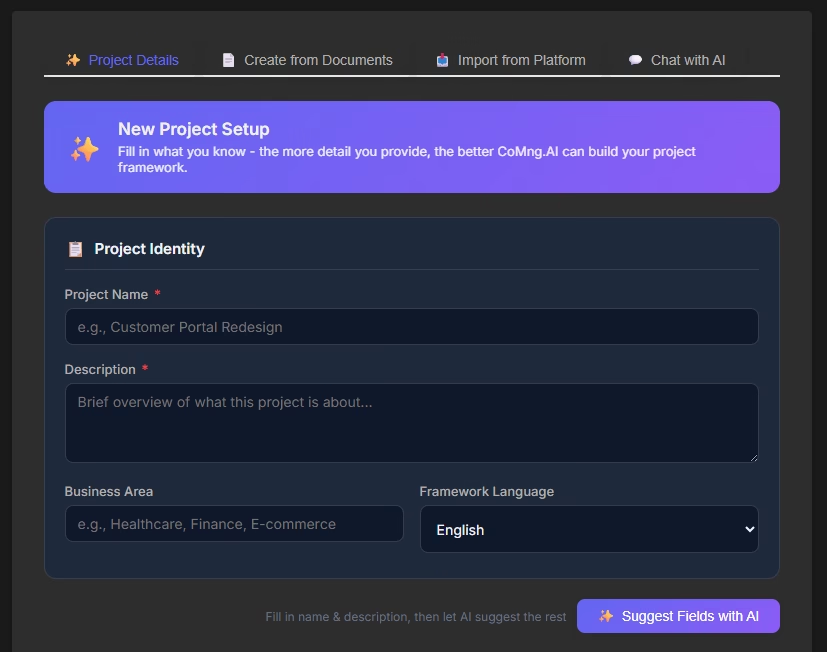
Method 1: Describe your project – AI builds the whole framework
Best for: New projects where you have a clear vision but no documented plan yet.
The fastest way to go from idea to execution-ready project is also the simplest: write a paragraph. Tell CoMng.AI what you’re trying to accomplish, who it’s for, any constraints or deadlines you know about, and what success looks like. Plain language. No special format. No templates to fill in.
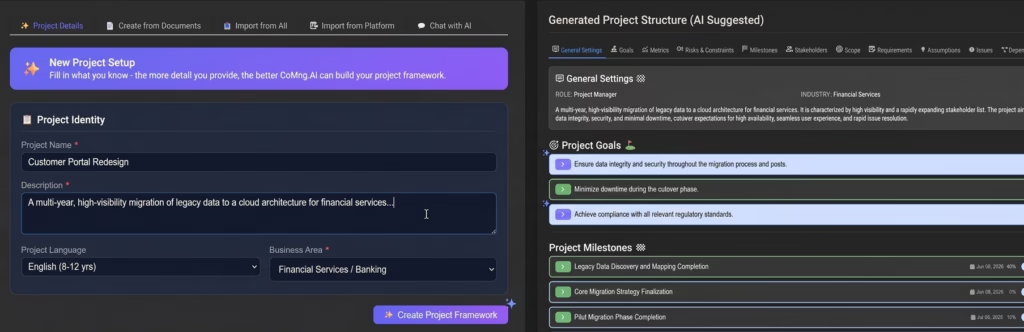
The AI reads your description and generates a complete project structure – automatically.
In minutes, you get:
- Strategic goals and KPIs – specific, measurable objectives tied to the outcomes you described
- A full work breakdown structure – every task and subtask required to reach each goal, with effort estimates, dependencies, and acceptance criteria
- A risk log – potential blockers and obstacles identified before they become problems, each with a suggested mitigation strategy
- A timeline with milestones – realistic, dependency-aware scheduling, not an optimistic straight line
- Budget recommendations – AI-suggested line items based on project scope, with vendor examples and cost estimates
- Role identification – the team roles your project requires, with skills profiles and justifications
This isn’t autocomplete. The AI understands context across 100+ business domains, so a software launch gets structured differently from a compliance initiative, a marketing campaign, or a construction project. Industry best practices are baked in automatically.
The practical result: what would traditionally take a project manager two to four weeks of stakeholder meetings and manual planning is done in under three hours. And unlike a plan you built yourself, this one doesn’t have blind spots – AI consistently surfaces risks and tasks that human planners miss under pressure.
Common use cases: New product launches, quarterly initiatives, department projects, startup planning, marketing campaigns, IT implementations.
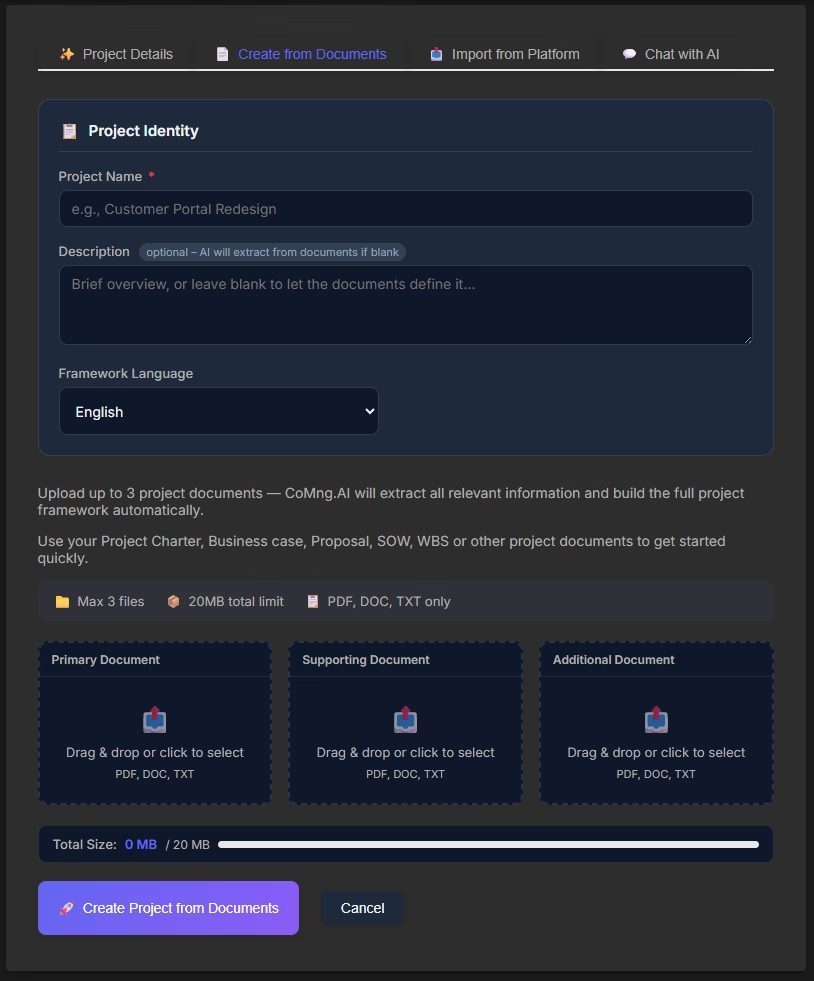
Method 2: Upload a document – AI extracts and structures the project
Best for: Projects that already exist on paper – client briefs, SOWs, RFPs, strategy decks, or existing project plans.
Most real projects don’t start from nothing. They start from a 40-page RFP, a client SOW emailed on a Friday afternoon, an existing Word document from a previous project, or a PDF that someone spent two weeks writing. The traditional workflow is painful: read the document, manually extract requirements, build a task list, cross-reference the timeline in the document against reality. That process takes days and still loses detail.
CoMng.AI’s document intake does it in minutes.
Upload any PDF, Word document, or text file and the AI reads it completely – not just skimming for keywords. It extracts:
- Deliverables and their acceptance criteria
- Stated timelines and hard deadlines
- Budget constraints and financial parameters
- Compliance or regulatory requirements buried in the language
- Stakeholder names and their roles
- Implicit risks mentioned in the document
Then it structures everything into a live, actionable project. Tasks are created from the deliverables. The stated timeline becomes a milestone map. Budget constraints become the ceiling for the auto-generated budget lines. Compliance requirements become checklist items with their own monitoring tasks.
This is particularly powerful for agencies, consulting firms, and procurement-heavy industries. A client SOW that would normally require a day of work to turn into a project plan becomes a five-minute operation. The team jumps to execution faster, with less risk of something being missed in translation from document to plan.
Supported formats include PDF, Word (.docx), plain text (.txt), and configuration files including YAML, JSON, and XML. CoMng.AI can also analyze images and CSV files for data-driven project contexts.
Common use cases: Client project setup from SOW/RFP, compliance initiatives from regulatory documents, converting legacy project plans, onboarding documentation, grant-funded project setup.
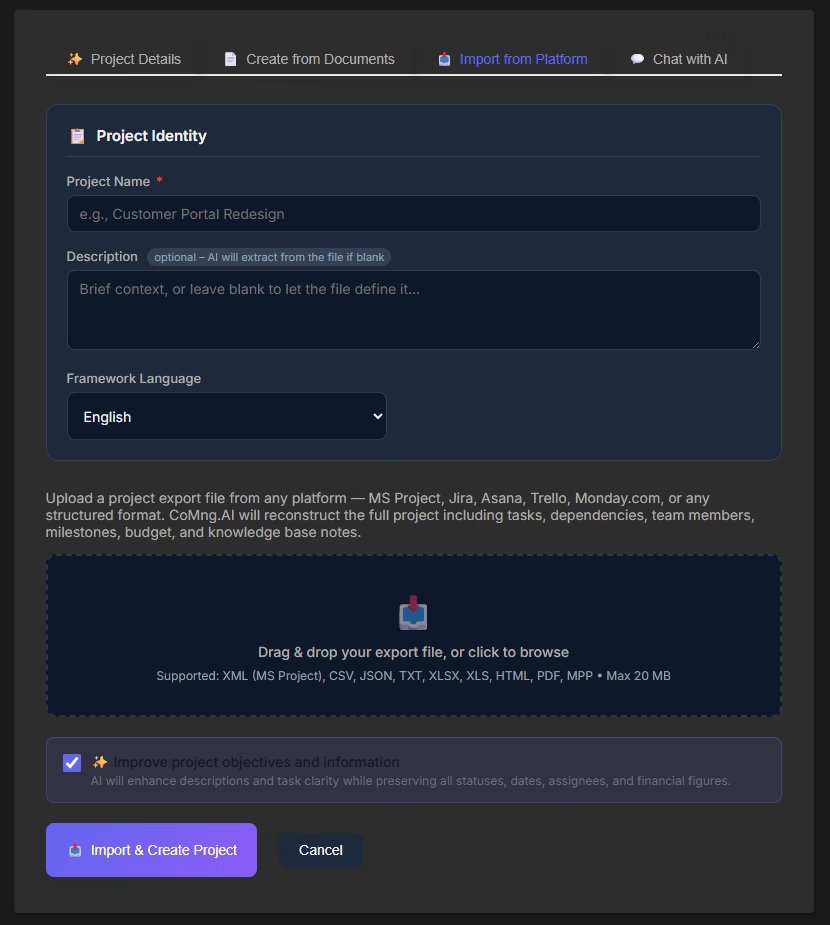
Method 3: Import from Jira, Asana, Trello, Monday, or MS Project
Best for: Teams switching to CoMng.AI from another tool, or bringing an existing in-flight project under AI management.
One of the most common questions from teams evaluating any new project management software is: “What happens to everything we already have?” Years of tasks, sprints, epics, and project history sitting in Jira or Asana aren’t easily abandoned – and they shouldn’t have to be.
CoMng.AI lets you import directly from the tools your team already uses.
Supported import sources:
- Jira (Cloud and Server)
- Asana
- Trello
- Monday.com
- Microsoft Project (including Project Online exports)
The import process maps your existing data – tasks, subtasks, assignments, priorities, statuses, and dependencies – into CoMng.AI’s structure. Existing work doesn’t disappear; it becomes the foundation that AI intelligence is layered on top of.
What’s different from a standard migration is what happens after import. Once your project data is in CoMng.AI, the AI immediately analyzes it. You get a risk assessment of the current project state, an identification of gaps or missing tasks, a critical path analysis, and recommendations for team assignments based on skills. An in-flight project that was being tracked in a basic task list suddenly has the full intelligence of an AI co-manager applied to it.
This also solves the “we already started” problem. You don’t need to recreate months of existing work to benefit from CoMng.AI. Import it, let the AI assess what you have, and move forward with a stronger foundation than the one you were working from.
Migration tip: Import is the fastest way to evaluate CoMng.AI against your current tool – run a real project in both and see what the AI finds that you were missing.
A note for Microsoft Project Online users: your deadline is September 30, 2026
If your organization runs projects on Microsoft Project Online, you need to act now. Microsoft has officially confirmed that Project Online will be permanently retired on September 30, 2026. After that date, the service goes dark – no access to projects, no access to data. This is a hard stop, not a phased sunset.
Sales of new Project Online licenses already ended on October 1, 2025. From April 2026, organizations can no longer create new Project Online tenants. The window to migrate your data in an organized, low-risk way is closing.
For many PMOs and project teams, this retirement represents more than a tool change. Project Online often holds years of project history, resource data, portfolio reporting, and governance workflows built on top of it. Migrating that to a modern platform – without losing what matters – takes time. Industry guidance suggests allowing up to 20 weeks for a thorough migration.
CoMng.AI’s MS Project import path is built for exactly this transition. You export your project data from Project Online (via .xml, csv, xls), import directly into CoMng.AI, and immediately gain something Project Online never offered: a true AI co-manager that analyzes your imported project, identifies risks, generates missing tasks, and keeps plans accurate without manual effort.
What you don’t get with Microsoft’s suggested migration paths – moving to Planner Premium or Project Server Subscription Edition – is AI-native project intelligence. You get a different container for the same manual process. CoMng.AI gives you a fundamentally different way to run projects from day one of migration.
If you’re currently on Project Online, the practical checklist is:
- Export your active projects from Project Online before September 30, 2026 (don’t wait – governance features using SharePoint 2013 workflows stop working in April 2026)
- Import into CoMng.AI using the MS Project import
- Let AI analyze and enrich each imported project
- Start on CoMng.AI’s free plan with real data – it’s free forever, no trial clock running
This is a forced transition. The only question is whether you land somewhere better than where you started.
Common use cases: Switching project management software, migrating from Microsoft Project Online before the September 2026 deadline, consolidating multiple tools onto one platform, bringing an in-progress project under AI management, auditing an existing project’s health.
Method 4: Chat with AI conversationally to define the project iteratively
Best for: Projects that are ambiguous, early-stage, or where you need to think through the definition before committing to a structure.
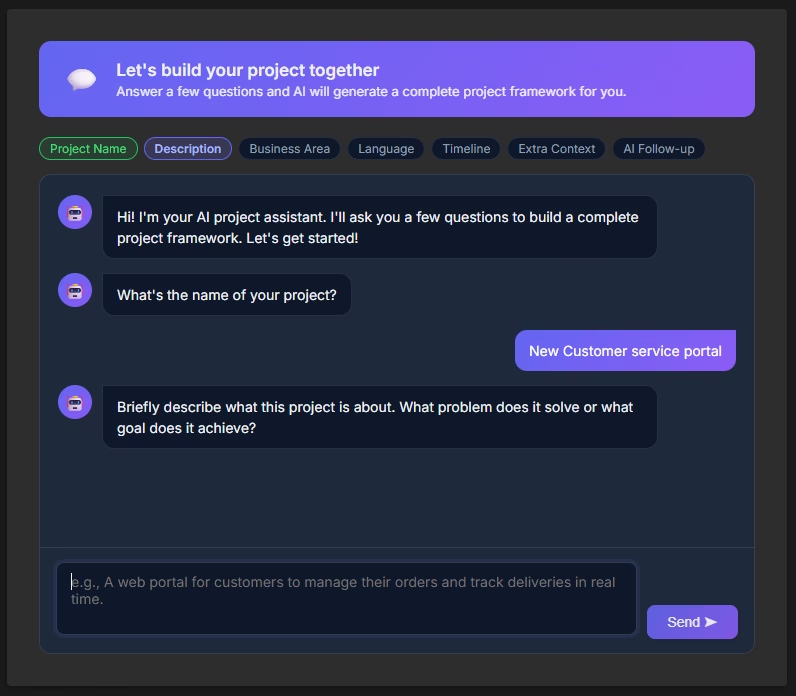
Not every project arrives fully formed. Sometimes you have a direction but not a plan. A stakeholder wants “something to improve customer onboarding” – and that’s the entire brief. You need to explore the idea, ask the right questions, and work out what the project actually is before you can plan it.
This is where conversational project creation changes the dynamic.
Instead of filling in fields or writing a description you’re not confident about, you open a dialogue with CoMng.AI’s AI. The AI asks you targeted questions: What’s the business problem? Who are the stakeholders? What does success look like in three months? What can’t change? The conversation guides you through the definition process the way an experienced project manager would in a discovery meeting – except you can have this conversation at any hour, as many times as needed, without scheduling anyone.
As the conversation evolves, the AI builds the project structure in parallel. Each answer you give refines the framework. By the end of the conversation, you have a project that reflects a genuine exploration of the problem – not a plan written in haste to fill a template.
This method is also useful for complex projects where requirements have competing priorities that need to be talked through. The AI can surface trade-offs: “If you prioritize the June deadline, the scope as currently defined means the team would be at 140% capacity. Do you want to reduce scope or adjust the timeline?” These are the conversations that normally happen weeks in, when it’s harder to change course.
Every conversational exchange is automatically saved to the project’s knowledge base, so the reasoning behind decisions is preserved – not lost in a Slack thread.
Common use cases: Early-stage ideation, ambiguous briefs, stakeholder alignment sessions, discovery phases, projects that need scope negotiation before planning.
Method 5: Import a CoMng.AI project export – for backups, snapshots, and org moves
Best for: Moving a project between organizations, restoring a saved project state, or picking up a project template created by someone else.
This one is easy to overlook, but it solves problems that come up constantly in real project work.
CoMng.AI lets you export any project as a portable file and re-import it anywhere. The export captures the complete project – tasks, subtasks, milestones, risks, budget, team structure, knowledge base notes, and all AI-generated content – as a single package you can store, share, or restore.
Three situations where this matters:
Moving between organizations. If you’re a consultant or agency managing projects across multiple client accounts, or if your company restructures its CoMng.AI workspace, you can export a project from one organization and import it cleanly into another. No rebuilding from scratch, no copy-pasting task by task. The full context travels with it.
Saving a snapshot. Before a major scope change, a phase transition, or a significant replanning session, export the current project state. If the new direction doesn’t work out, you have a precise restore point. This is the project management equivalent of a Git commit – a named, intentional checkpoint you can return to.
Backup. Projects represent weeks or months of planning, decisions, and institutional knowledge. An export is a complete, portable backup. Store it in your document management system, your cloud storage, or hand it to a client as a deliverable. The project’s full history is preserved outside the platform.
This capability is especially useful when combined with the AI enrichment that happens on import. Export a well-structured project, import it into a new organization, and the AI immediately has full context – it can generate fresh reports, assess current health, and continue co-managing without a ramp-up period.
Common use cases: Agency or consulting project handoffs between client workspaces, project phase archiving, pre-restructure backups, sharing project templates across teams, client deliverable packages.
Which method should you use?
The five methods aren’t mutually exclusive – they’re designed to match reality, which is rarely neat.
| Your situation | Best starting method |
|---|---|
| You have a clear idea and no documentation | Type a description |
| You have a client SOW, RFP, or existing plan | Upload the document |
| Your project is already running in Jira / Asana | Import it |
| You’re on Microsoft Project Online (retiring Sept 2026) | Import from MS Project – now |
| You’re still defining the project | Chat with AI |
| You need to move a project between orgs or workspaces | Export and re-import |
| You want a restore point before a big change | Export as a snapshot first |
| You have a document and want to refine it | Upload, then chat |
| You want to migrate an existing project and improve it | Import, then describe what you want to change |
The important thing is that you never start from scratch. Every entry point puts AI to work immediately – generating structure, identifying risks, estimating effort, and building the foundation you’d otherwise spend weeks creating manually.
What happens after you start
Regardless of which method you choose, every new project in CoMng.AI arrives fully equipped:
- A task board (Kanban) ready for daily execution
- A Gantt chart with dependencies and critical path identified
- A risk register with mitigation strategies
- A budget outline with line items and justifications
- A team role map with skills requirements
- A knowledge base ready to capture decisions and documentation
- A Project Pulse health score tracking Velocity, Sentiment, and Alignment
From your first input to a fully operational project: under three hours for a complex initiative, under thirty minutes for a focused one.
The blank page is retired.
Start free – no trial, no deadline
CoMng.AI has a free plan that’s free forever. No credit card, no countdown clock, no feature bait-and-switch. Create real projects using whichever method fits your current work and see how much of your planning overhead disappears.