Most reporting tools give you data. A spreadsheet full of task completion percentages, a dashboard with budget bars, a calendar of missed deadlines. What they do not give you is a report – a document that takes all that data, understands what it means, and explains it in plain language to the person reading it.
That gap – between raw data and a finished, stakeholder-ready document – is where project managers lose hours every week. It is where the Friday afternoon reporting spiral begins: open four tools, pull numbers, paste into a template, write the narrative, check it twice, format it, send it. Do it all again next week.
AI generated reports close that gap entirely. Not by populating templates with numbers, but by reading your live project data, reasoning about what it means, and writing the report for you – complete narrative, risk flags, budget summary, and recommended next steps – in under two minutes.
This guide covers everything: what AI generated reports actually are, how the automate reporting process works inside CoMng.AI, why automated dashboards and AI reports serve different purposes, how executive summary AI works for leadership audiences, and how conversational AI reporting lets you ask questions and get instant written answers from your own project data.
What are AI generated reports – and how are they different from manual ones?
An AI generated report is a structured, narrative document produced automatically by an artificial intelligence system from live data – without human writing, data collection, or formatting.
The key word is narrative. A dashboard shows you that budget utilization is at 73%. An AI generated report tells you that budget utilization is at 73%, that three of the five remaining milestones are in the highest-cost phase, that the current burn rate projects a 12% overrun by the final deadline, and that two specific line items are driving the variance. It tells you what the number means, why it matters, and what to do about it.
This is what separates artificial intelligence reporting from traditional automated reporting. Traditional automation fills in the blanks – it retrieves the 73% figure and puts it in the right cell. AI reporting interprets the blank – it understands that 73% at week six of an eight-week project is a different problem than 73% at week two.
The practical result is that an AI generated report from CoMng.AI is ready to forward to a stakeholder the moment it is produced. A traditional automated report still requires a human to read the numbers, understand what they mean, and write before it becomes a communication.
The three types of project report and where AI fits:
| Report type | Data source | Narrative | Ready to share? |
|---|---|---|---|
| Manual report | Human-collected | Human-written | After 60–90 min of work |
| Traditional automated report | Auto-collected | None – human must write | After additional writing |
| AI generated report (CoMng.AI) | Auto-collected, AI-interpreted | AI-written, narrative | Immediately |
How to automate your reporting process in CoMng.AI – step by step
Automating your reporting process in CoMng.AI does not require integrations, API connections, or technical setup. The platform collects and interprets your project data natively – the moment your project exists, the data pipeline for report generation is already running.
Here is exactly how the process works.
Step 1: Keep your project data live – this is the only discipline required
The quality of AI generated reports is a direct function of the quality of the data feeding them. CoMng.AI needs three things to be current: task statuses, logged hours, and budget entries. Everything else – narrative, analysis, risk flags, critical path – the AI generates itself.
Make sure your team is updating task progress as work happens, logging hours in the Activities section, and recording budget items as they are approved or paid. This is not additional work – these are the same updates a team makes in any project management tool. The difference is that in CoMng.AI, every update feeds the AI report engine directly.
Step 2: Use the Personal Advisor before generating a report
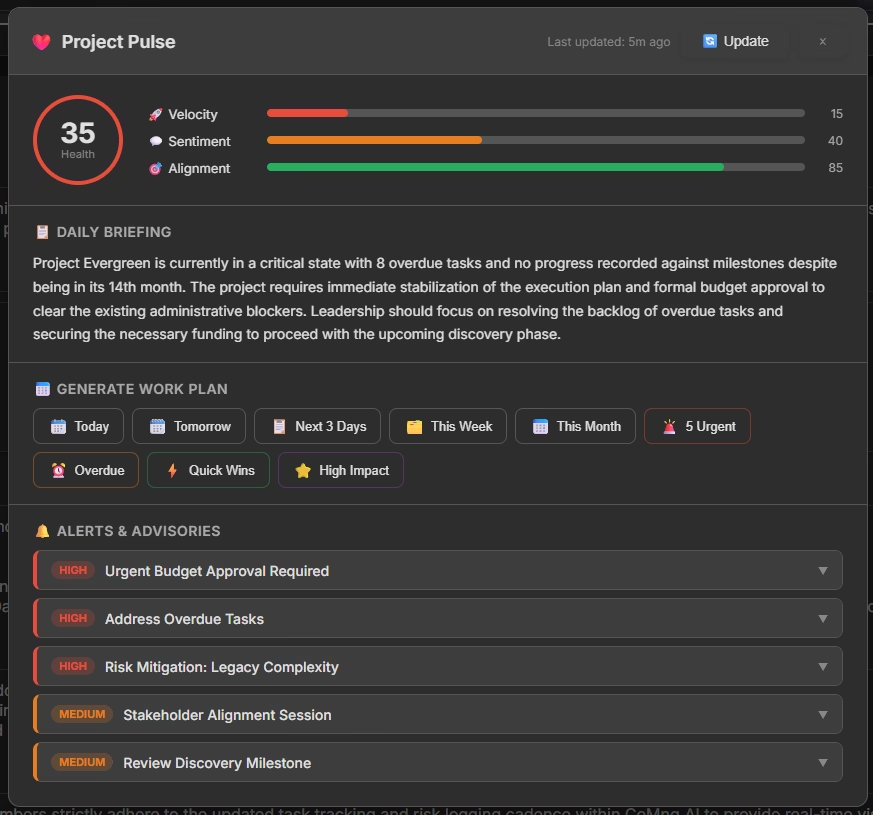
Before opening the Report Generator, navigate to the Overview Dashboard and click Analyze Project Status. The Personal Advisor – CoMng.AI’s built-in AI consultant – scans your entire project and surfaces the most critical insights: approaching deadlines, blocked tasks, resource overallocation, budget variance, and critical path risks.
This step takes 30 seconds and serves two purposes. First, it gives you the AI’s assessment of your project’s current state so you can add any context the report should include. Second, it ensures the AI report engine is working from the most current interpretation of your data.
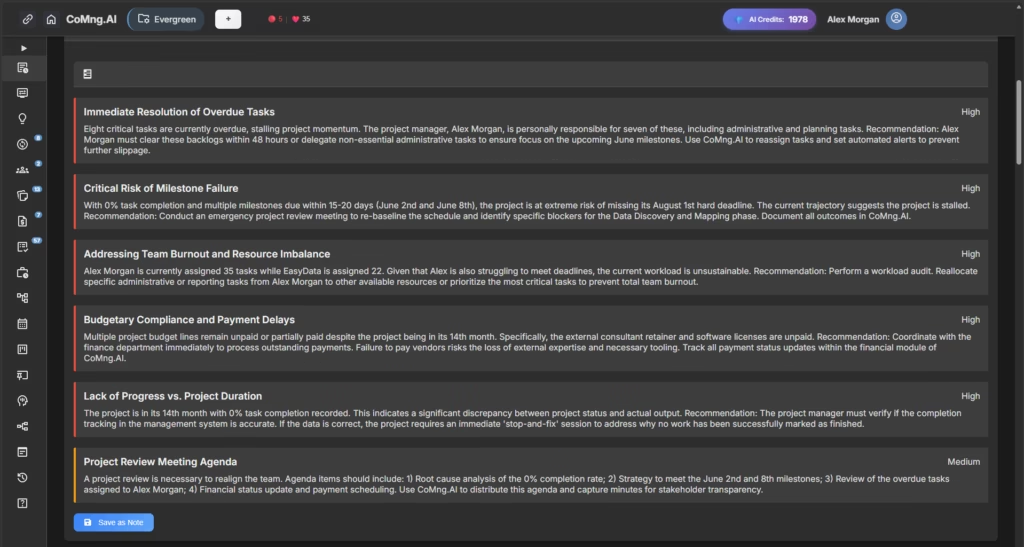
You can save the Personal Advisor output as a Knowledge Base note – which also creates a time-stamped record of the AI’s project assessment at that point in time. Over weeks and months, these snapshots build an automatic project history.
Step 3: Open the Report Generator and select your template
Navigate to the Reports section inside your project. CoMng.AI presents a full library of report templates, each designed for a specific audience and purpose:
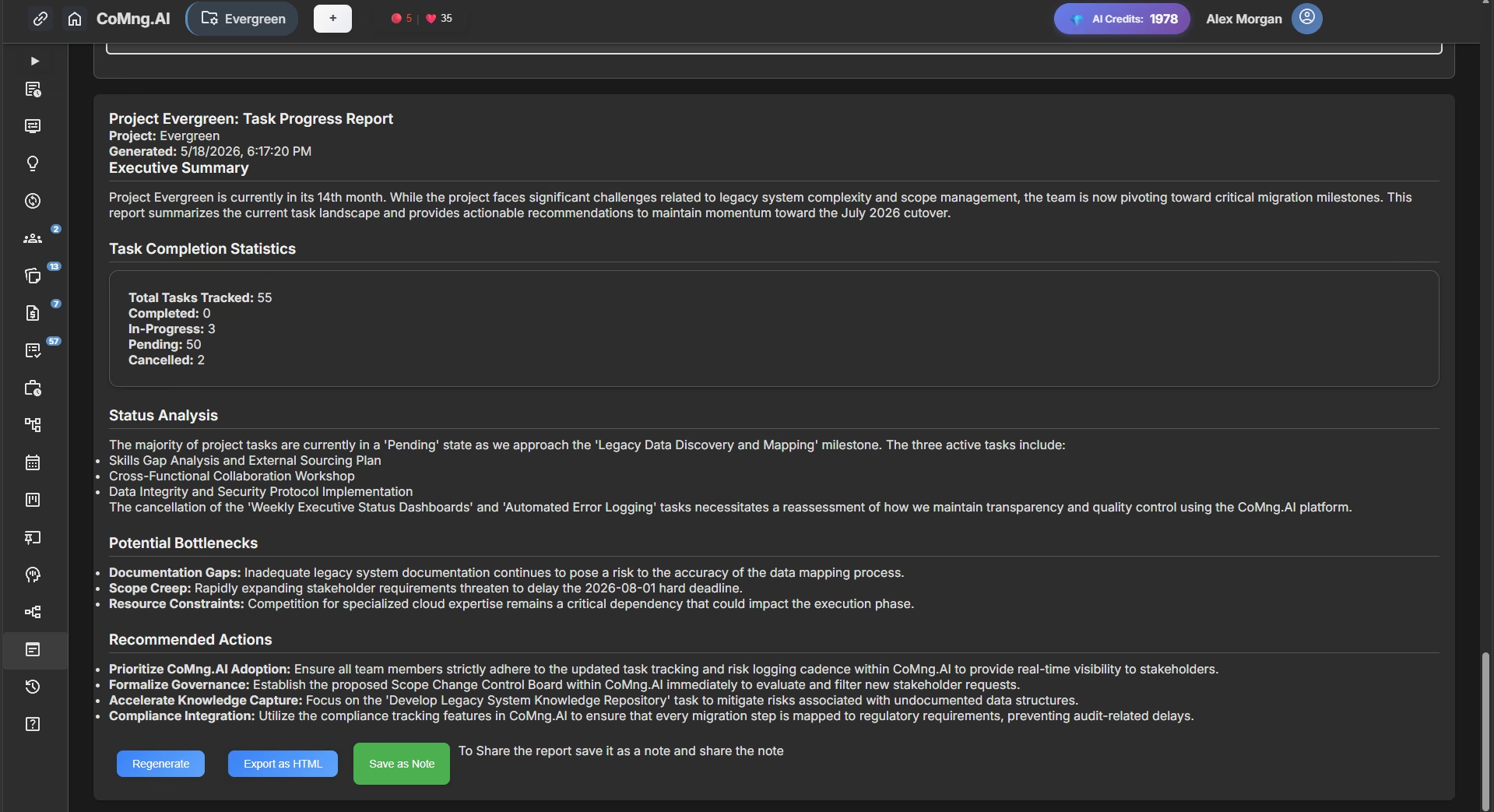
- Task Progress Report – for team leads and internal updates
- Executive Summary Report – for C-suite and senior leadership
- Risk Assessment Report – for milestone reviews and governance meetings
- Budget Analysis Report – for finance and client billing conversations
- Team Performance Report – for resource planning and retrospectives
Select the template that matches your current need.
Step 4: Configure your three options
Each template gives you three configuration choices:
Date range: Define the reporting window – last sprint, last 30 days, last quarter, or full project lifetime. The AI will analyze activity within that window and compare it against the overall project baseline.
Focus areas: Toggle the sections you want included – Budget Overview, Key Risks, Timeline Summary, Team Utilization, Next Steps, and more. Different stakeholders need different information; the same underlying data can produce a client-facing summary or a detailed internal analysis depending on which focus areas you select.
Report length: Brief (one to two pages, high-level narrative), Standard (three to four pages, balanced detail), or Detailed (comprehensive, suitable for board or audit purposes).
Step 5: Generate, review, and export
Click Generate Report. In 15 to 30 seconds, CoMng.AI produces a complete document – narrative paragraphs, structured sections, risk callouts, and data summaries – drawn from every live data point in your project.
Read through the output. In most cases it will require no editing. If there is context the AI could not know from project data – a client conversation that happened by phone, a strategic decision not yet reflected in the task list – add a paragraph. This is your five-minute contribution to a report that would otherwise take 90 minutes to write.
To distribute as an AI summary PDF or formatted document, click Export as HTML – this produces a clean, professionally formatted file suitable for email attachment, printing, or upload to a shared drive. The exported document reads as a polished artificial intelligence report PDF, not as a system-generated data dump.
To preserve a permanent record, click Save as Note. The report is time-stamped and stored in your project’s Knowledge Base – building an auditable history of project status across the full project lifecycle without any manual archiving.
For external stakeholders – clients, board members, or executives without a CoMng.AI account – use the password-protected shared link. They see exactly what you want them to see, with no login required.
Automated dashboards vs. AI generated reports – which do you need?
These two things are frequently confused, and many teams spend time trying to make a dashboard do what only a report can do. They are complementary tools that serve fundamentally different purposes.
What an automated dashboard does
An automated dashboard is a live visual interface that displays current project metrics in real time. Numbers update as data changes. Charts reflect the current state without manual refresh. The CoMng.AI Overview Dashboard is a perfect example: four metric cards showing task progress, time investment, team status, and budget status – all live, all current, all visual.
Dashboards are for monitoring. You open a dashboard when you want to quickly check where things stand. They answer the question “what is the current state?” with visual clarity and no delay.
What an AI generated report does
An AI generated report is a discrete, shareable document that captures a period of project activity, analyzes it, and explains it in narrative form. It has a beginning, middle, and end. It is meant to be read once, understood, and acted on – not monitored continuously.
Reports answer the question “what happened, what does it mean, and what should we do?” They are designed to be forwarded, presented, filed, and referenced later.
Why you need both – and how CoMng.AI provides both
For most project teams, the workflow looks like this: the automated dashboard is open all week, giving the project manager continuous visibility. At the end of the sprint or week, the AI Report Generator produces a shareable document summarizing the period – drawing from exactly the same live data the dashboard has been tracking.
No double-entry. No copy-pasting from a dashboard into a document. The dashboard and the report engine read the same source of truth.
How CoMng.AI compares to standalone dashboard tools
Tools like Power BI report automation or SCADA reporting in Excel are powerful for organizations with large-scale data infrastructure – but they require technical setup, data connections, and ongoing maintenance, and they produce dashboards, not narrative reports. A Power BI dashboard showing 73% budget utilization still needs a human to write “we are projecting a 12% overrun” before it becomes a useful stakeholder communication.
CoMng.AI’s automated dashboard and AI report generator work together out of the box, with no technical configuration, and produce both the live view and the narrative document from the same project data.
Executive summary AI: generating C-suite and board reports automatically
Executive-level reporting has a different requirement from every other report type. Executives and board members are not reading your project report to understand the details – they are reading it to make decisions. Every word that does not support a decision is a word they will skip.
AI generated executive summaries understand this. CoMng.AI’s Executive Summary Report template is built specifically for leadership audiences, and the output reflects that discipline.
What an AI generated executive summary contains
A CoMng.AI executive summary covers five areas in this order:
Overall project health. A single-sentence status – on track, at risk, or critical – followed by two to three sentences explaining the basis for that assessment. This is the first thing an executive reads and the most important thing the report communicates.
Schedule performance. Milestone achievement to date versus plan, current velocity, and projected completion date. If the project is on the critical path with any risk of delay, this section says so plainly.
Budget position. Total budget versus spend to date, current burn rate, and projected final cost. Any significant variance from the approved budget is flagged with the specific line items driving it.
Key risks and decisions required. A numbered list of the two to four items that require leadership attention or decision. Not every risk – only the ones that require action at the executive level.
Next period priorities. The three to five most important things happening in the next reporting cycle. Gives leadership the forward-looking context they need for conversations with external stakeholders.
This structure is generated automatically from your live project data. You do not configure it – the AI determines what belongs in each section based on the current state of your project.
AI annual reports and end-of-project summaries
The same Executive Summary template can be scoped to cover the full project lifetime – making it suitable for annual project reviews, end-of-phase summaries, or the kind of AI annual report a PMO director needs to present to a steering committee. Set the date range to the full project and select Detailed length – CoMng.AI generates a comprehensive narrative document covering the entire arc of the project from initiation to current status.
Board-level reporting in minutes
Board reporting traditionally requires a PMO team to compile data across multiple projects over several days. With CoMng.AI, each project manager generates their own executive summary, which can be compiled into a board pack in minutes rather than days. The consistency of AI-generated formatting and narrative structure also makes board packs easier to read – every project summary follows the same structure, so board members can find the information they need without re-learning a new format each time.
Automated sales analysis reports: tracking revenue, pipeline, and performance with AI
Sales teams and agency account managers are among the heaviest consumers of reporting – and among the people most likely to be doing it entirely manually. Pipeline reviews, client performance summaries, campaign progress reports, revenue tracking – these are repetitive, time-consuming documents that follow the same structure every cycle.
CoMng.AI treats a sales engagement, a client campaign, or a revenue target initiative as a project – and generates automated sales analysis reports from it using exactly the same engine that powers project status reporting.
What an automated sales analysis covers in CoMng.AI
When a sales initiative is structured as a CoMng.AI project, the automated report pulls data across all the dimensions that matter for sales performance:
Pipeline milestone tracking. Each stage of a sales process – prospecting, qualification, proposal, negotiation, close – is a milestone. The AI reports which milestones are complete, which are in progress, and which are at risk relative to the target close date.
Budget vs. actual on sales costs. Customer acquisition costs, marketing spend, travel, and tools – tracked against the approved budget with variance analysis built into the automated report.
Team performance. Hours logged per team member versus estimates, activity completion rates, and task distribution – the same data a sales manager would otherwise compile manually from CRM exports and time-tracking spreadsheets.
Velocity and forecast. Based on actual milestone completion rates, the AI generates a forward-looking projection: at current velocity, will the sales target be reached by the target date?
Sales leaders who previously spent Monday mornings compiling pipeline reviews from Salesforce exports and Excel spreadsheets now generate a complete, narrative automated sales analysis report in CoMng.AI in under two minutes – and the report reflects data that is current to that morning, not to last Thursday’s export.
Conversational AI reporting: ask questions, get instant written answers
Every other section of this article has been about scheduled or on-demand report generation – you configure a template, click Generate, and receive a formatted document. Conversational AI reporting works differently. It is not a template. It is a dialogue.
CoMng.AI’s Personal Advisor is the platform’s conversational AI interface. Rather than generating a pre-structured report, it allows you to ask natural language questions about your project and receive immediate, narrative answers drawn from live project data.
What conversational AI reporting looks like in practice
A project manager opens the Personal Advisor and asks: “What is blocking sprint 3?”
The AI does not return a list of tasks with “blocked” status. It returns a paragraph:
“Sprint 3 has two blocked tasks: the API integration review (Task #31) and the staging environment setup (Task #38). Both are blocked by the same upstream dependency – the infrastructure access credentials, which were requested on May 12th and are still pending approval from the IT team. Three additional tasks are waiting on Task #31 to complete before they can begin. If the credentials are not received by Thursday, the sprint goal is at risk.”
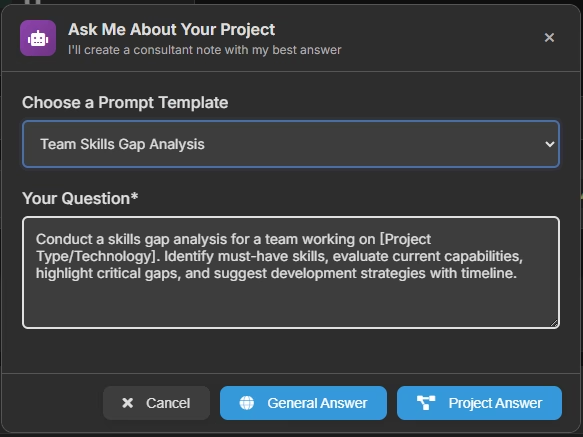
That is not a filtered task list. That is a written explanation of a situation, its cause, and its consequence – generated from live data in seconds.
Other questions the Personal Advisor handles in the same way:
- “What is our budget burn rate and are we on track?”
- “Which team members are overallocated this week?”
- “What are the top three risks to the current milestone?”
- “Summarize what happened in the project last week.”
- “What needs my attention today?”
Each answer is a brief, narrative AI generated report specific to that question – contextual, current, and written in plain language rather than displayed as a filtered data table.
When conversational AI reporting is more useful than a full report
Full AI generated reports are the right tool for scheduled communication: weekly stakeholder updates, sprint reviews, board presentations. Conversational AI reporting is the right tool for ad-hoc decision-making: the question that comes up in a meeting, the concern a client raises on a call, the blocker a team lead surfaces on a Tuesday morning.
Together, they cover the full spectrum of how a project manager needs to interact with project information – from formal structured documentation to instant, specific answers to specific questions.
Saving conversational AI outputs
Any response from the Personal Advisor can be saved as a Knowledge Base note with a single click. This means that even ad-hoc conversational AI reports become part of your project’s permanent record – a timestamped log of questions asked and answers given, building an automatically documented history of project decision-making.
The complete CoMng.AI reporting toolkit – a summary
CoMng.AI provides multiple interconnected tools that together cover every reporting scenario a project manager faces:
Overview Dashboard – the automated dashboard for continuous real-time monitoring. Live metrics on task progress, time investment, team utilization, and budget. Always current, no manual refresh.
Personal Advisor – conversational AI reporting for instant, narrative answers to specific questions. Ask anything about your project in natural language and receive a written, data-grounded response.
Report Generator – structured AI generated reports from a library of templates. Configurable by date range, focus areas, and length. Produces narrative documents ready to share with any audience.
Composer – AI-powered communications tool that generates professional emails and documents from live project data. Useful for the communication that surrounds a report: the cover email, the meeting agenda, the follow-up action document.
Knowledge Base – the repository where every saved report, Personal Advisor analysis, and Composer output is stored with a timestamp. Automatic project history, zero manual archiving.
These tools work together from a single source of truth – your live project data – so there is never a version problem, a stale number, or a report that contradicts the dashboard.
How much time does automating the reporting process actually save?
To make this concrete, here is a typical reporting week for a project manager before and after CoMng.AI.
Before – manual reporting across a typical week:
A project manager running two active projects spends approximately:
- 45 minutes pulling task data and updating the team tracker
- 30 minutes writing the internal status report for each project (60 min total)
- 40 minutes preparing the client-facing summary for each project (80 min total)
- 30 minutes compiling the executive summary for the monthly leadership review
Total: roughly 3.5 hours per week on reporting across two projects.
After – automated reporting with CoMng.AI:
- 5 minutes reviewing the AI generated internal status reports (both projects)
- 8 minutes reviewing and approving the AI generated client summaries (both projects)
- 10 minutes reviewing the executive summary before the leadership meeting
Total: under 25 minutes per week – a reduction of more than 85%.
The reclaimed time goes back to the work that actually requires human judgment: stakeholder relationships, strategic decisions, team development, and the conversations that no report can replace.
FAQ: AI generated reports and automating the reporting process
What is an AI generated report? An AI generated report is a structured, narrative document produced automatically by an AI system from live project data – without manual data collection, analysis, or writing. Unlike traditional automated reports that populate templates with numbers, AI generated reports interpret the data and write explanations, risk assessments, and recommendations in natural language. In CoMng.AI, a complete AI generated report is ready in 15 to 30 seconds.
Can AI create an AI summary PDF automatically? Yes. CoMng.AI generates reports that can be exported as formatted HTML documents – cleanly structured, professionally presented, and suitable for printing or sharing as a PDF. The export function is available on every generated report. For an AI summary PDF, generate your report, click Export as HTML, then save or print as PDF from your browser. The output reads as a polished professional document, not a system-generated data export.
What is an automated dashboard and how is it different from a report? An automated dashboard is a live visual interface that displays real-time project metrics – it updates continuously and is designed for monitoring. An AI generated report is a discrete, shareable document that captures a period of activity, analyzes it, and explains it in narrative form – designed to be read, shared, and filed. CoMng.AI provides both: the Overview Dashboard for continuous monitoring and the Report Generator for on-demand narrative documents.
How does conversational AI reporting work? Conversational AI reporting lets you ask natural language questions about your project – “what is blocking sprint 3?”, “are we on track for the deadline?”, “what is our budget burn rate?” – and receive immediate, narrative answers generated from your live project data. In CoMng.AI, the Personal Advisor handles conversational AI reporting. Answers can be saved to the project Knowledge Base as permanent records.
How do I automate the reporting process without technical setup? In CoMng.AI, no technical setup is required. Create your project, let the AI generate your baseline, keep task statuses and hours updated as work progresses, then navigate to Reports and click Generate. The entire pipeline from live project data to formatted AI generated report is built into the platform. There are no API connections to configure, no data warehouse to set up, and no dashboard tools to integrate.
Can I generate an executive summary AI report for board presentations? Yes – and this is one of CoMng.AI’s most-used report types. Select the Executive Summary Report template, set the date range to cover the period you need (sprint, quarter, or full project), select Detailed length for board-level depth, and generate. The output covers overall project health, schedule performance, budget position, key risks, and forward priorities – structured specifically for leadership audiences and formatted for presentation.
Start generating AI reports today
The technology exists. The platform is ready. And the first AI generated report from CoMng.AI takes less than two minutes to produce – from the moment you open the Report Generator to the moment a polished, stakeholder-ready document is in your hands.
The question is simple: how many more hours of manual reporting do you want to do before you automate the process?
Try CoMng.AI free – no credit card required →
Related reading
- Automated Reporting with AI: The Complete Guide to Automatic Report Generation – the full breakdown of how automated reporting works, the types of automated reports, and how AI planning and reporting connect
- Understanding Your Project Overview Dashboard – a complete guide to CoMng.AI’s live automated dashboard and all its components
- Creating Data-Driven Reports with the AI Generator – step-by-step Knowledge Base guide to generating, customizing, and saving reports
- AI-Powered Document and Email Generation with Composer – how to use CoMng.AI’s Composer to generate context-aware project communications
CoMng.AI is the world’s first AI-integrated project framework – an Autonomous Execution System that co-manages your project budget, baseline, and documentation so you can lead instead of administrate. See who CoMng.AI is built for →